Version 1.0.255
November 18, 2026 · Android
On this page
This version is available on Google Play. It covers everything since 1.0.254. The screenshots are from the Ukrainian app.
A few terms
- Banner: a short card at the top of the home screen that tells you what is happening at your station right now.
- Calendar event: a change you scheduled for your inverter, such as a night charge from the grid.
- Island: a station whose data stays at home, in your own Home Assistant or on your phone, instead of the Svitgrid cloud.
- Home Assistant: a program for running a smart home, which works on your own device at home.
- ED-1 board: our small device that collects data from your inverter.
- Phone station: a station whose data the phone itself collects.
- Cloud copy: a copy of an island's data that it also sends to the Svitgrid cloud.
- TOU: the inverter's schedule by hour of the day (Time of Use), which says when to charge the battery and when to use it.
- SOC: the battery's charge, in percent.
- Master and Slave: the two roles in a pair of inverters that work together. The master leads, the slave follows.
Sign-in for every station
Your station and its history are now tied to your account, so they survive a lost or replaced phone. Until now you could use the app without an account, and the station lived only on that phone. Every station now belongs to an account, island stations included.
- On a new phone, the sign-in screen no longer offers Продовжити без облікового запису. You choose island mode, a phone station included, after you sign in.
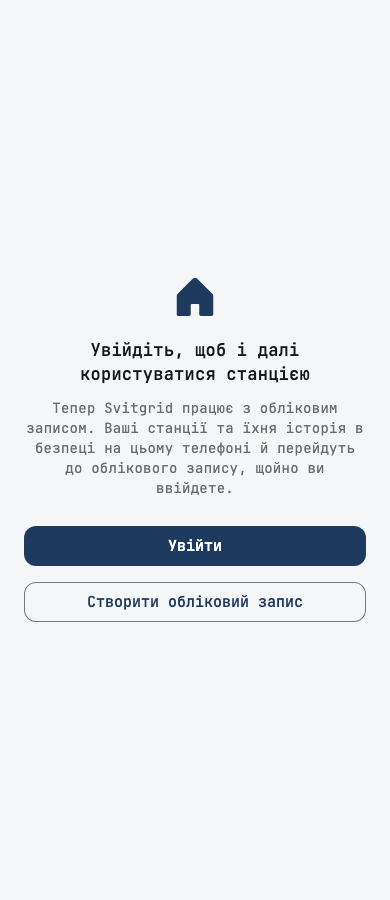
- If this phone already keeps a station without an account, the app opens on Увійдіть, щоб і далі користуватися станцією. Your stations and their history are safe on the phone, and nothing is deleted. Until you sign in, the phone stops reading the inverter.
- After you sign in, every station this phone created moves to your account by itself, with its history, and its dashboard opens. If the move fails, Спробувати ще раз repeats it, and the next start tries again.
- A station moved this way as a phone island does not count against your plan's station limit.
- The station's own Telegram bot keeps sending alerts after the move. Stations you joined with a code keep working, without asking for the code again.
Home screen banners
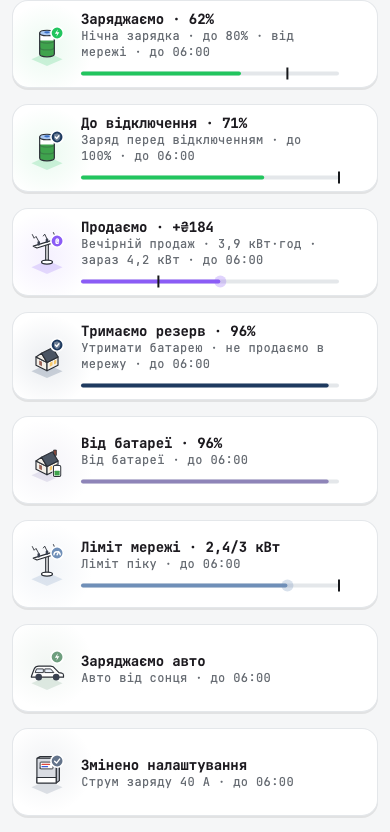
A running event should tell you what it is doing for you, not only that it is on. Each kind of event now has its own banner, which leads with what it does and one live number.
- What it does, in one word: «Заряджаємо · 62%», «До відключення · 71%», «Продаємо · +₴184», «Тримаємо резерв · 96%», «Ліміт мережі · 2,4/3 кВт». An event that switches devices off reads Знижуємо споживання. The line under it names the event, its goal, where the energy comes from, and when it ends.
- How far it got: a bar fills toward the goal, with a mark at the goal. A dot at the end of the bar moves while live readings arrive, and stays still when they stop.
- Protection before an outage: any charge that ends shortly before a scheduled outage says so, for example «захист від відключення о 08:00 · вистачить ≈ 9 год». If the charge will not reach its goal before the power goes, the banner warns you early.
- To the end: a short event keeps its banner through its last minutes, with «завершиться о 15:15».
- Waiting: an event in its window whose condition has not let it run says Чекає своєї умови.
The event screen, live
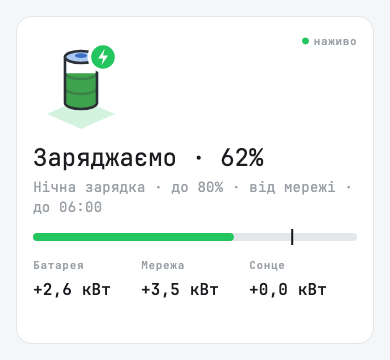
While an event runs, the top of its screen shows the same words and bar as the home banner, large, with the battery, grid and solar power now and a наживо mark.
When it ends
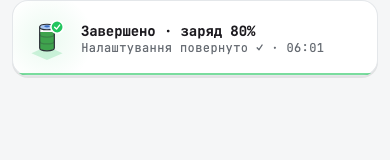
- The result stays on the home screen for an hour. A tap opens the result: the outcome, and Як і планували ✓ when it reached its goal. The end notification opens the same result.
- A finished result that you swipe away goes to the bell already read, with no count on the bell.
- A tap on the banner of a quick battery override, such as «Від батареї до 09:03», opens that override's event. Before, it could say the result was not available.
Other banners
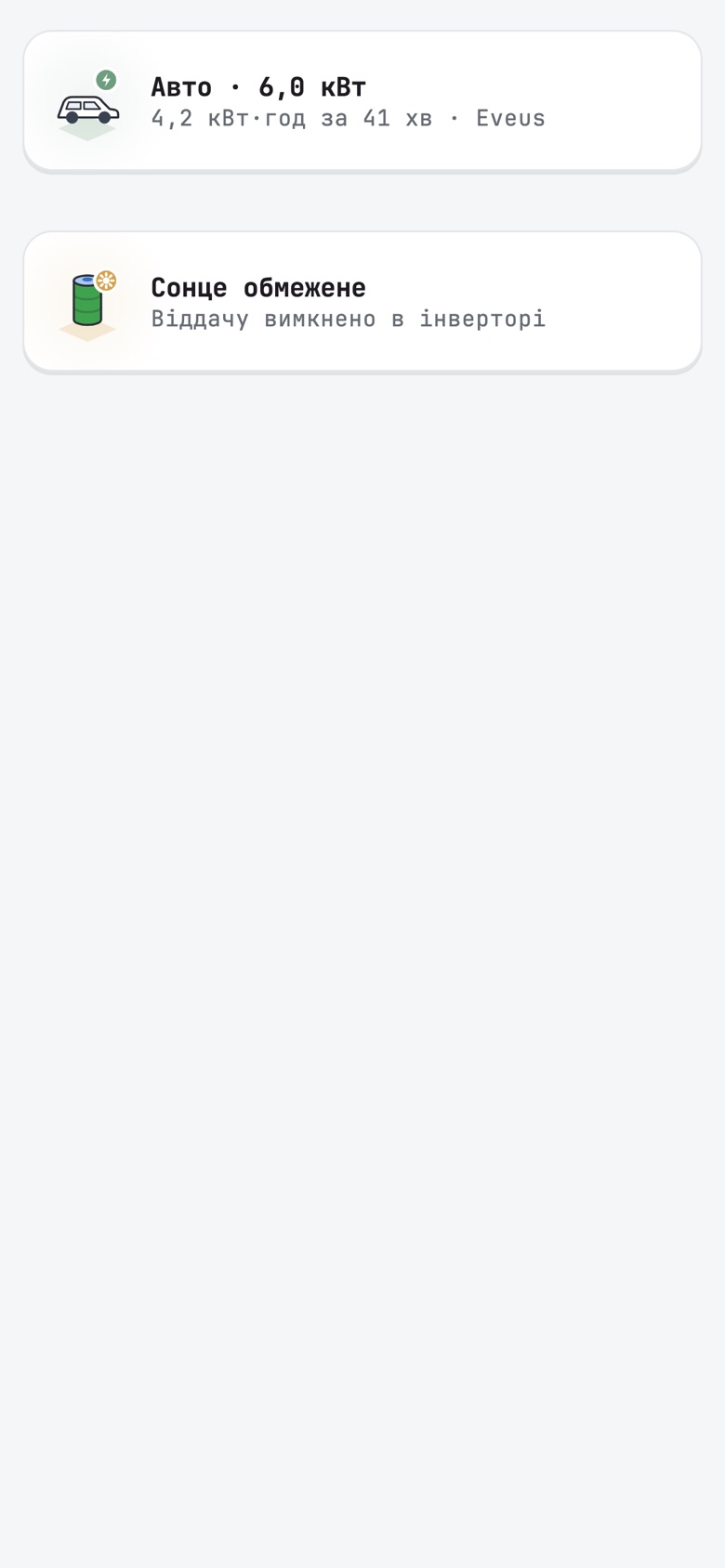
- EV charging is a banner now. While the car charges, Авто · 6,0 кВт shows the live power, and the line under it shows the session energy and time where the charger reports them, or «Надлишок сонця» when it follows the solar surplus. A tap opens the charger. Before, the charging figure sat in the header, where it could overflow and printed «6.0» with a point.
- Сонце обмежене tells you when a full battery holds back your panels. It reads your inverter's own export setting, so a station with export on is no longer told that export is off. With export off it says «Віддачу вимкнено в інверторі».
- A station that has had no grid for 7 days shows a calm grey card, «Мережі немає з 5 жовтня», instead of a red outage that never ends. It opens on that card, with no red flash first.
- On a tablet, the energy diagram starts below the banners instead of under them.
- Banner text wraps onto a second line instead of ending in «…», at large text sizes and on narrow phones.
- The undo message after you hide a banner goes away by itself again.
Outages
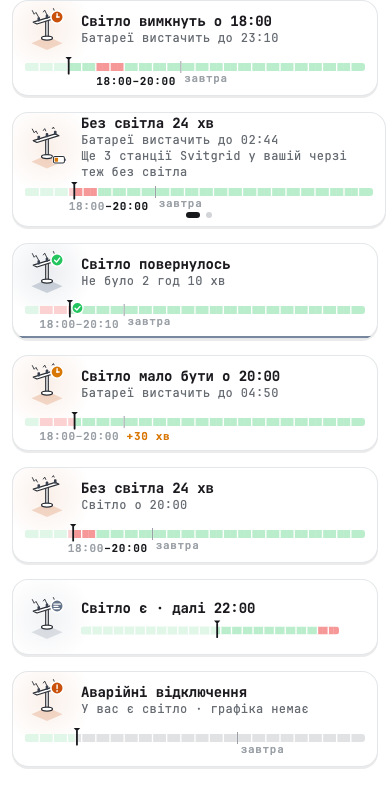
Three hours is enough to charge from the grid before the power goes, so the app now starts helping three hours ahead.
The schedule on the home screen
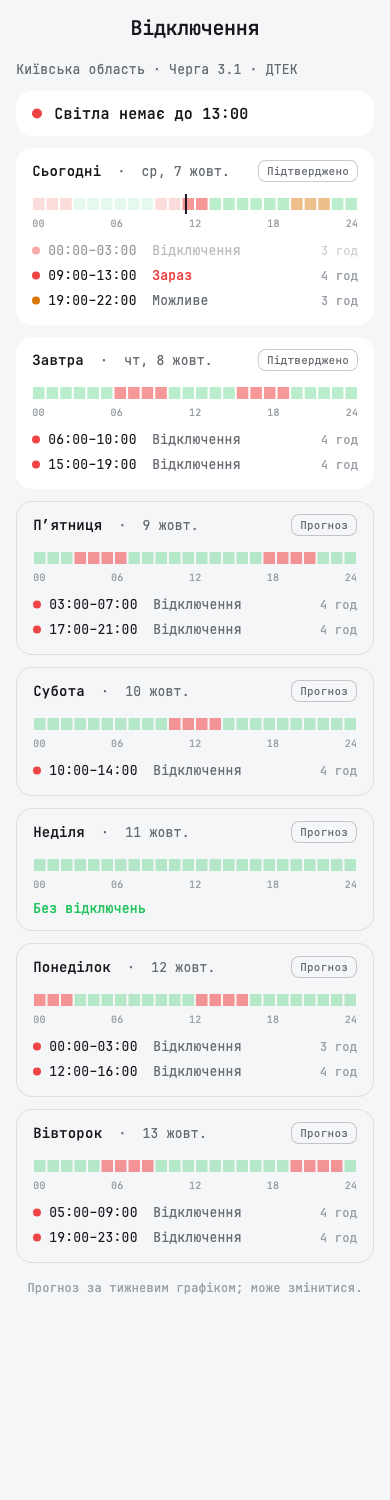
On a calm day, the outage schedule is a regular banner with the hours of the day as its second line: «Світло є · далі 22:00», «Світло є · без відключень», or «За графіком, але світло є» when the grid outlived a window. Swipe it away for the rest of the day. The «before» card still comes back three hours ahead.
Until tomorrow's schedule is published, the strip shows today from 00:00 to 24:00, so grey cells no longer look like a fault. Once it is published, the strip runs 24 hours ahead with a small завтра label at midnight.
During an outage, the card again says how many other Svitgrid stations in your queue are also without power.
A charge sized for the outage
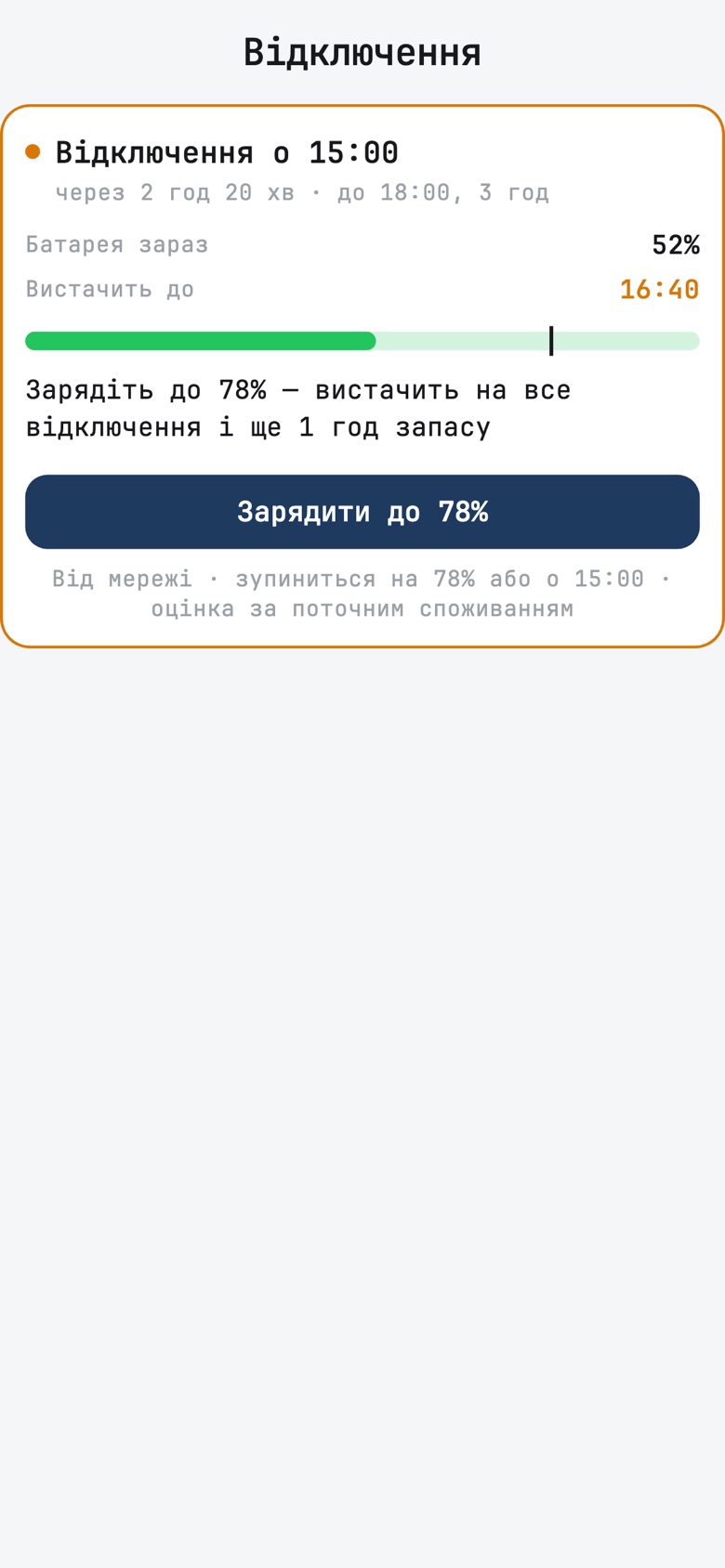
A tap on the schedule card or the «before» card opens the outage screen. Within three hours of an outage it says when the outage starts and how long it lasts, what the battery holds and how long that lasts, and offers one button: Зарядити до N %. N is the level that carries your home through the outage, plus your reserve hours. The charge stops at N or when the outage starts, whichever comes first. A charge already running shows its progress and Зупинити.
The estimate assumes your home keeps using what it uses now. If you plan to switch on something heavy, the battery runs out sooner.
The outage log
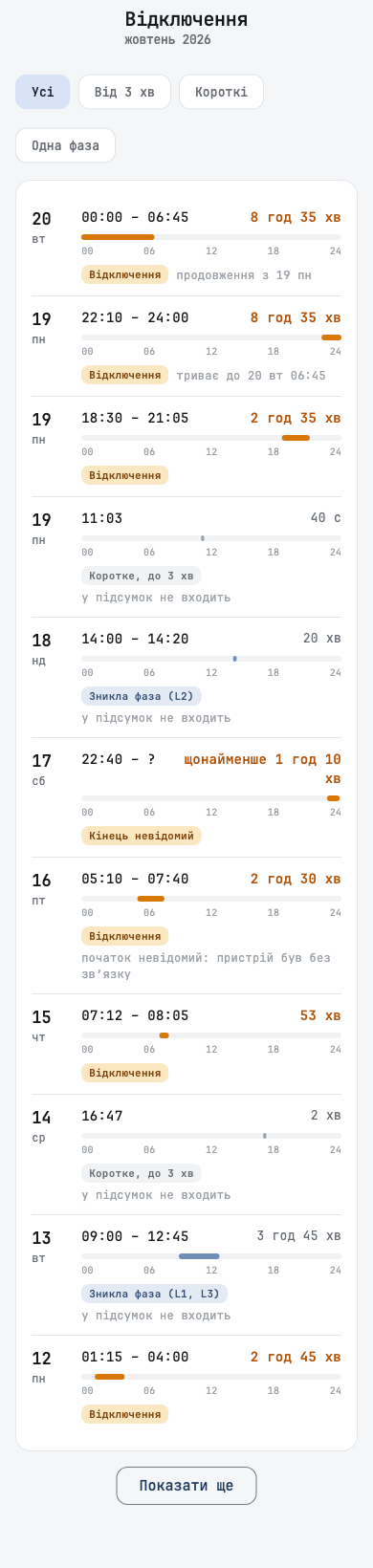
- An outage across midnight shows on each day it touches. A 23:29 to 20:03 outage reads «23:29 – 24:00» with «триває до 8 нд 20:03» on the first day, and «00:00 – 20:03» with «продовження з 7 сб» on the next. Each month shows its own days of an outage that crosses months.
- «Уся станція» on a station with several inverters. Надійність мережі used to show only the oldest inverter. It now shows the whole station, and chips let you pick one inverter. A phase loss only one inverter saw names that inverter.
- No grid for 7 days is not an outage. After 7 days, the report says the grid is not connected and stops counting the time as an outage. The log row where counting stopped says «далі мережі не було: це не рахуємо як відключення».
- A station rebuilt from a backup no longer reads more than 100 % of the time without power.
Charts in landscape
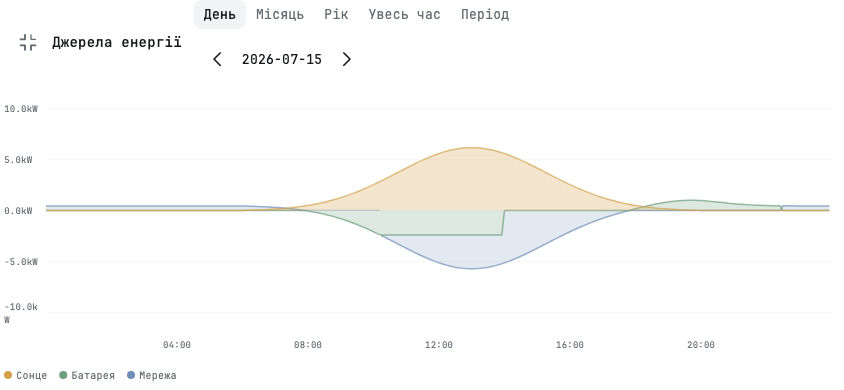
A history chart is easier to read sideways. A button at the top right of Джерела енергії, the battery chart and the grid charts opens the chart turned to landscape, with the same period and date controls, pinch zoom and touch read-out. In this view, grid export no longer overlaps battery charge. Close it, or go back, to return.
Deye
The app now shows your Deye's schedule the way its own screen does.
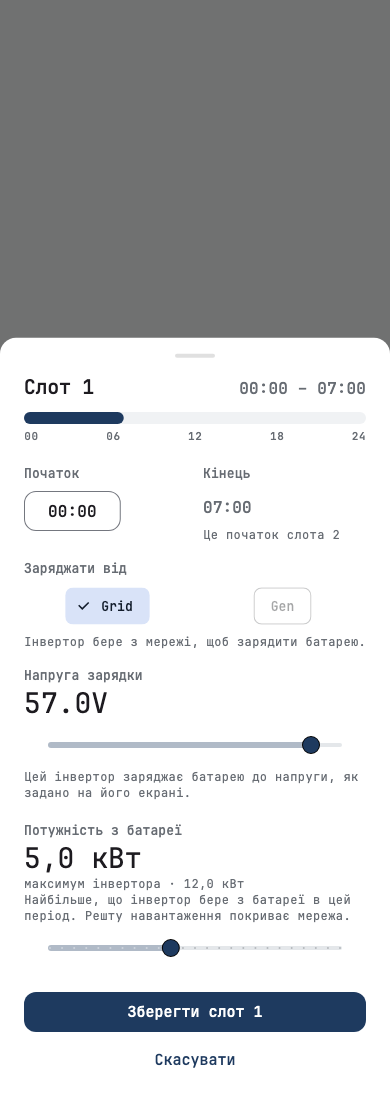
- Battery targets in volts or percent. A Deye works in percent or in volts, depending on its battery mode. Work Mode2 and the battery thresholds now follow that mode: «Batt 57.0V» in voltage mode, «Batt 70%» in percent mode. In voltage mode, the slot editor sets the charge voltage instead of a percent that the inverter would ignore.
- Gen SOC. A slot keeps the battery target for the grid and for the generator. The app now shows both, as «Batt 70% · Gen 54%», and a slot change no longer erases the generator value. You can change Gen on single-phase models, where the app can write the whole schedule at once.
- Work Mode2 on two lines per slot, with the grid, generator and sell ticks, and Work Mode4 shows the days of the week. The sell tick is hidden, because the app cannot read it reliably yet.
- A slave's settings belong to its master. A slave inverter's work mode, schedule and grid charge current are disabled, with a note that you change them on the master.
- Away from home, a station whose data stays at home disables the controls it cannot reach.
- The slot editor's power limit follows your inverter's own rated power, not the family maximum, and the waiting mark appears on the slot you changed.
- Rated power can be typed, in kW, instead of pressing − and + many times. A rated power read off the inverter that is far above the model's maximum is ignored.
- Choosing a zero-export mode now also sends your answer to whether to sell solar.
- «Працювати від батареї» now also turns the inverter's grid charge switch off for its window, and back on afterwards, on boards with S3 2.161.0 or newer and on phones. Before, some Deye units kept drawing from the grid at full battery.
- The battery stop level in countdowns is the level a grid-connected Deye really stops at (Low Batt), not the off-grid one.
- Gen Port Use shows the mode the inverter stores, and an unknown mode shows its number instead of «Generator Power».
- Some high-voltage Deye models, such as the 30 to 80 kW SG01HP3, show Max Sell Power in watts, not ten times too low.
Anenji settings in the inverter's own order
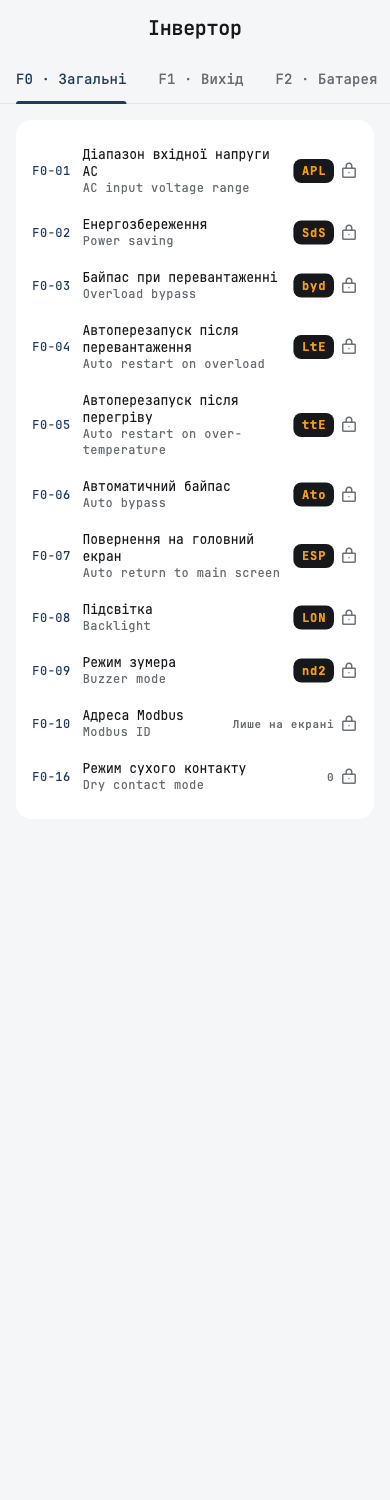
The settings screen now reads like the menu on your inverter. The app reads which protocol your Anenji speaks, and lays out the settings as its screen does.
- Protocols 1 and 11: the numbered program list, 01 to 50, with each program's name, the label from the manual, and the value or the display code, such as Sbu or SNU. A pencil marks the settings you can change, a lock the ones you can only read. A program the app cannot read says «Лише на екрані».
- Protocols 2 and 3 to 6: the F0 to F4 groups, each on its own page.
- Інвертор · немає в меню екрана lists settings the inverter keeps but its menu does not show.
- On protocols other than 11, the settings are read-only for now.
Some values reach the screen on a board only with the next board firmware.
Islands
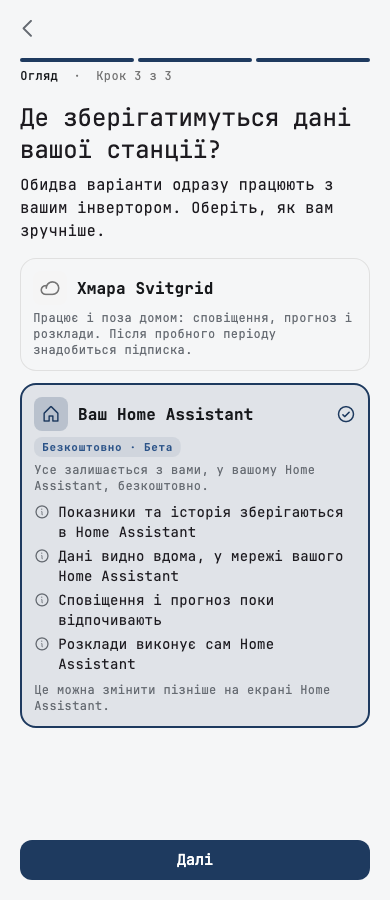
An island now does more without the cloud, and leaving it is safer.
Boards on an edge island
With a Svitgrid integration in Home Assistant that supports it, the board's screen now works on an edge island as it does in the cloud. With an older integration, these buttons stay off, as before.
- Restart, pause and resume a board, rename it, factory reset it or remove it. A card says while Home Assistant passes the command on. If the board does not answer, the app offers to forget it.
- The board's state comes from Home Assistant: whether it is paused, its serial port and its RS-485 state. A new Ключі підпису row shows how many phones the board trusts.
- A register dump and a new inverter address reach the board through Home Assistant.
- «Критичні пристрої» can be saved and run on an edge island with Zigbee sockets. Elsewhere on an island, the screen says what it needs.
- «Зниження споживання» and «Споживання від сонця» run on an edge island.
On an island, Compare in Reports works from Home Assistant's history, the outage schedule loads for your region, and screens that need the cloud say so in one sentence instead of showing nothing: the Svitgrid value card, adding or replacing a board, and Підключені асистенти, which says an assistant cannot see an island's data.
Back to the cloud
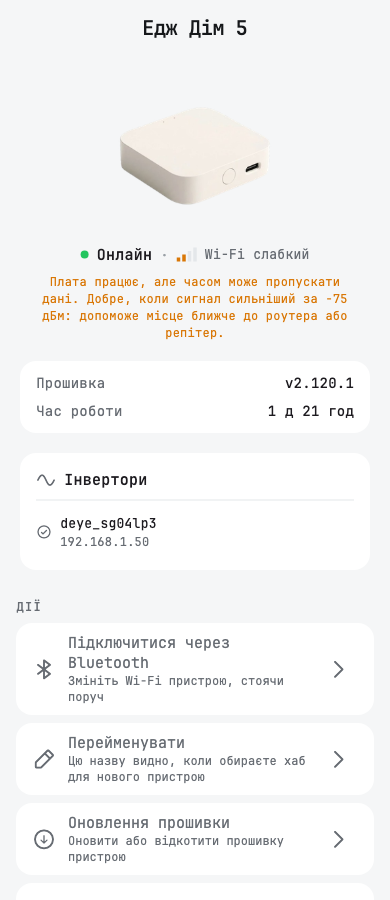
- Повернути в хмару asks first and lists what changes. Without a plan, it warns that the cloud dashboard will be locked, and offers Переглянути плани.
- It refuses instead of pretending. If Home Assistant cannot be reached, the app says so and leaves the station where it is. Each refusal says what went wrong and what to do: connect to your home Wi-Fi, update the integration, connect this phone again, or sign Home Assistant in to Svitgrid.
- Home Assistant більше немає? If Home Assistant is gone for good, the owner can return the station to the cloud without it, then choose a new collector: this phone or a Svitgrid hub.
- Your schedules and rules come back from a Home Assistant island too, and the old cloud events from before the island are switched off, so they do not run beside the new ones.
- Battery packs and Zigbee devices you added on the island follow the board back to the cloud, and phones approved during the island can control it again.
- The last board sent back over Bluetooth ends the island.
- Telegram: after any return to the cloud, the app offers to connect the Svitgrid bot, because the station's own bot stops sending alerts.
- A move to Home Assistant now names each EV charger that stops working there.
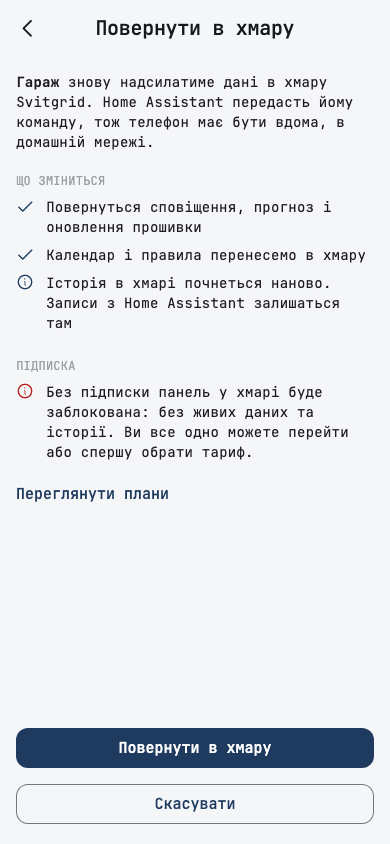
Підключитися через Bluetooth is a new row on the board's screen. It lets you change the board's Wi-Fi standing next to it, and on an island, move it back to the cloud even when Home Assistant is down. A board turns on Bluetooth after five short presses of its button with the next board firmware. Until then the app asks you to update the board first.
Your data on an island
- An account with an island station sends no usage analytics, and its crash reports carry no email address.
- Commands to Home Assistant on your home network can no longer be repeated later by someone who captured one.
- Надіслати логи в підтримку on the phone station's screen, the board's screen and the Home Assistant screen sends logs when support opens diagnostics for your station.
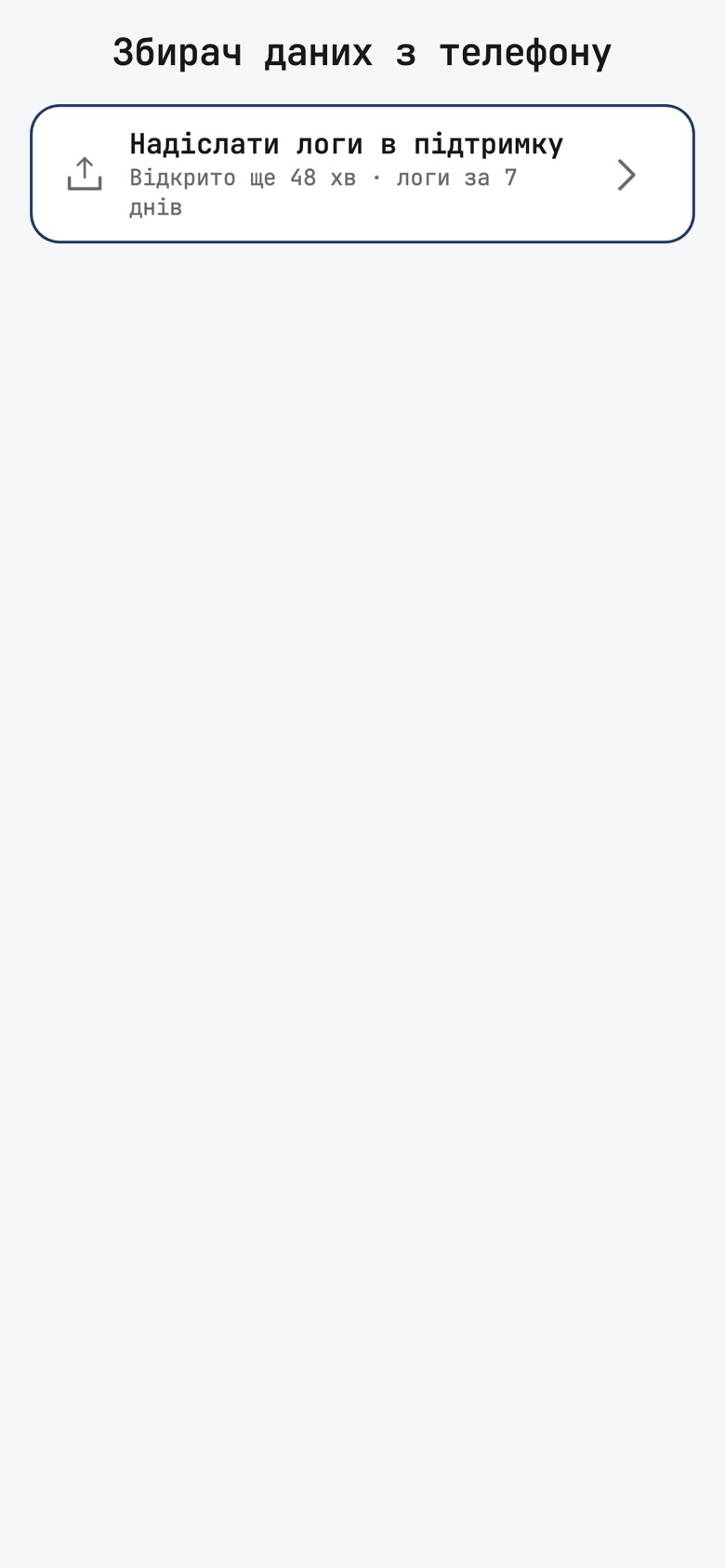
Phone stations
- A second phone at home can change settings through the station phone. When you share the station, choose Лише перегляд or Може керувати. Phones paired earlier stay view-only until you tap Дозволити керування on the station phone.
- Removing a phone works without the cloud, so a lost phone loses control of the station.
- Deye settings changes work again on a phone station.
- Your history comes with you. Leaving a phone station offers Перенести мою історію в хмару, and history older than 7 days now goes up as hourly and daily totals. A phone whose station was moved from another phone still offers the upload.
- Telegram: a phone station sends low, critical and full battery alerts, and daily and weekly summaries. Its grid-restored message waits until the grid holds, as the cloud's does.
- The grid tab and the batteries read what the phone keeps: the outage report, the outage log and the battery packs, also on a second phone at home.
- If the station phone is gone and the station keeps a cloud copy, a banner on another phone offers to take the station over.
- A phone station with no cloud copy keeps its inverter settings off the cloud, sends the cloud only a small hourly status so it appears on the map, and no longer offers quick override buttons that cannot work there.
- The account's notification settings show each island station's Telegram row instead of push switches that do nothing for it.
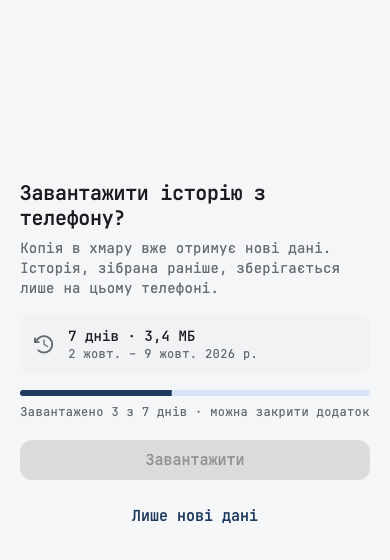
Rules and calendar
- An Eveus charger condition can choose Заряд завершено, Заряджається, Під'єднано, не заряджається or not connected, and you can pick several.
- A smart socket goes back as it was. When a rule lets go of a socket, it returns the socket to the state it had before the rule took it. A boiler that was off stays off.
- A scheduled-outage condition can start up to 6 hours before the outage, so a large battery has time to charge.
- A refused save names what is in the way, such as the rule or the «Працювати від батареї» button that holds the same settings.
- The run card says why an event stopped early, for example that the battery reached the minimum set in the inverter, or that the grid went down.
- Every reason an event was skipped reads as a sentence, never as a code.
- The day planner explains three more reasons for an empty plan, and a plan asked for without a forecast says to try later.
- A rule with no condition says in its start notification what it did and until when.
- Day charts and the alert history follow the station's clock, also when the phone is in another time zone.
- A tap on the week strip brings the hours back to that day after you scrolled into another week.
- The calendar sees a new signing key without a restart.
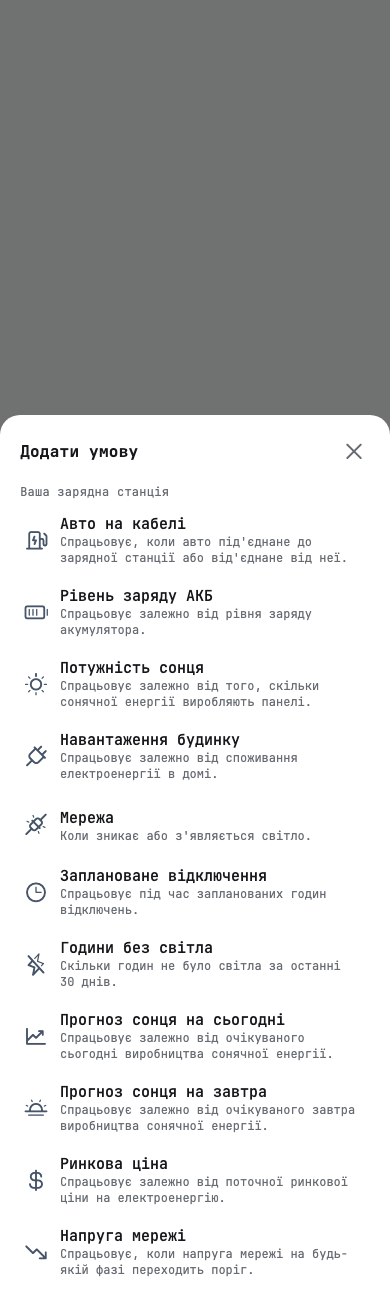
Setup and inverters
- Edecoa EM-302A, a 24 V model, is supported.
- A SmartESS collector found by the search is saved with the right connection, whatever model you pick, so the station reads data.
- Searching «anenji» lists only the Anenji models. The SRNE 12KW no longer reads as an Anenji.
- A logger serial with letters is accepted, and the app explains why an ED-1 may not read a Deye through such a logger.
- Add board marks each Deye three-phase inverter of a parallel pair as Master or Slave, read from the inverter itself.
- The review titles a parallel pair «Інвертор 1 · Master» and «Інвертор 2 · Slave», with the master and its batteries first.
- The panel direction step says that peak power and the MPPT input can be set later.
- A Huawei SUN2000 reports its inverter temperature, so temperature conditions work for it.
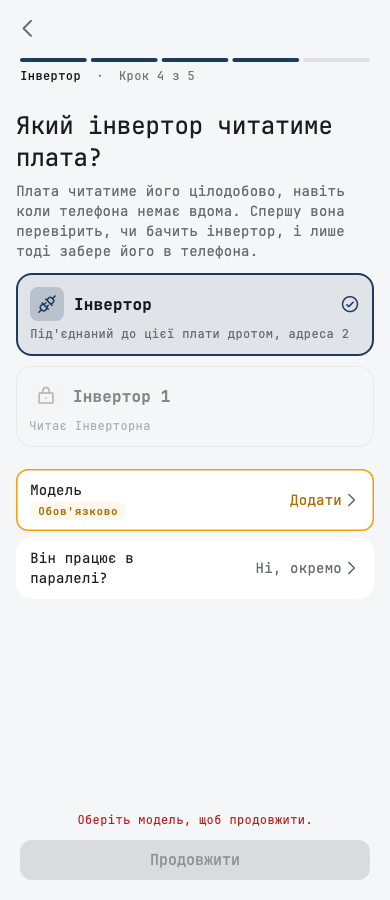
Batteries
- The capacity warning is right more often. A JK pack's health is no longer counted twice, and the warning waits until every pack has been read.
- «Перевірити ємність» opens the inverter's battery screen, where the capacity is.
- A pack's screen explains the capacity gap: the BMS's own figure can be lower than the label, and keeping the label is fine.
- A pack over 2000 Ah is refused with the limit named, and the app says to enter a bank pack by pack with Додати батарею.
- A single wrong charge reading no longer sends a low or critical battery notification, and a critical alarm ends once the battery is back above 12 %.
Security
Your phone confirms more of what happens to your station.
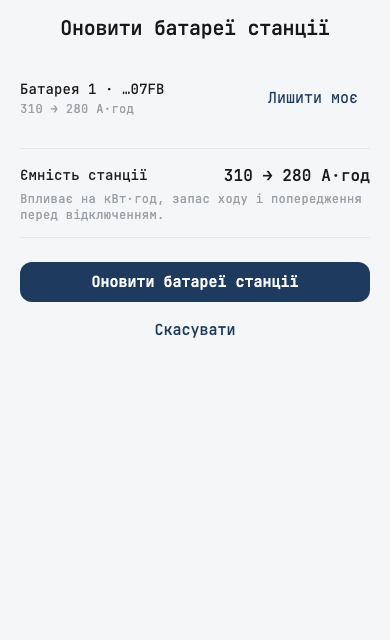
- Removing a phone or a member from your station is now confirmed by your phone, the same way as setting changes.
- With the next hub firmware, a Zigbee network reset runs only when your phone confirms it. This app version already does.
- A board is never sent a firmware version that is not signed, and the firmware screen says so if you pick one.
- Turning two-factor sign-in (2FA) off asks for your authenticator code when needed, instead of failing with a general error.
Dashboard and reports
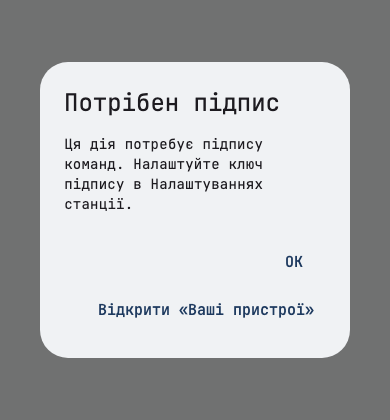
- Each inverter's own page shows its own daily solar and load, instead of 0.
- A grid-tie inverter on a Deye's generator port is counted once in the day's production, on the home screen and in Reports.
- On a station with several inverters, a battery sell day keeps the solar in «Віддано з сонця».
- Smart Load counts both inverters of a parallel pair.
- A unit that lags its pair is dimmed and shows how old its reading is.
- The outage notification and banner read the battery on the master when the slave has none.
- The diagram draws the current clamp where it really sits, at the grid connection, and no longer flickers or invents a grid line during an EV charge or a sudden load.
- The panel card no longer suggests shading when your strings face different ways or the inverter is holding output back.
- The load chart marks a clipped spike with its real value, and no axis label is cut off.
- The grid sheet prices today's import at today's rate, and lists the kWh and rate of each tariff zone. Green-tariff households see the day's net contribution to the month.
- Today's grid import is no longer shown as 0 on days with heavy import.
- In Reports, a week or range across a month end counts every day, and «Від початку року» shows the whole year to date. Long labels in the period menu show whole.
Smaller fixes
- An owner with two or more stations opens on the station opened last.
- Starting the app offline no longer crashes it.
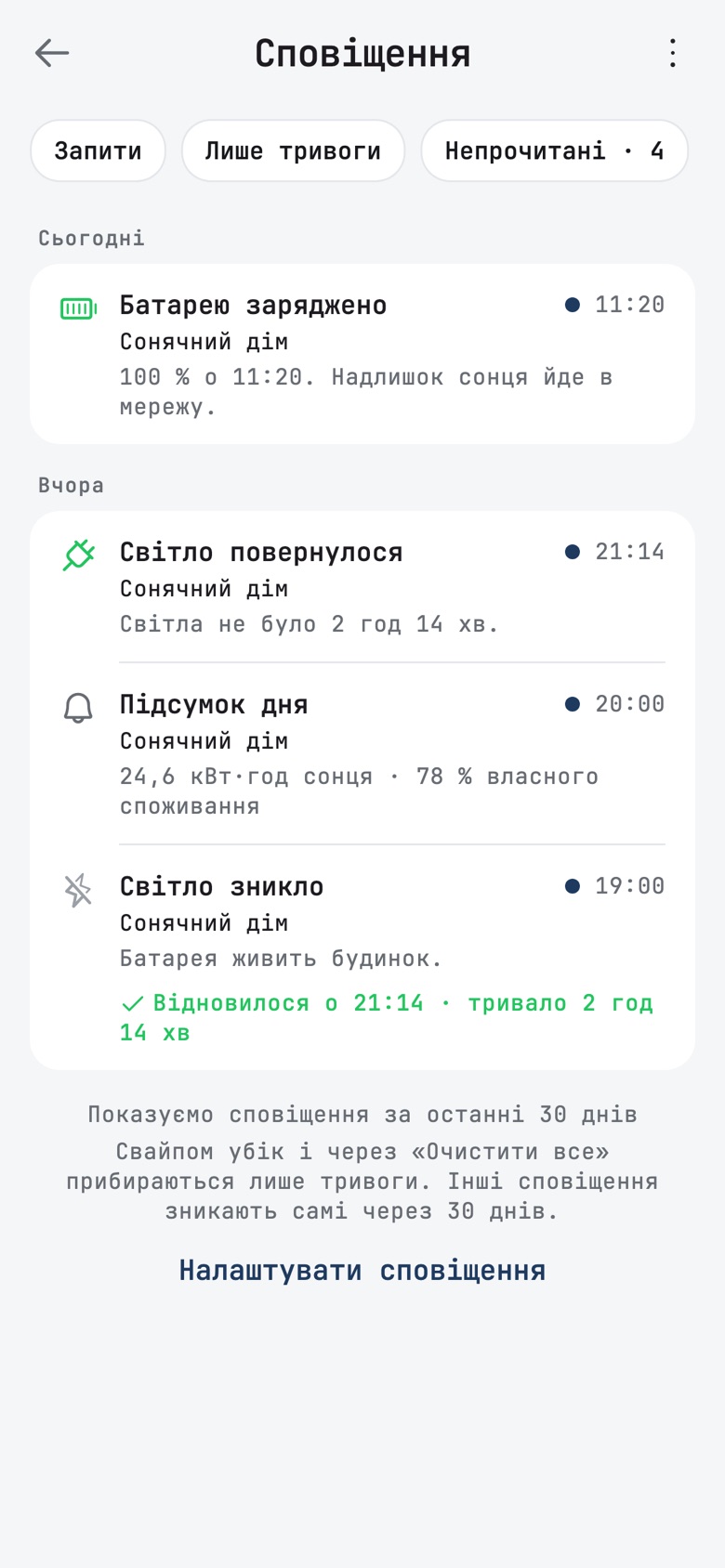
- The notifications screen says that only alarms are cleared by a swipe or by «Очистити все», and that other notifications leave by themselves after 30 days. «Очистити все» is greyed out when there is nothing to clear.
- An older outage that never got its restore no longer shows as ongoing next to a newer one.
- Solar history's headline no longer reads 0.0 when the strings produced.
- «Оновлення застосовано» no longer flashes on every start after an old update.
- The last button of the alert screen stays above the Android navigation bar.
- The phone station card no longer shows an error after the phone loses its Wi-Fi.