
Battery
A screen of its own: charge level, how long it will last, each physical pack you own, and — if you have a compatible BMS — the voltage of every individual cell.
Open it by tapping the battery on the dashboard.
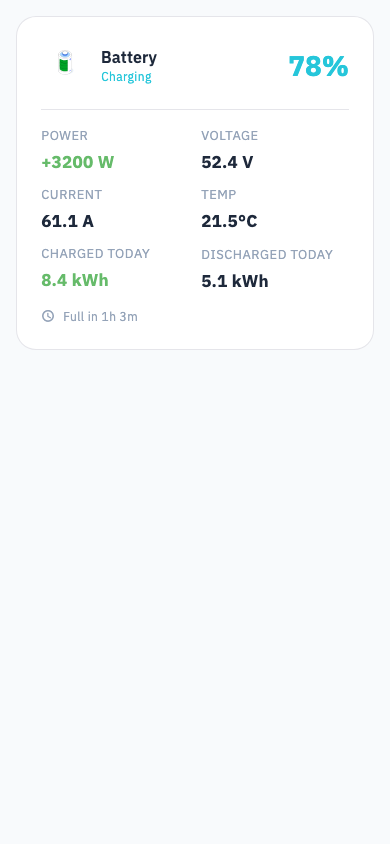
What you see
- State of charge — how full, as a percentage.
- Power — how fast it is charging or draining, in watts.
- Runtime — how long until it reaches your inverter's cut-off point at the current rate. Shown as "more than 48 hours" when the drain is very slow.
- Packs — one card per physical battery you own.
- Cells — per-cell voltages, if a battery monitor is connected.
Why runtime is shorter than you expect
Svitgrid counts down to the level your inverter stops at, not to zero. If your inverter is set to keep 30% in reserve, a battery showing 50% has only 20% of usable energy left. That is the honest number.
Packs
If your installation has several batteries, each is a card. Give them names — Garage, Left rack — so a warning about one tells you which one to walk to.
Svitgrid compares what you configured against what the battery actually reports, and shows the disagreement on the card rather than silently trusting either.
Cells
With a battery monitor connected, Svitgrid shows every cell's voltage, the spread between the best and worst cell, temperatures, and whether the balancer is working. See Battery monitors for which monitors are supported and how to connect one.
The screen leads with a plain verdict — Battery is healthy, Cells are drifting apart, One cell is falling behind, Too cold to charge, Readings cannot be trusted.
A blank is not a zero
If Svitgrid cannot measure something, it leaves it blank instead of showing 0. A reading that fails its own consistency check is withheld rather than displayed. Being visibly missing beats being quietly wrong.