
Supported inverters
Svitgrid reads 107 inverter models from 23 brands. Nine of those brands can also be controlled from the app.
There are two different questions, and the answer is not the same:
- Can Svitgrid read my inverter? For everything in the table below, yes — live power, history, charts, money, forecast, alerts. The 43 models on the Compatibility page, from 13 brands, are supported. The rest come from the manufacturer's documentation and have not been tested on a real station yet.
- Can Svitgrid control my inverter? On nine brands, at one of two levels. Deye, Sunsynk and Sol-Ark take schedules and settings. Anenji, Edecoa, MUST, the LuxPower SNA5000 WPV, Axioma and Solis take settings: the app changes the inverter's own settings, such as its charge current and output priority. Every other brand is read-only.
Read this before you buy
Calendar events, the daily planner, work modes, export limits and time-of-use editing need schedules, which only Deye, Sunsynk and Sol-Ark take. On a read-only brand, Svitgrid is an excellent monitor and cannot change a single setting. That is a limit of what the manufacturer exposes, not something we can switch on.
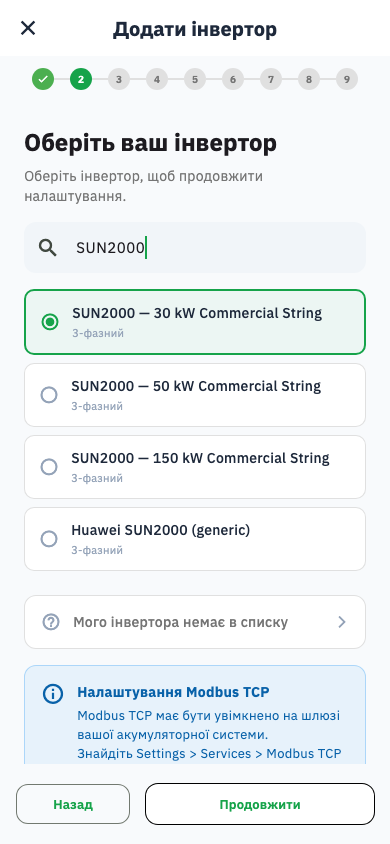
All supported brands
| Brand | Models | Type | Control? | What you need |
|---|---|---|---|---|
| Deye | 18 | Hybrid 1/3-phase, split-phase, string, microinverter | Schedules and settings | Logger stick serial |
| Sunsynk | 5 | Hybrid 1 and 3-phase | Schedules and settings | Logger stick serial |
| Sol-Ark | 4 | US split-phase hybrid | Schedules and settings | Logger stick serial |
| Victron | 8 | MultiPlus-II, Quattro-II | No | Modbus TCP enabled on the GX |
| Huawei | 4 | SUN2000 commercial string | No | SmartLogger3000 |
| Solis (Ginlong) | 6 | 30K 3-phase string, S6 and RHI hybrids | Settings | Logger stick serial |
| Solplanet (AISWEI) | 2 | ASW100K/110K-LT | No | Ai-logger |
| Sofar | 2 | HYD 3-phase hybrid (also sold as ZCS Azzurro) | No | Logger stick serial |
| SRNE | 5 | Hybrid 12/24/48 V (also sold as Easun ISolar SMX-II) | No | Logger stick serial |
| Anenji | 4 | ANJ-4.2KW, ANJ-5KW, ANJ-6200, ANJ-11KW | Settings | SmartESS collector |
| Megarevo | 2 | R…KH3 3-phase, high-voltage battery | No | Logger stick serial |
| KSTAR | 3 | KSE, BluE-S (also sold as Eaton xStorage Hybrid) | No | Logger stick serial |
| Afore | 16 | AF…K-TH hybrid, BNT…KTL string | No | Logger stick serial |
| TSUN | 2 | TSOL-MS microinverters | No | Logger stick serial |
| Swatten | 1 | SiH-TH 3-phase, high-voltage battery | No | Logger stick serial |
| CHINT / CPS | 1 | SCE 3.6–6 kW (also sold as Senergy) | No | Logger stick serial |
| INVT | 1 | XD 3–6 kW | No | Logger stick serial |
| LuxPower / EG4 | 5 | 18kPV, 12kPV, FlexBOSS21, LXP-LB-EU 7K, SNA5000 WPV | Settings on the SNA5000 WPV | An RS-485 to Wi-Fi gateway; ED-1.1 cable for the SNA5000 WPV |
| SolaX | 1 | X3-Hybrid G4 3-phase, high-voltage battery | No | Modbus TCP through an RS-485 gateway |
| Edecoa | 1 | EM-624A 1-phase hybrid (the EM-654A is set up as one) | Settings | ED-1.1 with an RS-232 cable |
| Daxtromn Power | 1 | AGH-6.2KW-PRO 1-phase hybrid | No | ED-1.1 with an RS-232 cable |
| Axioma Energy | 1 | ISGRID 15000 3-phase hybrid | Settings | ED-1.1 with an RS-232 cable |
| MUST | 14 | PV18, PH18 and PV19 hybrids, 12 to 48 V | Settings | ED-1.1 with an RS-485 cable |
Your inverter may be here under another name
Many of these machines are sold under several brands. Sunsynk and Sol-Ark units are the same hardware as the matching Deye models, so the app lists them as Deye entries — searching Sunsynk or Sol-Ark takes you straight to the right one. The same is true for Easun (SRNE), ZCS Azzurro (Sofar), Eaton xStorage (KSTAR) and Senergy (CHINT).
More detail — which collectors work with which brand
Not every brand works with every collector.
Works with the Svitgrid Gateway (24/7, no phone): Deye, Sunsynk, Sol-Ark, Solis, Sofar, SRNE, Megarevo, KSTAR, Afore, plus Huawei, Victron and Solplanet. The LuxPower SNA5000 WPV and MUST work with an ED-1.1, connected by an RS-485 cable. Edecoa, Daxtromn Power and Axioma work with an ED-1.1, connected by an RS-232 cable.
Phone or Home Assistant only: TSUN, Swatten, CHINT, INVT, LuxPower/EG4 hybrids, Anenji. A Gateway will not collect from these — there is no firmware support for them yet, so it would sit there reading nothing.
Check this before buying a Gateway for one of those six brands.
More detail — brand-specific quirks worth knowing
- Victron support is new. If a value looks wrong, tell us. It connects on port 502 and needs Settings → Services → Modbus TCP switched on in the GX device. It does not report grid import/export energy, so those totals stay empty.
- Huawei connects through a SmartLogger3000 on port 502. Close the FusionSolar app while Svitgrid is reading — the logger serves one client at a time.
- Solplanet uses port 9999, not the usual 8899.
- LuxPower / EG4 needs an RS-485 to Wi-Fi gateway you buy separately, wired to the inverter's Modbus port. Set the gateway's protocol to Modbus — the factory default of None fails silently: bytes move, nothing decodes. The SNA5000 WPV needs no gateway: an ED-1.1 reads it directly over RS-485 (Modbus RTU, 19200 baud). Unplug its Wi-Fi dongle first, because the port carries one master only. The wiring is on the RJ-45 pinout page.
- Anenji works the other way round from everything else: the manufacturer's collector dials out to Svitgrid, so there is no IP address to enter. While Svitgrid is collecting, the manufacturer's own app stops receiving data — the collector only talks to one server at a time.
- SRNE HSI-1500 has no grid power register at all, so grid figures stay blank.
- Afore BNT string inverters come in two protocol generations that are chosen by serial number prefix, not by the model on the label. If your readings look wrong, try the other entry.
- Grid current is calculated from power and voltage on every brand — no inverter in this list reports it directly.
How well each model is proven
Support for a model means Svitgrid knows where that inverter keeps its numbers. For the long-standing Deye and Sunsynk models that mapping has been checked against real hardware many times over. For several of the brands added recently it comes from the manufacturer's documentation and has been confirmed on few units — or, in a couple of cases, none yet.
If a reading looks wrong, it may well be wrong — please tell us
A value that is ten times too big or too small, a battery charging when it should be discharging, or a figure that disagrees with the inverter's own screen: send it to hello@svitgrid.app with your model and a screenshot. Nearly every mapping correction we have made started with a message like that, and it usually takes one reading to settle.
Not on the list?
Email hello@svitgrid.app with the make, model and a photo of the label. Adding a brand means mapping its registers, which needs either documentation or access to a real unit.