
Household settings
In short
Name, photo, location, blackout region, and the battery reserve Svitgrid protects for you.
Settings → Household settings. Owner or admin only.
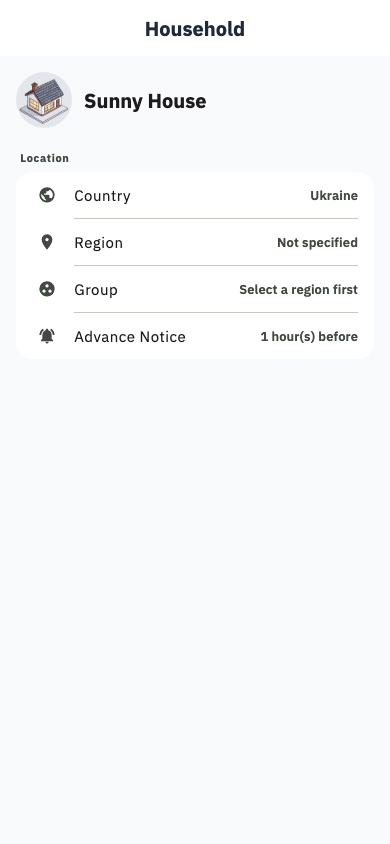
What you can change
- Name and picture — how the home appears in your list.
- Location and country — drives the solar forecast, and decides whether Ukrainian tariff and blackout features appear at all.
- Blackout region and group — see Blackout schedule.
- Advance warning — off, or 1, 2, 3 or 6 hours before a scheduled outage. The default is 1 hour.
- Diagnostic code — a short code identifying this home. Quote it when you report a problem and support can find your system immediately.
- Battery reserve — the charge level Svitgrid will not plan below.
- Outage buffer — extra charge held back specifically to cover a scheduled blackout, up to 6 hours' worth.
Several homes
Settings → Households → Create household adds another. Each has its own inverters, tariff, members and history. Switch between them from the same menu.
How many you may own depends on your plan — see Plans and subscription.
Renaming and removing
Rename freely.
Deleting is different from what most people expect, so it is worth being precise. Svitgrid shows you a count of what will be detached before you confirm, and then:
- The home disappears from your account and from every member's account. Nobody can reach it again.
- Its name and identifying details are anonymised.
- Any Svitgrid Gateway attached to it has its access revoked, so it stops collecting. Where the app can, it also tells the device to wipe itself.
- The readings themselves are kept, detached and belonging to nobody.
You cannot undo it, and you cannot get the home back
"Detached, not destroyed" does not mean recoverable. There is no restore button. Treat deletion as permanent.