
Time-of-use explained
Deye, Sunsynk and Sol-Ark inverters keep their own daily schedule of up to six time slots. Svitgrid edits that schedule; it does not replace it. Other brands have no such table.
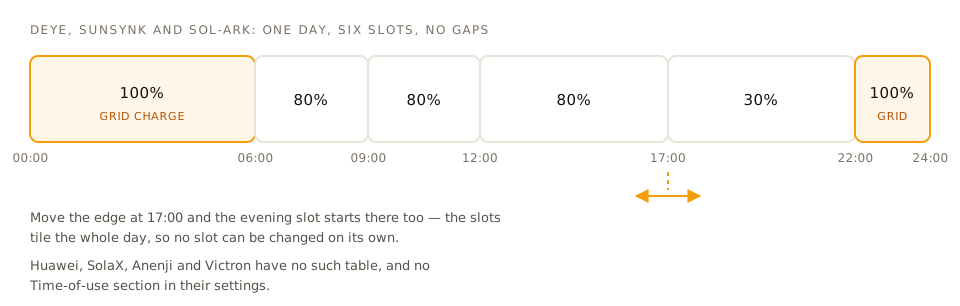
Hybrid inverters have a time-of-use table burned into their own settings — typically six slots covering the whole 24 hours. Each slot says: until this time, aim for this battery level, and may you charge from the grid. Huawei, SolaX, Anenji and Victron have no such table.
The inverter follows this table by itself, with no phone, no internet and no Svitgrid. That is why it keeps working when everything else fails.
What Svitgrid does with it
When you create a calendar event, Svitgrid translates it into changes to those slots, sends them to the inverter, and puts the old values back afterwards.
Two important consequences
The slots are a partition. They tile the entire day with no gaps. Changing where one slot ends necessarily changes where the next begins.
Editing one slot rewrites the whole table. Svitgrid always writes a complete, valid schedule rather than patching a single row, because a half-written table is a table your inverter will follow incorrectly all night.
Where to see it
Settings → Inverter controls → Time-of-use. You can edit the slots directly if you prefer to manage your own schedule.
If Svitgrid's calendar and your hand-written slots disagree, the calendar wins while an event is running — and restores your slots when it ends. To stop that, either delete the event or turn on "suspend time-of-use during this event".