
New to Svitgrid?
On this page
Thanks for stopping by! Svitgrid shows on your phone what your solar system is doing, and can run the inverter for you. You can start with your phone and no hardware. To collect data around the clock, you need an ED-1 or ED-1.1 board, and three questions below tell you which.
Thank you for your interest in Svitgrid. This page is for anyone who has just arrived: what Svitgrid is, why we build it, where to start, and where to find us.
What Svitgrid is
Your inverter already knows everything: how much the sun is making, how full the battery is, whether the grid is up. It just keeps it to itself, on a small screen in a cupboard. Svitgrid reads that data and puts it on your phone:
- Live. Sun, battery, grid and house, updated every few seconds.
- Alerts. When the power goes out and when it comes back, in the app and in Telegram.
- History and money. Days, months and years, what you paid the grid and what you earned.
- Control. Charges the battery when energy is cheap, and fills it before a scheduled outage.
Why we build it
Svitgrid is made in Ukraine, a country where power outages have become part of life. We want every solar owner to know what their energy is doing and to be able to act on it, whatever the inverter brand and whatever the manufacturer's cloud. One app for Deye, Huawei, Victron, Anenji and more.
We are a small team, and we read every message in the group. Much of what is in the app came from your questions and bug reports.
Four ways to collect data
Svitgrid gets its data from a collector: a device that reads the inverter and sends the readings to the cloud. You can change the collector at any time, and your station keeps its history.
| Collector | How it reads the inverter | Good for | Hardware |
|---|---|---|---|
| Phone | Through the inverter's Wi‑Fi module | Trying Svitgrid and checking that your inverter can be read | None |
| ED-1 | Through the inverter's Wi‑Fi module | Collecting data around the clock, no wires | ED-1 board |
| ED-1.1 | By cable, through the RS-485 port | An inverter with no module, or a module that does not answer | ED-1.1 board |
| Home Assistant | Through your Home Assistant | If you already run Home Assistant | None |
Choose your path
Answer the questions in order, and stop at the first "yes".
1. Your inverter has no Wi‑Fi module, or the module is not on Wi‑Fi?
You need ED-1.1. It connects to the inverter with a cable and does not need the module. The phone test will not work for you, because the phone reads the inverter only through the module.
2. A Deye, Sunsynk or Sol-Ark, and the module's serial number starts with a letter?
You need ED-1.1. Modules with a letter in the serial, usually a D as in D25831234020, send data only to the Deye cloud and do not answer on your home network. Neither the phone nor ED-1 can read them.
| Module | Serial on the label | What to choose | |
|---|---|---|---|
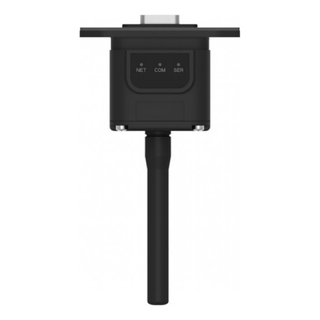 | Older style: a square block, a separate antenna, three lights | Digits only, for example 2712345678 | Run the phone test (question 3) |
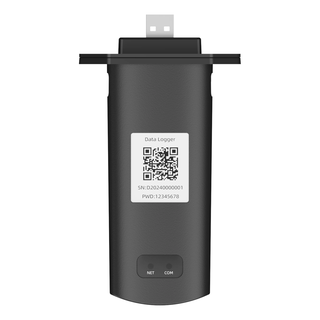 | Newer style: a long stick, no antenna, two lights | Starts with a letter, for example D25831234020 | ED-1.1 |
Read the serial from the module, not the inverter
The inverter has its own serial number, and it can contain letters too. You need the number on the label of the Wi‑Fi module itself, the one plugged into the bottom of the inverter.
3. Anything else: try it with your phone, no hardware needed
Install the Svitgrid app and set up a station with your phone as the collector. It takes about 10 minutes. The phone reads the inverter the same way ED-1 does, so the result carries over:
- You see live readings: Svitgrid works with your inverter. When you want data around the clock, buy an ED-1.
- The phone cannot read the inverter: choose ED-1.1.
Step by step: Will ED-1 work with my inverter?
Already running Home Assistant? You can connect Svitgrid through it, with no board. See Home Assistant.
What you need
For every path:
- A smartphone, iPhone or Android, with the Svitgrid app and an account. See Download and install.
- An inverter Svitgrid supports. See Supported inverters.
Then, depending on the path:
- Phone: your phone at home, on the same Wi‑Fi network as the inverter's module, and the serial number from the module's label.
- ED-1: the board, any 5 V phone charger (the box holds only the board and a USB-C cable), your home Wi‑Fi password, and the inverter's module on that same network. The board joins only 2.4 GHz networks.
- ED-1.1: the board, a 5 V phone charger, your home Wi‑Fi password (2.4 GHz), and a cable from the board to the inverter's RS-485 port. The cable is not in the box: you or your installer make it from the RJ-45 pinout. For an installer, it is about fifteen minutes of work.
- Home Assistant: Home Assistant already reading your inverter, HACS installed, and your phone on the same network as Home Assistant.
Where to buy
- ED-1: Wi‑Fi, no wires. For an inverter the phone could read. Order ED-1
- ED-1.1: an RS-485 cable. For an inverter with no module, or with a module that does not answer. Order ED-1.1
When the board arrives, see Setting up your Svitgrid Gateway.
The Telegram group
In the Svitgrid group, the people who build Svitgrid read every message. Ask anything: which path to choose, whether your inverter is supported, what a number on the screen means.
- A bug, or something not working? Post in the Баги (Bugs) topic and add the diagnostic code from the app (Household settings → Diagnostic code, it looks like
SG-KE9VV2). The bot looks at your station straight away. - Rather not post in public? Message
@svitgrid_botprivately. - Every confirmed bug earns points toward your subscription. See Points for bugs.
More: Support in Telegram. The group is mostly in Ukrainian. To write in English or Portuguese, join the Svitgrid Discord server.