
Creating a calendar event
In short
An event is a rule: between these hours, on these days, make the inverter behave this way.
Tap + on the Calendar tab.
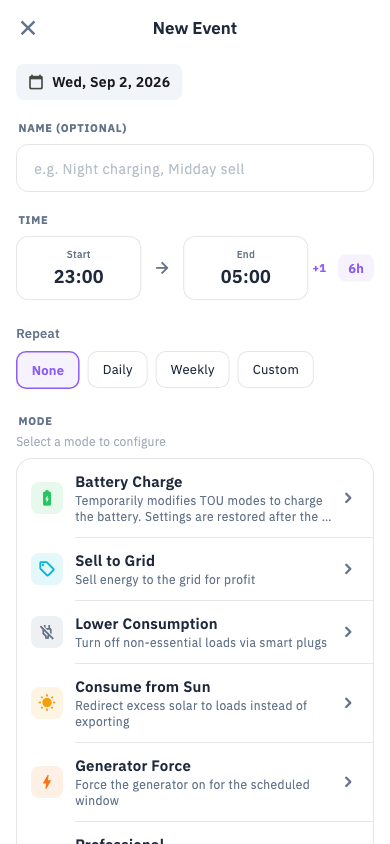
Choose what the event does
| Mode | What happens |
|---|---|
| Charge battery | Fills the battery, from solar, the grid, or both |
| Sell to grid | Exports surplus power |
| Lower consumption | Reduces what the house draws |
| Use solar at home | Prefers self-consumption over export |
| Use battery | Draws from the battery rather than the grid |
| Hold battery | Stops the battery being used at all |
| Start generator | Runs a generator on the gen port |
| Battery maintenance charge | A deliberate full charge to keep cells balanced |
| Day planning | Hands the window to the planner |
| Professional | Your own conditions and actions |
Set the time window
Start and end time, then how it repeats — once, daily, weekly on chosen days, or a custom pattern. You can also give it a start and end date.
Set the details
Each mode has its own options. The common ones:
- Charge battery — where the power comes from (solar / surplus / grid / both), the target charge level, and a maximum charging power. There is also a switch to suspend your inverter's own time-of-use schedule while the event runs, so the two do not fight.
- Sell to grid — a minimum battery level to protect, a maximum export power, and in Ukraine a minimum price below which it will not sell.
- Start generator — the charge level that starts it, the level that stops it, quiet hours, minimum run and rest times, and whether it should only run when the grid is actually down.
- Professional — up to eight conditions and eight actions. Conditions can test battery level, solar power, house load, whether the grid is up, whether a blackout is scheduled, the day's forecast, or the market price.
What happens when it runs
At the start time, Svitgrid sends the commands to your inverter and notifies you. At the end, it puts the previous settings back and notifies you again.
An event needs a live collector
If nothing is collecting when the event is due — phone in your pocket, Gateway unplugged — the event cannot run. The calendar will show it as missed.
Every command Svitgrid sends is recorded in Write history, with a timestamp and the value written.