
Svitgrid Gateway
A small box that sits next to your inverter and collects data around the clock, so you do not need to leave a phone at home.
Sold as the Svitgrid Gateway, 999 ₴. The compliance label on the underside calls it ED-1 — same device.
Why you would want one
Your phone can only read the inverter while you are home with the app open. The Gateway never stops. It also does things a phone cannot:
- Collects 24/7, including overnight and while you are away
- Runs your scheduled events even when nobody is home
- Talks to Zigbee smart sockets and EV chargers
- Reads a battery BMS continuously
Setting one up
Follow Setting up your Svitgrid Gateway: which board you have, where it goes, the cable for an ED-1.1, and every screen of the setup.
To add a board to a station you already have, open the station's Settings tab, then Edge Device → Add a board.
The label has a QR code
Scanning it with your phone camera opens setup for that exact device. It contains no secrets — it is a shortcut, not a key.
The status light
One light, two meanings — there are no blink codes
Solid on — a reading reached the Svitgrid cloud in the last 12 minutes. Everything works.
Off — nothing has been confirmed delivered for 12 minutes, or nothing since it was switched on.
That is the whole vocabulary. Silence is the failure signal; the device never signals "unhealthy" in any other way. On some early hand-built units the light is not connected at all and never comes on.
The button
Do not use hold-the-button gestures you may read elsewhere
On production hardware the case button is wired directly to the chips' reset lines. It is a hardware reset — the firmware cannot detect it being held, so timed presses do nothing. Pairing, factory reset and removal are all done from the app.
Managing it
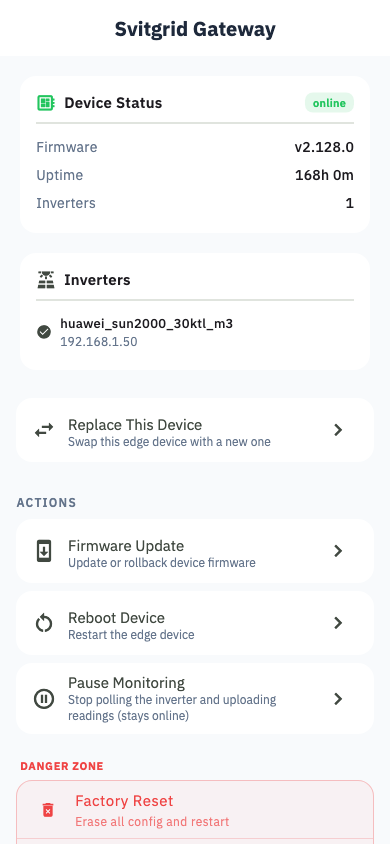
The station's Settings tab → Edge Device, then tap the device:
- Uptime, firmware version and signal strength
- Pause / resume monitoring
- Reboot
- Factory reset
- Replace with a new unit, keeping your history
- Remove
Pausing is not the same as switching off
A paused Gateway stays online, keeps its Wi‑Fi and still answers Svitgrid — it simply uploads nothing. It looks exactly like a broken device. See Troubleshooting, which covers this first because it is the most common false alarm.
It beeps
The Gateway plays a short melody each time it successfully applies a battery-charge command from the cloud. On a busy schedule this can be many times an hour.
There is currently no way to switch the sound off. If it bothers you, reduce how often your calendar events change the battery-charge setting.