
Version 1.0.254
November 14, 2026 · Android
On this page
This version is available on Google Play. It covers everything since 1.0.253. The screenshots are from the Ukrainian app.
A few terms
- Banner: a short card at the top of the home screen that tells you what is happening at your station right now, such as an outage or a running event.
- Calendar event: a change you scheduled for your inverter, such as a night charge from the grid between 22:00 and 06:00.
- ED-1 board: our small device that collects data from your inverter.
- AI assistant: a chat program built on artificial intelligence, such as Claude or ChatGPT, that you can allow to read data from your Svitgrid account.
- Change request: a list of changes an AI assistant proposes for your station. Nothing changes until you approve it.
- Organisation: a company, such as an installer, that looks after several stations with their owners' consent.
Home screen banners
The energy diagram is the reason you open the app, so nothing should push it aside. Many of you told us that the messages above the diagram squeezed it: an outage, old data, a request and a schedule each took their own line, and on a bad evening the diagram shrank until it could not be read. Up to ten of them could stack up at once.
Now every message is a banner in one slot that floats over the diagram, and the diagram keeps its full size.
- One card at a time. Swipe left or right for the next one. Dots under the card show how many there are, and from 5 cards a counter such as «2/7» replaces them.
- The most important card comes first: your own change in progress, then anything that makes the diagram untrue (old data, an offline station), then requests waiting for you, then the grid, then station settings, then what is worth knowing.
- Each card has a small picture from the diagram, such as the battery, the inverter or the power line, with a badge for its state. The picture moves while something is changing, and stays still when you turn on reduced motion in your phone's settings.
- A tap does what the old button did: it opens the event, the board or the screen with the details.
- The diagram moves to the middle of the space under the banner, and back when there is none. It never shrinks for a banner.
Hide a banner, and bring it back
Swipe a card up to hide it. It goes to the bell, under Сховано з головної, and counts on the bell icon until you read it. For four seconds you can undo.
Banners about old or missing data cannot be hidden, because without them the diagram would show numbers that are no longer true. Such a card carries a pin, springs back when you swipe it, and says why. It goes away by itself once the data is fresh.
In the bell:
- Swipe right puts a banner back on the home screen at once.
- Swipe left stops showing that whole group on the home screen. The app asks first, and says what stays: the phone notification and the entry in the bell.
Choose what appears over the diagram
Сповіщення in the settings has a new section at the end, Банери на головній, with one switch per group: Зміни, події і правила, Запити, що чекають на вас, Без світла, Налаштування станції and Варто знати. Офлайн і збір даних is always on. A banner whose group is off still reaches you as a phone notification and in the bell. Switching a group back on returns its hidden banners to the home screen.

Clearer messages about your data
- A paused board has its own banner. When you pause monitoring on an ED-1 board, it keeps its Wi-Fi and sends no readings. Before, the app said nothing, and after six minutes it said the data may be outdated and offered troubleshooting for a board that was fine. Now it says Моніторинг призупинено, names the board, and a tap opens the board, where you can resume.
- The age of your data is never cut off. «Data may be outdated» lost the time to the end of the line on narrow phones. The title is now short, and the line under it says how long ago the data was updated.
- No repeated «Offline» mark on a station with one inverter. The banner already says how old the data is, so the mark that sat on the diagram's line to the house is gone. The inverter picture still dims. With several inverters the mark stays, because it names which one went silent.
- A quick battery charge opens its event. A tap on its banner opens the event, where you can stop it. While the grid is down, the banner says that only solar can charge the battery, so it no longer says «charging» over a diagram that shows discharging.
Your calendar events, on the home screen
When you schedule a night charge, you should not have to wonder whether it ran. The home screen now follows each calendar event and rule from the moment it is about to start until your settings are back.
- Before it starts: «О 22:00 · Нічна зарядка» with Все готово, or a warning when something may get in the way.
- Starting: Вмикаємо, with four steps: Сервер, Плата (or HA for Home Assistant), Інвертор and Дані, and the charge it is aiming for.
- Running: Діє до 06:00, with the value it drives, or Чекає своєї умови when it waits for a condition.
- Ending: Завершиться о 06:00, and a reminder that your settings come back.
- Done: green Завершено with Налаштування повернуто, or red Не вдалося with the reason in words.
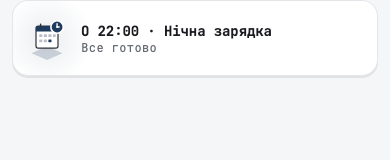
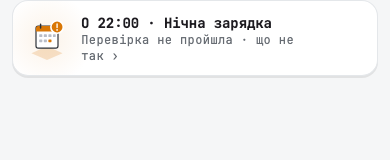
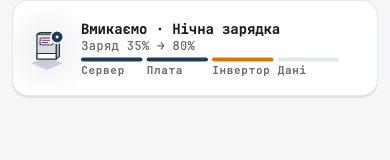
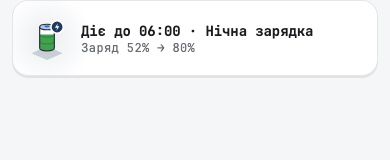
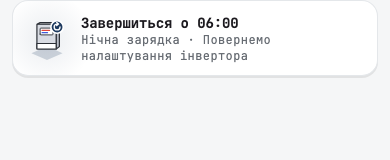
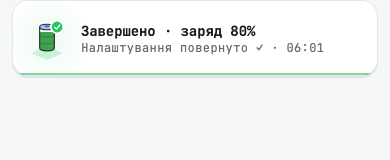
A tap on the card opens Що станеться: what the event will change, one line each, such as «Заряд до 80 %», «Від мережі» and «Струм заряду 120 А», and when your settings come back. Under Чи спрацює it lists the checks, such as whether the board is online, the readings are fresh and the event overlaps another one. Each failed check has a button that takes you to the fix: the board, the troubleshooting screen, or the other event.
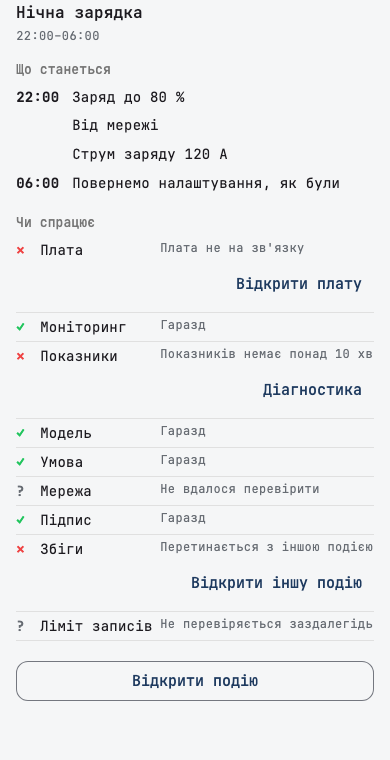
Times on these cards follow the station's clock. A quick charge shows once, on its own banner.
One outage card, from before to after
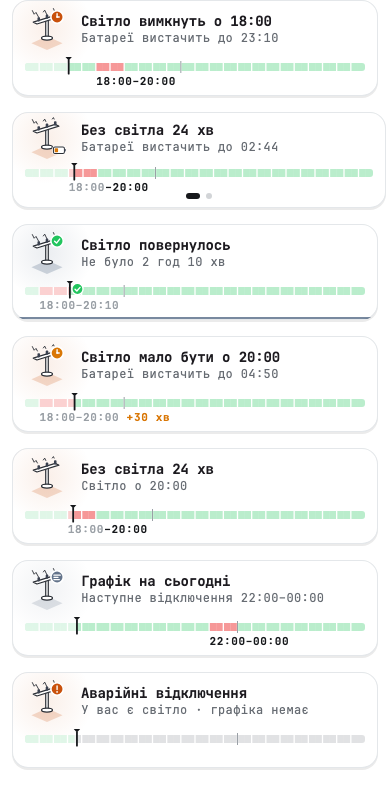
An outage is one story, so it now has one card. Before, the schedule strip sat above the diagram and took its height, and the outage banner was a separate line. Now one card follows the outage through its stages, with the 24-hour schedule strip inside it:
- Before: «Світло вимкнуть о 18:00», and how long the battery will last at your home's current use, or the scheduled outage window when there is no battery.
- During: how long the grid has been off, and how long the battery lasts.
- Late: «Світло мало бути о 20:00», with an amber clock and how late the grid is, such as «+30 хв».
- After: «Світло повернулось» and how long it was off, for a few seconds.
- On a calm day: Графік на сьогодні with the next outage, and a card for emergency outages when there is no schedule.
Charge before the outage
A tap on the «before» card shows the battery now, how long it lasts as it is, and how long it would last when full. Зарядити до відключення starts a quick charge from the grid that stops by itself when the outage begins.
The battery estimate assumes your home keeps using what it uses now. If you plan to switch on something heavy later, the battery will run out sooner.
Показувати графік відключень in Appearance now hides the strip on every card, and the calm and emergency cards.
Change requests from AI assistants
You can now ask an AI assistant to set up your station, and keep the last word. Ask Claude or ChatGPT for a winter schedule, a night charge or a new rule, and it sends you a request. Nothing changes until you open it and tap Схвалити. Then your phone carries out the changes the same way as if you made them in the app. An assistant cannot change your station by itself.
What you see
Запит на зміни shows who asked, which station, and how long the request stays open. Each change is listed in plain words, with what it is now and what it will be, such as «Резерв батареї 20 % → 30 %». A change to the inverter's hourly schedule shows the whole table with the changed cells highlighted. The assistant's explanation is marked as the assistant's words, not Svitgrid's.
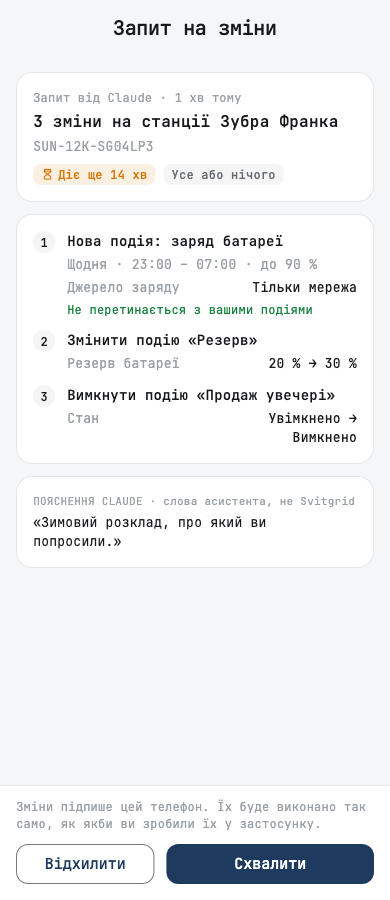
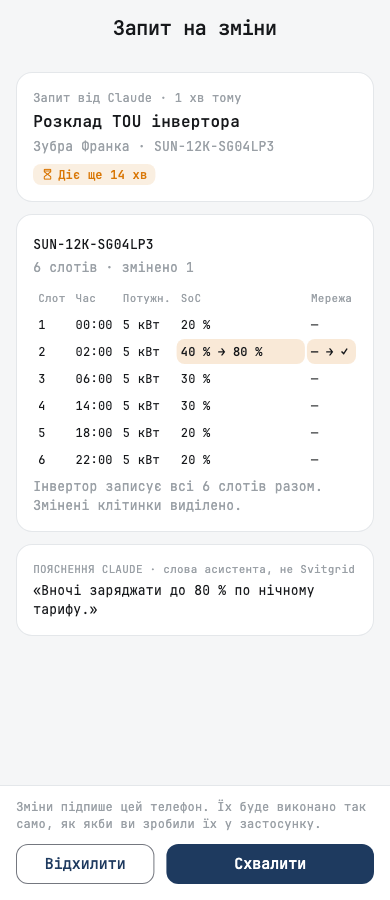
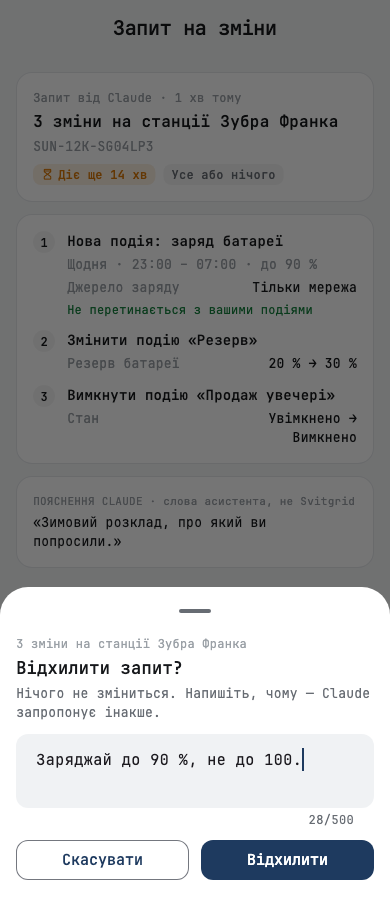
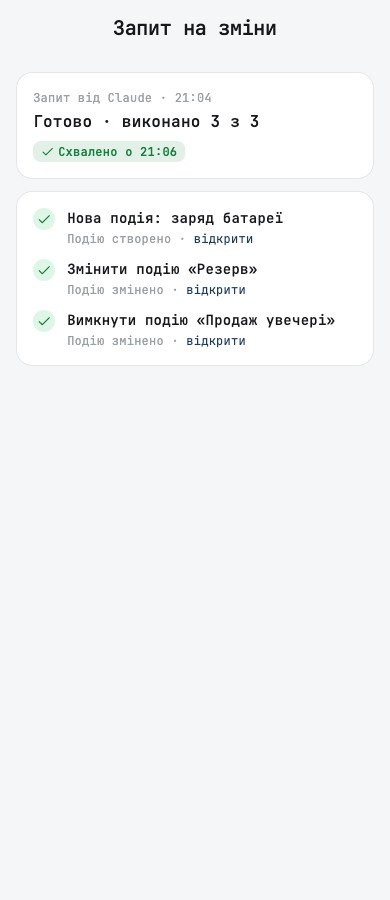
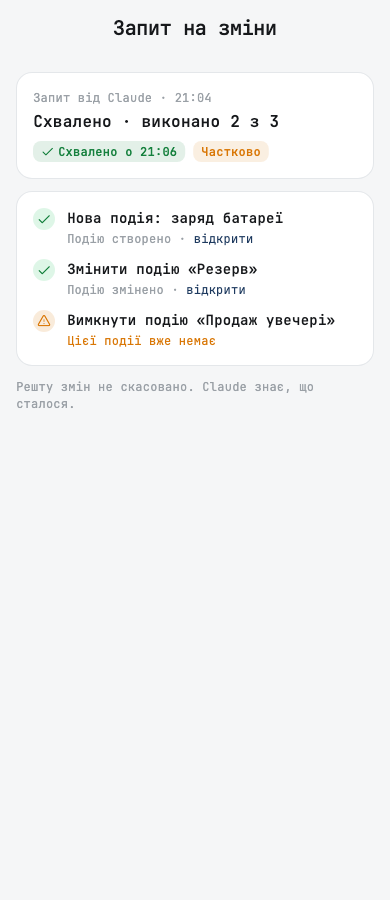
Відхилити lets you add a note of up to 500 characters, so the assistant knows what to change in its next proposal.
Where requests reach you
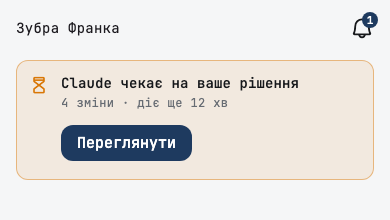
- On the home screen: a card on the station the request is for, with Переглянути.
- In the bell: waiting requests sit at the top, soonest to expire first. The Запити filter shows the last 30 days, each with its outcome: done, done in part, rejected with your note, or expired.
- As a notification: Запити від асистентів in the notification settings cannot be switched off, because without it you could not approve a request. To stop the requests, disconnect the assistant.
What an assistant can ask for
Calendar events and rules, the day plan, inverter settings such as the work mode, the hourly schedule and the grid charge current, station details and tariff, smart devices, EV chargers, batteries, a board restart or firmware update, and your notification settings. It can also ask to change the settings of Anenji, Edecoa, Daxtromn, Axioma, MUST, LuxPower SNA and Solis inverters. Each change goes through the same checks as the settings screen of that inverter, and a value the screen would refuse is refused before anything runs.
Your protection
- You always see who is asking. An assistant that is not verified is named by its web address with «(неперевірений)», so it cannot borrow a name you trust.
- A change is never made twice. If the app closes while it carries out a request, it does not repeat the change on the next start, it reports that the outcome is unknown and asks you to check the station.
- Only your phone carries out the changes. If this phone is not yet trusted to change your station, Схвалити is greyed out, and Попросити схвалення asks a phone that is.
- The trace stays. An event or rule made through a request shows where it came from, with a link to the request, and the inverter's change history names the assistant and who approved it.
- Підключені асистенти shows whether each assistant may send requests, and how many it sent in the last 30 days, with a link to them.
For organisations
If an installer or another organisation looks after your station, its team can send you a request too. The request names the organisation and who sent it, and says that they cannot change your station without your approval.
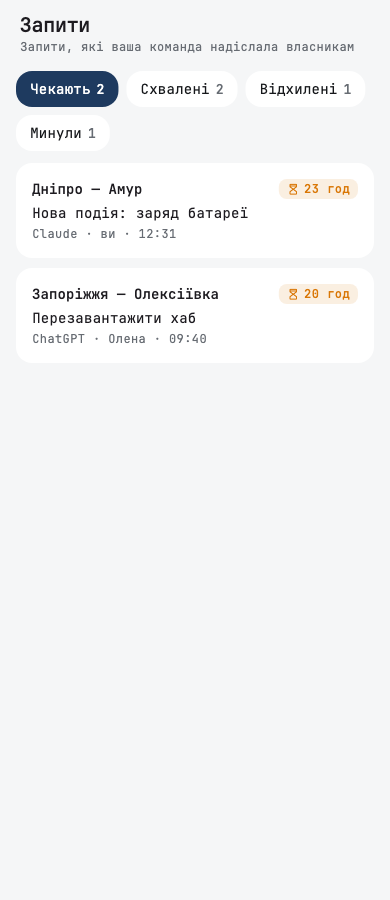
The team sees its requests on a new Запити tab, with the filters Чекають, Схвалені, Відхилені and Минули, a count on the overview, and a mark on every station with a request waiting. They can read the answer and your note, but cannot approve anything for you.
Battery and diagram
- How long the battery lasts is in the battery card now. The line above the diagram was covered by the banners and took the diagram's height. Tap the battery on the diagram: right under the charge, the card shows Вистачить на (Повна через while charging, Без світла вистачить на during an outage), the time it lands on, and, when known, a bar with the level where the inverter stops discharging.
- The voltage and current of each panel string are easy to read. They were tiny, and on some phones the two strings ran into one line. Each string now has its own compact line at the size of its name.
Smaller fixes
- When two-factor sign-in (2FA) cannot be set up on our side, the app says «Двофакторна автентифікація зараз недоступна. Спробуйте пізніше.», instead of a general error that invites a retry that cannot help.
- The phone of a station owner or admin prepares its key for signing changes at sign-in, so you no longer have to set it up separately. A key the phone already has is never replaced, and a phone whose request was refused is not asked again at every start.
- A phone that collects your station's data keeps a log of its work for about a week, without your access keys, so support can find the cause when you ask for help.
- When a rule stays where it was during a move to Home Assistant or back to the cloud because the app could not read its actions, the summary now says so, instead of blaming the cloud.