
Inverter settings and controls
Two screens: one describes your hardware to Svitgrid, the other sends commands to the inverter.
Both are under Settings, and both need owner or admin rights.
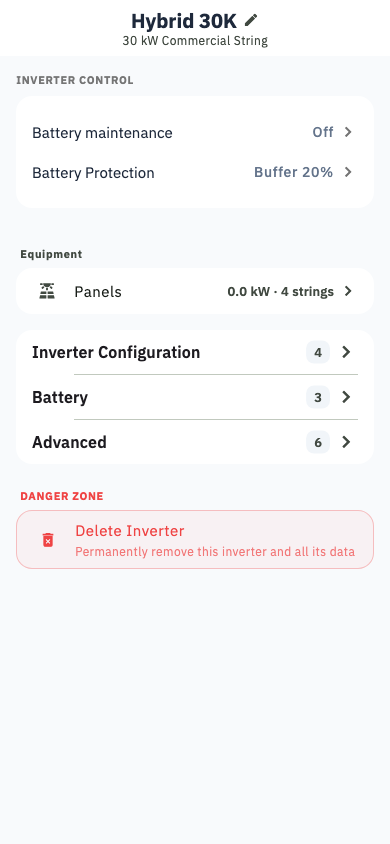
Inverter settings — describing your system
This is where you tell Svitgrid what you own. Getting it right matters, because the forecast, the money and the battery warnings are all built on it.
- Model, IP address, logger serial, phases
- Battery — chemistry, capacity, cells in series, and whether this inverter shares a battery bank with another
- Solar — strings, kWp, tilt, azimuth
- Generator port and smart load
- Power calibration — a correction factor, if your inverter reports a value at the wrong scale
- Daily write limit — a cap on how many commands per day Svitgrid may send
- Transfer collection to another phone — see Moving collection
Inverter controls — changing the inverter
Deye, Sunsynk and Sol-Ark only
On every other brand this screen is read-only, because the manufacturer does not expose writable settings. See Supported inverters.
| Control | What it does |
|---|---|
| Energy priority | Whether solar serves the house, the battery or the grid first |
| Work mode | The inverter's overall operating mode |
| Grid charge current | How hard the battery may charge from the grid |
| Grid peak shaving | Caps how much you draw from the grid |
| Generator force | Starts a generator on the gen port |
| Battery protection | Minimum reserve, and an extra buffer held back for a scheduled blackout |
| Battery maintenance | A periodic full charge to keep cells balanced |
| Time-of-use table | The inverter's own daily schedule — see Time-of-use |
| Maximum sell power | How much you may export |
The nameplate is a marker, not a wall
On maximum sell power, your inverter's rated output is drawn on the slider as a reference — you can set a value above it. Many installations are deliberately limited below the rating by a grid agreement, and a few can legitimately exceed it.
Every command is real
These write to your actual inverter. Svitgrid records every write in Write history, and asks for confirmation before anything destructive — but it cannot undo a setting your equipment has already applied.