
Solar forecast
Svitgrid predicts how much your panels will make over the next few days, using the weather and the real angle of your roof.
Open it from the Forecast button in the bottom bar.
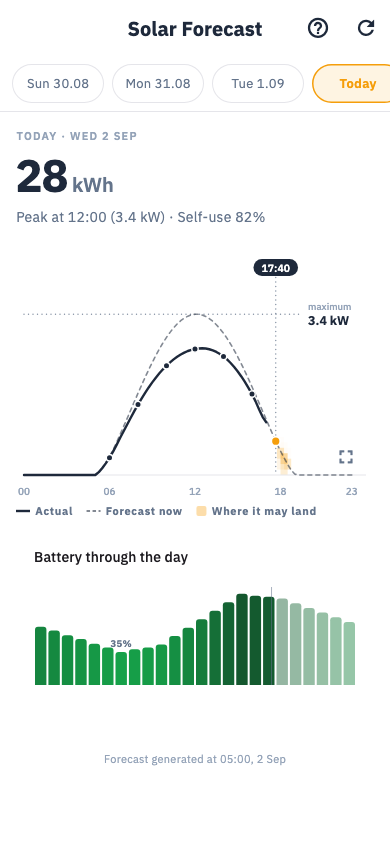
What you see
- Today's curve with a shaded band around it. The band is the uncertainty: narrow means confident, wide means the weather could go either way.
- The next few days as a strip you can tap through.
- How accurate we have been — yesterday's forecast against what actually happened.
- Unrealised generation — power your panels could have made but did not, usually because the battery was full and there was nowhere to put it.
- Battery outlook — hourly bars showing where your charge is heading.
Turn the phone sideways for a full-screen strip you can pan across several days.
How it works
Svitgrid combines the weather forecast for your exact location with what it knows about your system: how many kilowatts of panels, which way they face, their tilt, and how they have actually behaved on similar days.
That last part matters most. The forecast learns from your roof. A system with a tree shading it at 4pm will, after a couple of weeks, have that dip built into its prediction.
Making it accurate
Check Settings → Inverter settings → Solar configuration:
- kWp — total panel power. On the panel label, multiply the watts by how many you have.
- Azimuth — the compass direction the panels face. South is 180°. There is a compass tool: stand facing the same way as the panels and read it off.
- Tilt — the angle from flat. A typical pitched roof is 30–35°.
Set each string separately if they face different ways.
A new forecast needs about two weeks
Until then it works from the weather and your stated angles alone. Accuracy improves as it learns.
The forecast is cloud-computed. If you run Home Assistant in local mode with cloud sync switched off, there is no forecast — Svitgrid never sees the data it would need.