
Local mode
In short
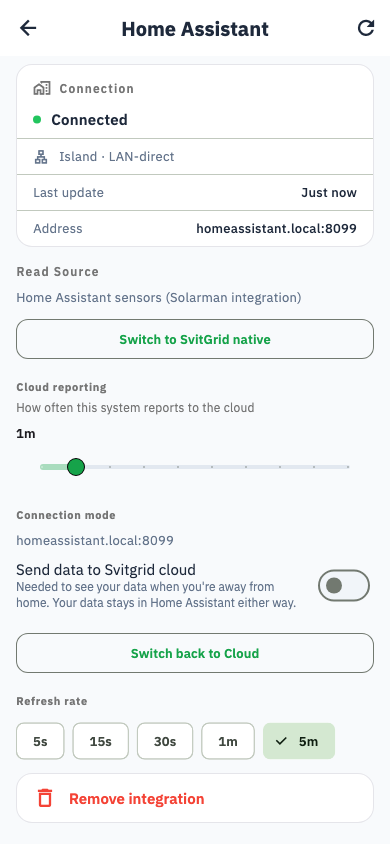
Home Assistant can run Svitgrid entirely on your home network, with no internet at all. You choose separately whether to also send data to the cloud.
Also called island mode. Two independent switches, and confusing them causes most of the surprises.
| Switch | What it controls |
|---|---|
| Connection mode | Whether your app reads from your home network directly, or from the Svitgrid cloud |
| Send data to Svitgrid cloud | Whether readings are uploaded at all |
Why you would use it
- Your internet is unreliable, and you want the dashboard to keep working anyway.
- Your schedule must run during an outage that takes your router down with it.
- You would rather your energy data did not leave the house.
Turning it on
Settings → Home Assistant → Connection mode. Available on Plus and above.
What you lose with cloud sync off
This is the trap
With cloud sync off, Svitgrid never receives your data. That means:
- No data when you are away from home. Your phone cannot reach your house, so the dashboard is empty on mobile data.
- No solar forecast. It is computed in the cloud from your history.
- No daily planner.
- No notifications. They are sent by the cloud, which no longer knows anything.
If you want local reliability and remote access, leave local mode on and cloud sync on. That combination gives you both.
When the box cannot be reached
If your phone is on local mode but cannot reach Home Assistant — you have left the house, or the box is down — Svitgrid falls back to the cloud automatically, provided cloud sync is on.