
Calendar and daily planner
The calendar is where you tell your inverter what to do and when. The planner writes that schedule for you, and asks before it changes anything.
Open the Calendar tab.
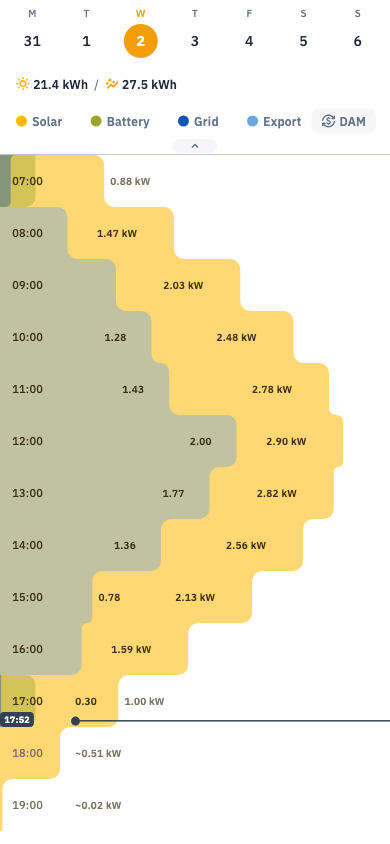
The calendar
A week strip at the top, and below it an hour-by-hour timeline of the day. You can lay your battery level, grid flow and export over the timeline, and — in Ukraine — the day-ahead electricity price.
Each coloured block is a scheduled event. Tap it to see what it did and what actually happened.
The daily planner
Rather than building a schedule by hand, let Svitgrid propose one each day. It looks at tomorrow's solar forecast, your tariff, your battery, and any scheduled blackout, and drafts a plan.
You approve it before anything runs. The plan review screen lists each proposed window, why it is there, and the limits it will respect.
Planning styles
| Style | Aims for |
|---|---|
| Lower my bill | Cheapest possible electricity cost |
| Maximum selling | Most revenue from exporting |
| Survive outages | Battery as full as possible before a scheduled blackout |
| Use solar at home | Least import, even if selling would pay more |
| Smart | A balance, adapting to the day |
| Custom | You set the priorities |
Authorising the planner
Because the planner writes to your inverter, it needs explicit permission. You will be asked once to authorise daily planning, which creates a signing key on your device. Without it, the planner can suggest but never act.
Authorisation expires. If plans stop being applied, check the calendar screen for a prompt asking you to re-authorise.
Planner activity
A log of every decision the planner made and every command it sent — useful for understanding why your battery did something unexpected.