
Version 1.0.253
November 12, 2026 · iOS
On this page
This version is available in the App Store. It covers everything since 1.0.250. The screenshots are from the Ukrainian app.
A few terms
- ED-1 board: our small device that collects data from your inverter. An ED-1.1 connects to the inverter by cable.
- Phone station: a station whose data the phone itself collects, with no board.
- Station's clock: the time zone where your station is, as opposed to the time zone your phone is in.
- TOU: the inverter's schedule by hour of the day (Time of Use). It tells the inverter when to charge the battery and when to use its charge.
- Wi-Fi module: the small communication module on the inverter that joins your network. Some inverters, such as Anenji, connect to the board through it.
- AI assistant: a chat program built on artificial intelligence that you can allow to read data from your Svitgrid account.
Deye settings, like on the inverter
You already know your Deye's menu from its own screen. The app's settings now follow the same menu, so you find a setting where you expect it. Before, one long page mixed the inverter's controls, the TOU schedule, Svitgrid's own settings and tools.
The settings page now opens on the seven tiles of the inverter's System Setup menu, in the inverter's order and under its own English labels: Battery Setting, System Work Mode, Grid Setting, Gen Port Use, Basic Setting, Advanced Function and Device Info. Below them sit Налаштування Svitgrid, then the tools (activity and diagnostics) and Видалити інвертор.
- System Work Mode has the inverter's tabs. Work Mode1 holds the work mode, solar sell, energy pattern, peak shaving and Max Sell Power as the inverter reports it. Work Mode2 holds the TOU schedule, and Work Mode4 shows the weekdays the schedule runs on.
- Battery Setting has Batt Set2, with Grid Charge, the grid charge current, generator charging and the battery level for grid charging, and Batt Set3, which shows the shutdown, low-battery and restart levels as the inverter reports them.
- Налаштування Svitgrid holds what belongs to Svitgrid rather than the inverter: your panels, battery maintenance charge, battery protection, and the configuration, battery and advanced lists.
- The controls are the same as before, with the same checks. Only their place changed.
- On a station whose data stays in Home Assistant, the Deye pages show the same values as on a cloud station.
The weekday view in Work Mode4 follows public descriptions of the Deye registers and has not yet been compared with an inverter's own screen. If the days you see differ from your inverter's, tell us in the Telegram group.
Settings open on the inverter list
Inverter settings now always open on the list of your inverters, even when you have one, and Додати інвертор lives only there. The other brands keep their settings pages as they were, without that button.
Times on the station's clock
If you travel, or your phone is set to another time zone, the app should still tell you the time at your station. An owner in the UK, two hours behind a station in Kyiv, saw an outage end at 20:21 when it had ended at 22:21 Kyiv time. These screens now read the station's clock:
- The dashboard outage banner: when the grid returns, and what the schedule says about the current hour.
- The Відключення screen, including the Зараз slot.
- Останнє відключення, the outage log and the day grid in the grid report.
- Сповіщення: each alert's time, and the split into Сьогодні and Вчора.
- Без світла: when the grid returns, when the battery runs out, and the times when devices are switched off.
- The hatched outage band on the dashboard's power chart.
The calendar and rules already used the station's clock. A station with no time zone saved keeps using the phone's clock, as before.
A board that went offline
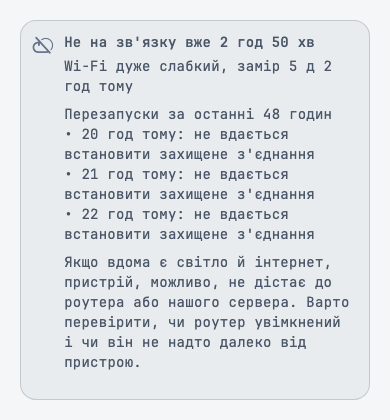
When your board goes quiet, you should be able to tell a home network problem from a board problem without writing to support. Before, its page said «Офлайн» and nothing else.
A board's page now shows a card while the board is offline. It says how long the board has been out of touch, how strong its Wi-Fi was when last measured and how long ago, and up to three restarts from the last 48 hours, in plain words, such as «не вдається встановити захищене з'єднання» or «просідання живлення». It ends with what to check: whether the router is on, and whether it is too far from the board.
Firmware updates
- Доступне оновлення плати in the bell and in Сповіщення disappears once the board runs the offered version. Before, it could stay for up to a day after a successful update.
- If you leave Оновлення прошивки open during an update and come back hours later, the screen shows the real result at once. Before, it could show the last moment before you left, with a moving bar, which looked like an update stuck halfway.
Outages
In an outage, the banner should tell you what you can plan by, and nothing you could misread.
- In the first minutes of an outage, the banner no longer estimates how long the battery will last from a reading taken before the outage started. One owner saw «~220 год» three minutes into an outage. The banner says the station is on battery until the first reading from the outage arrives.
- When the battery lasts more than a day, the banner adds the date to the time, for example «18.11 22:30».
- The line about other stations now says whose they are: «Ще 1 станція Svitgrid у вашій черзі теж без світла». Before, «у вашій групі» read as a second station on your own account. These are other people's Svitgrid stations in your outage queue.
Phone stations
- When you create a phone station, the review now checks whether this phone can read the inverter model. For models it cannot read yet, such as MUST, the model row explains that an ED-1 board reads it by cable, and the station cannot be created as a phone station. Before, such a station was created and then never collected anything.
- A phone station created earlier for such a model now says so on Збір даних: «Цей телефон поки не вміє зчитувати цю модель інвертора.», and that your inverter is fine. Before, the screen showed only «Помилка».
- A phone that stops collecting data no longer leaves a hidden connection open behind it. That connection could delay a command sent from another phone to the inverter.
- A command that reaches a phone just after it stopped collecting data now fails with a clear reason, instead of a program error.
Connected assistants
You should always see who can read your data, and be able to stop it in one tap. Налаштування has a new row in Акаунт: Підключені асистенти. It lists the AI assistants connected to your Svitgrid account.
- Each one shows whether it is verified, what it can read (your stations, and an organisation's fleet if it has that access, both read only), when it was connected and when it was last active.
- Відключити asks first, and the assistant loses access at once.
- An assistant that gave no name is called «Невідомий асистент».
The web console's card for connected assistants offers Try again when it cannot load, as the app does.
Rules
- In a battery-voltage condition, the slider now covers your battery's voltage range, for example 40 to 65 V for a 48 V battery. Before, it ran up to 1000 V, and switching on Відпустити при jumped to hundreds of volts. A threshold you saved earlier keeps its value.
- The condition's editor is titled with the condition's name, instead of a code.
Batteries
- A battery whose board you deleted can be added to a board again. Before, Додати батареї counted it as already added and offered «Додати 0 батарей». The battery keeps its name.
Dashboard
- While an EV charger charges your car, Споживання on the dashboard no longer jumps between 0 W and the car's power on stations where the inverter and the charger measure the car slightly differently. The house shows its own load. The web console has the same fix, and the home-screen widget gets it with our next server update.
The app in more languages
Svitgrid should speak your language on every screen. The Arabic, Dutch, French, German, Italian, Polish, Portuguese, Spanish and Turkish versions of the app showed about 700 texts in English each, from Home Assistant setup to critical devices, reports and rules. They are now translated. If a word reads oddly in your language, tell us in the Telegram group.
Smaller fixes
- A smart socket tap refused because the app sent too many requests now says «Забагато запитів. Зачекайте перед повторною спробою.», instead of a technical error. The app also waits as long as our server asks before it reads again, so it no longer uses up its request limit right after you open it.
- An Anenji whose settings format Svitgrid does not recognise yet shows a notice saying so, instead of «Підтверджено» over empty values with live edit buttons.
- An Anenji whose Wi-Fi module has not yet connected to the ED-1 board will say exactly that on its settings screen. This arrives with the next board firmware; until then, the screen still shows «Пристрій відхилив команду».