
Version 1.0.250
November 9, 2026
On this page
This release is on the App Store and Google Play. It covers everything since 1.0.248. The screenshots are from the Ukrainian app; every screen is available in all 11 app languages.
A few terms
- Rule: an instruction that runs by itself. It watches a condition, such as grid voltage or battery temperature, and changes an inverter setting while the condition holds.
- Home Assistant: a program for running a smart home, which works on your own device at home.
- Island mode: the station works without the Svitgrid cloud, and the data stays in your home.
- ED-1 board: our small device that collects data from your inverter. An ED-1.1 connects to the inverter by cable.
- Logger: the communication module on the inverter that joins your Wi-Fi.
- Grid-tie inverter: an inverter without a battery, which only turns solar power into household power.
- Generator port: an input on a hybrid inverter. Some owners connect a second, grid-tie inverter to it.
- MPPT: one solar input on an inverter. Each input takes one string, a row of panels.
- Peak shaving: a limit on how much power the inverter takes from the grid.
- Active consumer: a household that sells its surplus electricity at the market price.
Rules
A rule should tell you at a glance whether it is working, and building one should not need a manual. We rebuilt the Rules tab around those two things.
The Rules list
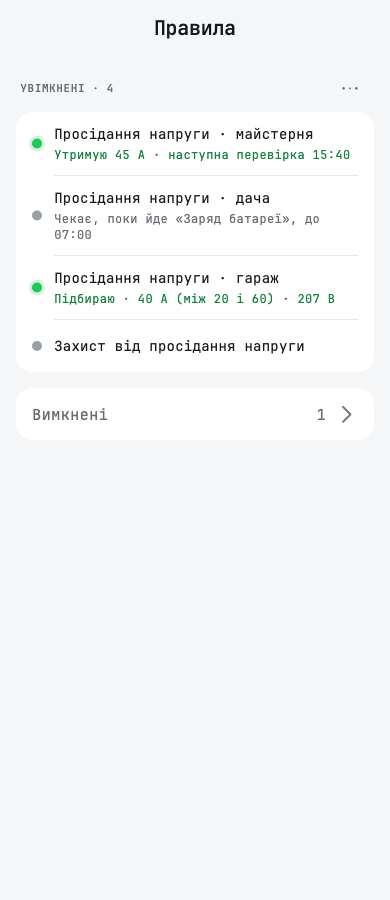
Each switched-on rule now has a coloured dot: green while it acts, grey while it waits, and red when it cannot act. Under the name, one line says what the rule changes.
- A waiting rule says how close it is, for example «Зараз 214 В · спрацює при 200 В» for a grid-voltage rule, or when it last ran, such as «Спрацювало вчора о 18:40».
- Switched-off rules fold into one Вимкнені row at the bottom.
- The list has no switches any more. You switch a rule on or off on its own screen, with Увімкнено.
- A group's name is a label above its rules, and the rules get the full width of the screen. Rules outside any group sit under Окремі правила.
- Вибрати and Змінити порядок sit behind the ⋯ next to the label. Вибрати lets you tick rules and join them into a group, with quick names such as «Ніч» or «Відключення».
- The «+» in the top bar adds a rule. An empty list explains what a rule is.
Building a rule in four steps
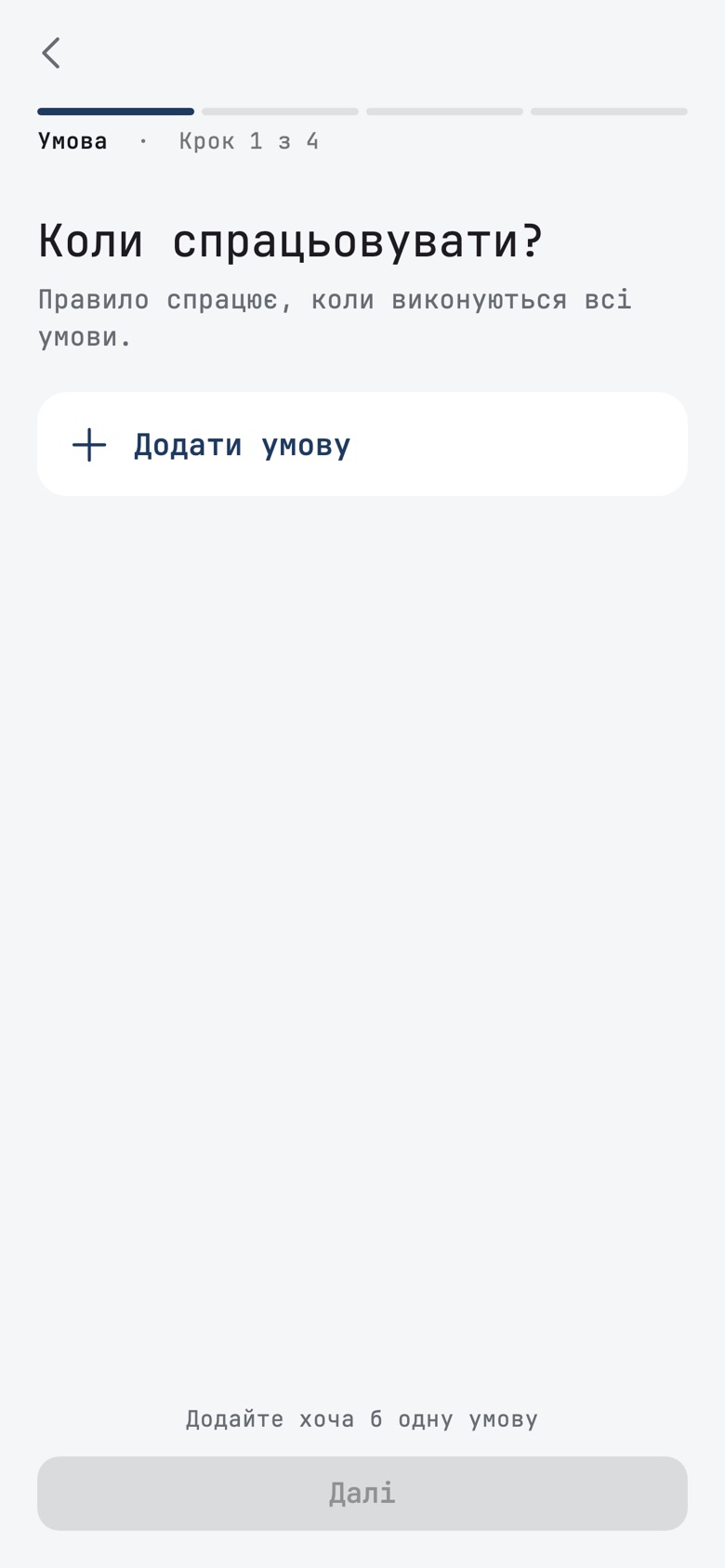
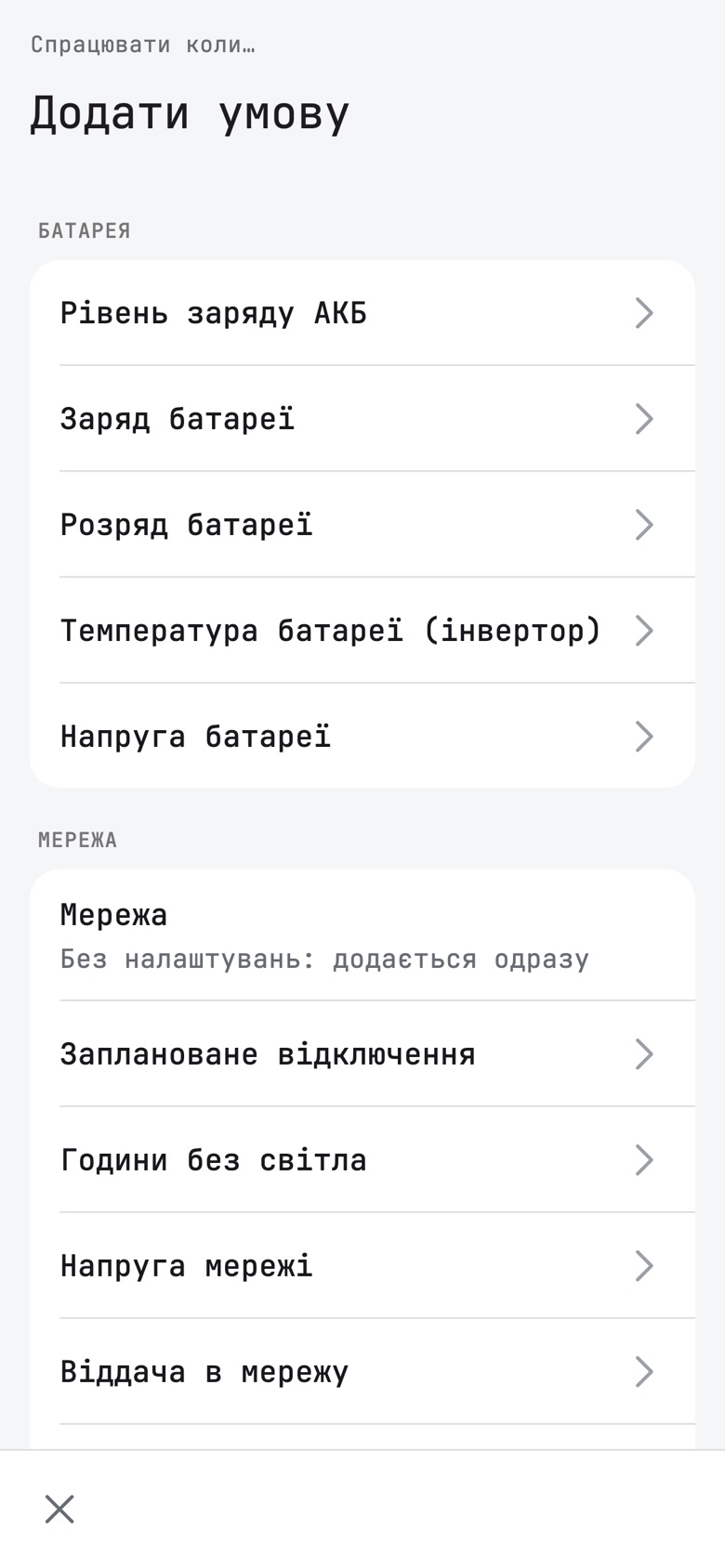
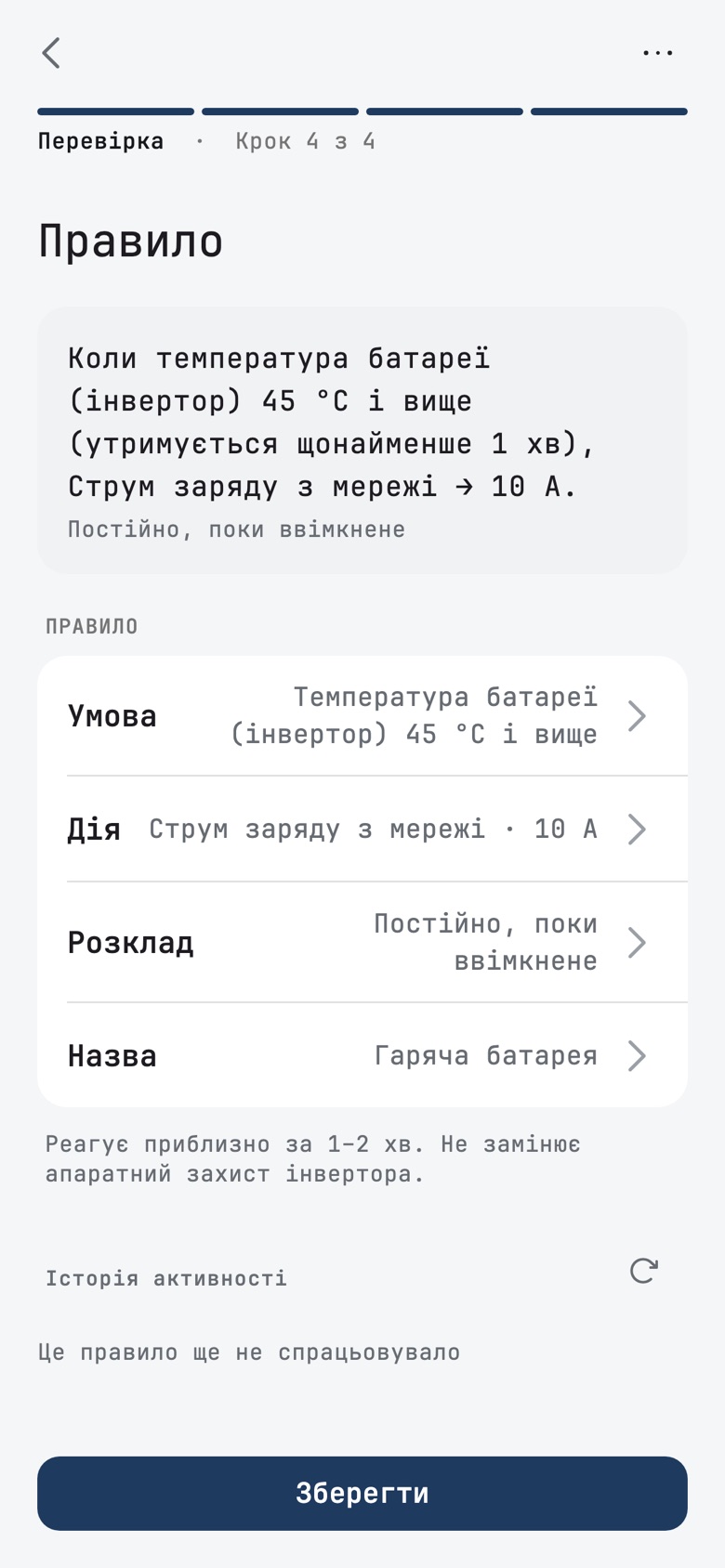
A new rule now walks you through Умова, Дія, Розклад and Перевірка, the same way station setup does. Each condition and setting opens on its own page, with a big number and quick picks for thresholds. Under each one, the app explains what it does on your inverter. The review states the whole rule in one sentence, and each part opens from its row. A rule that only sends a notification is a complete rule.
New conditions and actions
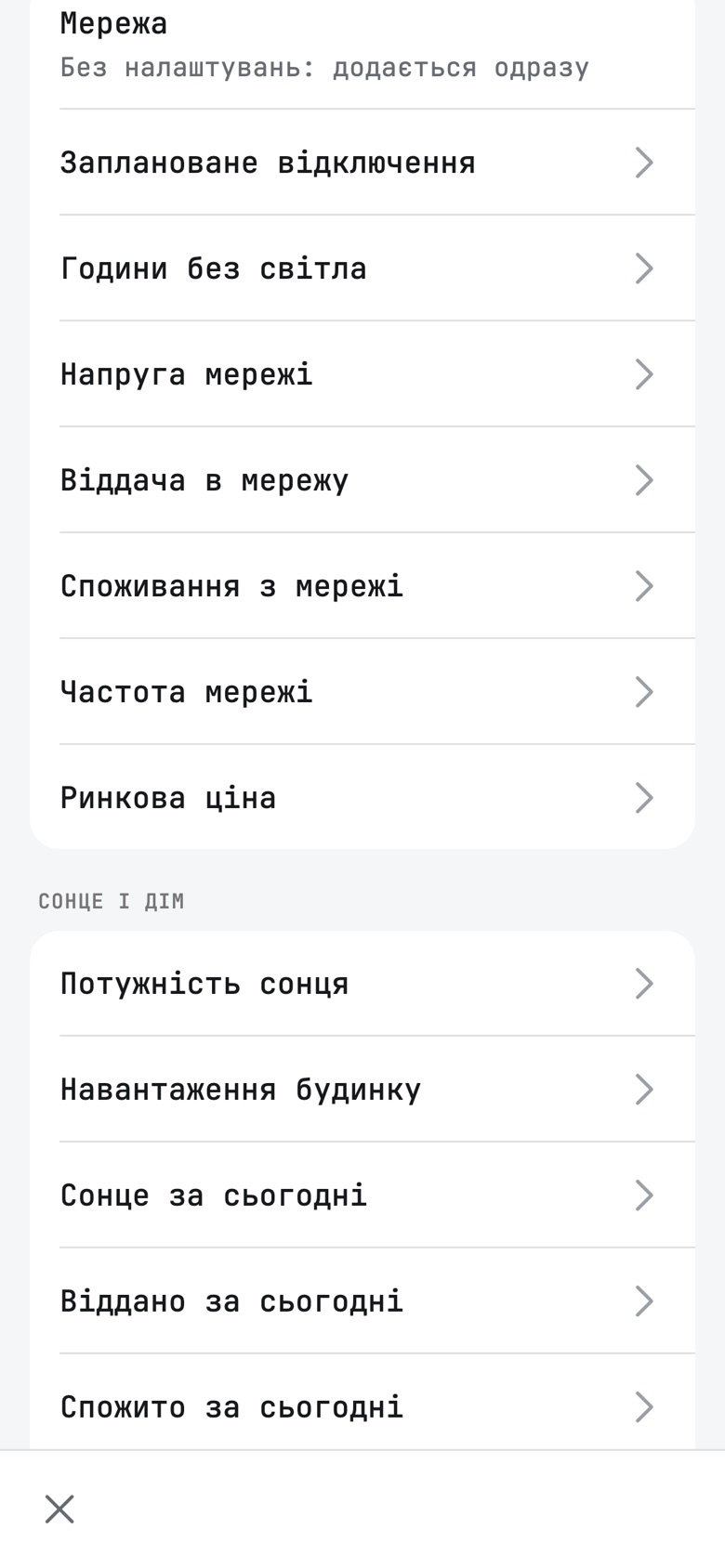
Your inverter already reports many more numbers than rules could use. Now they can use them.
- Віддача в мережу and Споживання з мережі: power going to or coming from the grid.
- Заряд батареї and Розряд батареї: how hard the battery charges or discharges.
- Температура батареї (інвертор) and Напруга батареї.
- Частота мережі and Потужність генератора.
- Сонце за сьогодні, Віддано за сьогодні and Спожито за сьогодні: today's energy totals.
- Обмеження від мережі (peak shaving) is now a rule action on inverters that support it. Until the inverter has reported its own limit, so that it can be put back later, the rule waits and says why.
The app offers a condition only when your inverter reports that number. A condition or action your inverter cannot run is shown greyed, with the reason, instead of being accepted and then never working. For example, the generator port is greyed on an ED-1 board, with a note that a board update brings it.
These conditions are checked in the cloud. On a Home Assistant island, a rule that Home Assistant cannot run now says so, for example «Home Assistant не перевіряє цю умову», instead of looking active. Such a rule also stays in the cloud when you move a station to Home Assistant.
Calendar events in steps
Creating a calendar event follows the same pattern: Що, Коли, Скільки for a charge, and Перевірка. Editing an event opens straight on the review. Споживання від сонця waits for a smart socket or an EV charger, with Додати розетку.
Other rule and calendar changes
- Approving a day plan that holds a battery hold now works, and the hold reaches the calendar.
- Adding a setting to an event or rule waits for what your inverter supports, and offers Повторити if it fails to load, instead of spinning forever.
- A rule with no condition, which only acts during its hours, can be saved again after an edit.
- Coming back to today in the Calendar reloads the hours at once, so today's later hours are no longer blank.
- After you browse another week, a tap back on today lands on the current hour, and the week strip stays on the week of the day you tapped.
- In the dark theme, the time pill on the now-line is readable, and the line no longer strikes through the hour's figures.
Setup
Setting up a station should end in a working station on the first try. This round removes several dead ends that owners hit in setup.
Update first
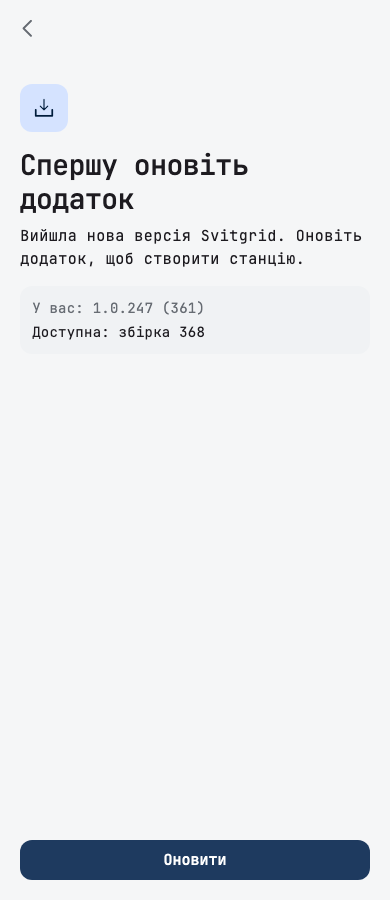
An owner spent half an hour in setup on an old app version, fighting a problem that a newer version had already fixed. Setup now checks the store first: Google Play on Android, the App Store on iPhone. If a newer version is available to your phone, setup opens on Спершу оновіть додаток, with your version, the available one, and an Оновити button. On Android it updates in place; on iPhone it opens the App Store. If the store does not answer, setup goes ahead as before.
Stations with several boards
Adding an inverter to a station with two or more boards used to stop with a message that the app could not do it yet. Now you choose the board: Яка плата читатиме цей інвертор? lists each board with what it reads, whether it is online, and how many of its 6 places are used, plus Нова плата. A full board is shown but cannot be chosen, and the review has a Читає row that takes you back to the choice.
A board reads at most 6 inverters. A seventh used to be accepted and then never read; now the app says the board is full.
Finding your inverter
- The search now asks every logger on your Wi-Fi, even after one has answered, so a second logger that ignores the first call is found too.
- Мого інвертора немає в списку · Ввести вручну appears under the results too, and keeps the inverters you already ticked.
- When nothing is found, Знаєте серійний номер Wi-Fi-модуля? sits next to Шукати ще раз, instead of below the fold on small phones.
- A Solarman logger is no longer mistaken for a Victron GX, listed twice, or read with the wrong protocol.
- A 3-phase Deye without a battery is named 3-фазний мережевий, not a hybrid.
Home Assistant setup
- On the Home Assistant path, setup waits until you approve the connection in Home Assistant, and says Підтвердіть підключення в Home Assistant. If you do not approve in time, it stops with Спробувати ще раз instead of opening an empty station.
- A new Home Assistant station that keeps its data at home no longer drops out of island mode during setup.
- Перші дані waits up to 3 minutes on the Home Assistant path and no longer promises a minute.
- An Anenji found through its SmartESS module can be handed to Home Assistant.
- After setting up a cloud Home Assistant station without a subscription, the free island offer appears without restarting the app, and switching to island opens the station.
Other setup changes
- When you add a grid-tie inverter to a station with a hybrid, the review asks: Він підключений до порту генератора вашого гібридного інвертора? Before, such an inverter could be counted twice.
- The number of solar strings starts at the model's number of inputs (MPPT), so a 4-input inverter no longer shows half its power.
- A second station that keeps its data on the phone takes no place on your plan, so a Basic owner can add one.
- An inverter handed to the station's board opens the dashboard after setup, not the phone's data collection screen.
- For a PI30 inverter on a cable, the review offers the two PI30 models, Edecoa and Daxtromn Power, and nothing else.
Inverters
More owners can use Svitgrid with the inverter they already have.
- Axioma Energy ISGRID 15000: an ED-1.1 board finds it on its serial (RS-232) port during setup, and it has its own settings screen with the values read from the inverter. Changing its settings from the app, and calendar events and rules for it, need board firmware that is not out yet. They arrive with the next board firmware.
- Daxtromn Power AGH-6.2KW-PRO: setup on an ED-1.1 cable and its own settings screen. Rules can use a new Режим інвертора condition on it.
- Deye SUN-40/45/50K-G04: a new 3-phase grid-tie model.
- Deye SG06LP1, SG06LP3 and SG02HP3-EU-AM3: the model search now finds these series by the code on their nameplate.
- Anenji with protocol 2: a phone now reads it, for monitoring only.
- Victron GX on the phone: the phone finds which part of the system answers where, so grid voltage, the solar charger and the battery read correctly. Daily solar yield was shown as a tenth of the real figure; it is now right. Boards get the same fix with the next firmware.
- SmartESS (phone): a calendar charge event on an inverter with a SmartESS module no longer fails because the phone dropped the module's connection.
- With Брати заряд (SOC) з BMS on, a discharging battery is no longer shown as charging. Readings stored before this fix keep the wrong sign.
Outages and the dashboard
In an outage, the numbers on your screen should be the ones you plan by.
- The outage banner «Без світла» and the grid sheet count from the real start of the outage. Before, they could restart the count in the middle of an outage.
- With the grid down in a region under emergency outages, the dashboard shows one compact banner with a line «Аварійні відключення у вашому регіоні», instead of two banners that squeezed the diagram.
- During an outage, the diagram no longer draws a grid line into the house.
- During an outage, the battery countdown runs to the battery's shutdown level, not to the level in the inverter's schedule.
- The «Відключення» screen reads the station when it opens and every minute, instead of a reading hours old.
- Outage schedules with half-hour boundaries, such as 10:00 to 15:30, are shown to the half hour, not rounded to the hour.
- On a station with two inverters, each solar input shows its name on one line and its power below it, and the diagram writes numbers as the rest of the app does («1,2 кВт»).
- The battery animation no longer flickers while discharging on phones with system animations turned off.
- Solar history shows the comparison with yesterday, such as «▲ 20% від вчора», and its daily total matches the inverter's.
- An active consumer's export is valued after the 18 % personal income tax and the 5 % military levy, as the settlement is, and the grid card's info sheet says so.
The home-screen widget
- The widget speaks the language the app shows.
- On a station with an EV charger, Споживання no longer counts the car a second time.
Subscription
- If a store payment fails, the plan screen and the dashboard say Оплата не пройшла, with the date your plan works until when the store gives it, and a button to manage the subscription.
- A cancelled plan names the day it ends: for example, «Plus до 30 листопада — не продовжиться».
- A plan bought on svitgrid.app is managed there: Керувати на svitgrid.app, with no store switch buttons that could charge you twice.
- A gift of Plus, or a thank-you, now shows its welcome instead of being skipped.
- When the cloud refuses data because there is no plan, the dashboard shows an error at once, instead of loading forever.
Getting help
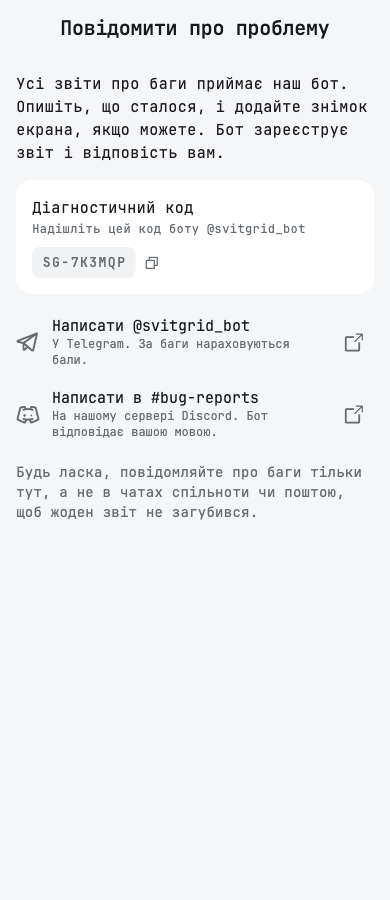
Every bug report should reach the place that can fix it. The menu's feedback row opened an email draft. It now opens Повідомити про проблему, which sends you to our bot: @svitgrid_bot in Telegram, or the #bug-reports forum on our Discord server. The screen shows your station's diagnostic code, so the bot knows which station you mean. Reports in Telegram earn bug points.
- Settings has Спільнота в Discord under Спільнота в Telegram, and guests see both.
- Запитати в спільноті on the dashboard and troubleshooting screens asks which community you want.
- Бали за баги loads your balance afresh each time you open it, and names each issue correctly.
Batteries
- One board reads up to six battery packs, up from five.
- When a hub has no room for every new pack, the extra pack stays unticked and says why.
- A pack removed in Монітори батареї also disappears from the station's battery list.
EV charger
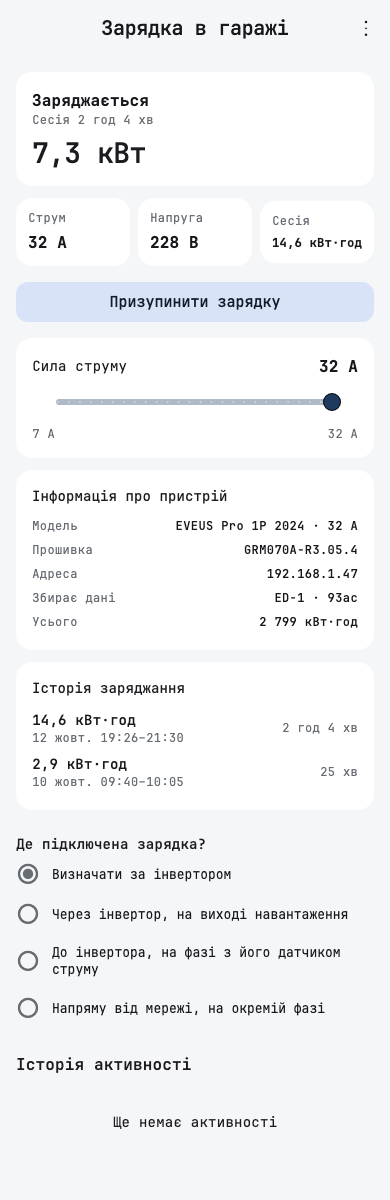
- Історія заряджання shows when each session started and ended, for example «12 жовт. 19:26–21:30».
- When the connection test for a Deye EV charger fails, it names what failed instead of always asking you to check the IP address and serial number.
Smaller fixes
- Налаштування сонячних панелей accepts typed station coordinates, so you can set the location when you are not at the station.
- Renaming an inverter no longer ends on an error screen.
- Історія записів shows a change you just made, without a pull to refresh.
- Reports' energy card works after you detach an inverter.
- A brand settings page scrolls down to Видалити інвертор with Конфігурація інвертора open.
- A long device address wraps inside Інформація про пристрій on narrow phones.
- The whole station name row opens rename, which also helps screen readers.
- Screen readers read each theme tile's name once in Зовнішній вигляд.