
Version 1.0.260
November 22, 2026 · iOS
On this page
This version is available in the App Store. It covers everything since 1.0.258. It also brings the changes of 1.0.259, which reached Android first. The screenshots are from the Ukrainian app.
A few terms
- Wi-Fi stick: the small communication module on the inverter that connects it to your Wi-Fi. It is also called a logger. Its serial number, 10 digits, is on its sticker.
- ED-1 board: our small device next to the inverter that collects its data around the clock. An ED-1.1 reads the inverter by cable.
- Phone station: a station whose data the phone itself collects, while the app is open on the data collection screen.
- Home Assistant: a program for running a smart home, which works on your own device at home.
- Island: a station whose data stays at home, in your own Home Assistant or on your phone, instead of the Svitgrid cloud.
- Confirmation by your phone: a digital signature your phone adds to a rule or a change. A board checks it, so only phones you trust can change the station.
- Parallel system: two or more inverters joined by a cable so that they work as one. One leads (the master), the others follow.
- CT clamp: a current sensor clipped around the grid cable, which measures what the house takes from the grid.
- Meter zones: a two-zone or three-zone meter bills day, night and, on three zones, peak hours at different prices. A flat meter has one price all day.
- Active consumer: a household that sells its own solar power to the grid under a commercial offer. РДН is the day-ahead market price, and УЗЕ is registered energy storage, such as your battery.
- Cell imbalance: the difference in voltage between the strongest and the weakest cell of a battery, which its BMS, the battery's own electronics, measures.
Setup with no dead ends
A setup should end in a working station, even when the search does not find your inverter at once. Before this release, an empty search, a board with no inverter, or a Wi-Fi stick that was not on the network yet stopped many of you with nowhere to go. Each of these now leads somewhere.
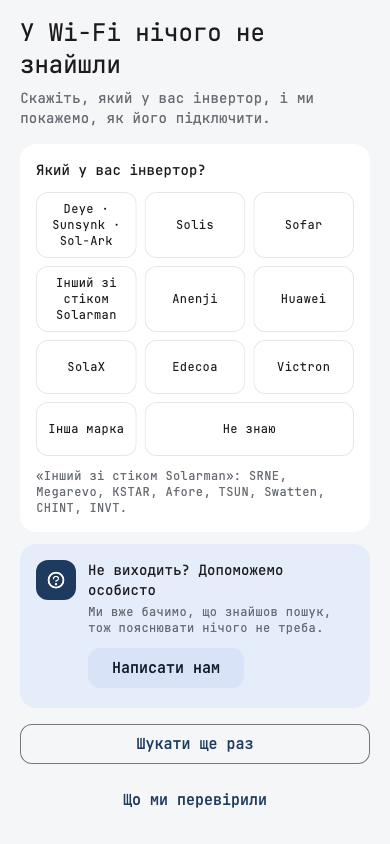
«Який у вас інвертор?»
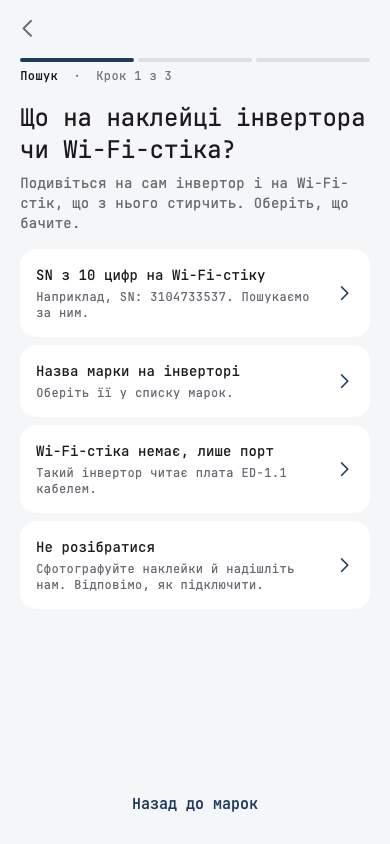
When the search finds no inverter, it now asks which inverter you have, instead of showing a checklist. You pick your brand from a list of tiles, including Інша марка and Не знаю, and each answer leads to the next real step:
- A Solarman stick with a hidden serial: the search by the stick's serial number.
- Anenji: its SmartESS module joins by itself, and the screen tells you what to check.
- SolaX and Huawei: a check of the stick's address, with how to turn Modbus TCP on.
- An inverter with no stick, only a port: how an ED-1.1 reads it by cable.
- Не знаю: a guide to what to look for on the inverter's and the stick's stickers, with a way to send us a photo.
- A brand we do not support yet: a request to add it, which we answer.
If the search did recognise something, the question starts from it: the brand it identified, the protocol the stick speaks and the brands that use it, or a new Deye stick heard over Bluetooth. Що ми перевірили shows everything the search tried. While an Anenji module may still call the phone, the screen counts down first with Чекаємо на модуль Anenji, and У мене не Anenji skips the wait.
The same question appears in two more places:
- A board found with no inverter. The sheet asks which inverter the board should read. Продовжити без інвертора now creates a station with the board alone. Before, it led to a review that asked for an inverter by hand, and creating the station then failed.
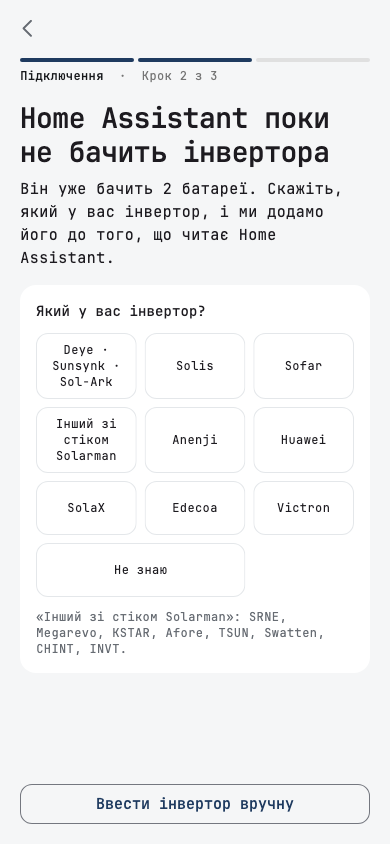
- Home Assistant that sees no inverter. Home Assistant поки не бачить інвертора says what Home Assistant already sees, such as batteries, and asks for the brand. Ввести інвертор вручну is there too.
A Wi-Fi stick that is not on the network yet
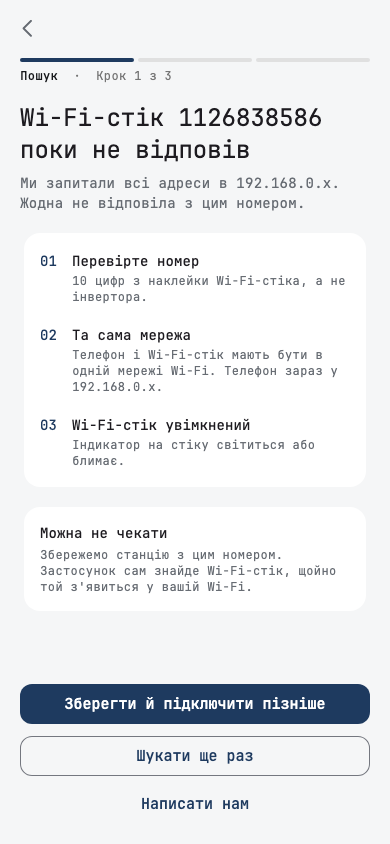
You no longer have to wait at the inverter until the stick answers. On a phone station, when the search by serial number finds nothing, the result shows Можна не чекати and Зберегти й підключити пізніше. The station is saved with the stick's serial number, and the app finds the stick by itself once it appears on your Wi-Fi. An Anenji whose module has not called yet can be saved the same way.
- The next step says that this phone will search, because an ED-1 cannot find a stick by its serial number yet. On the review, the address reads Знайдемо самі, and you can still type it.
- The phone searches your home Wi-Fi while Збір даних is open: at once, after 2, 5 and 10 minutes, then every 30 minutes. It takes only the stick with your serial number, never a neighbour's.
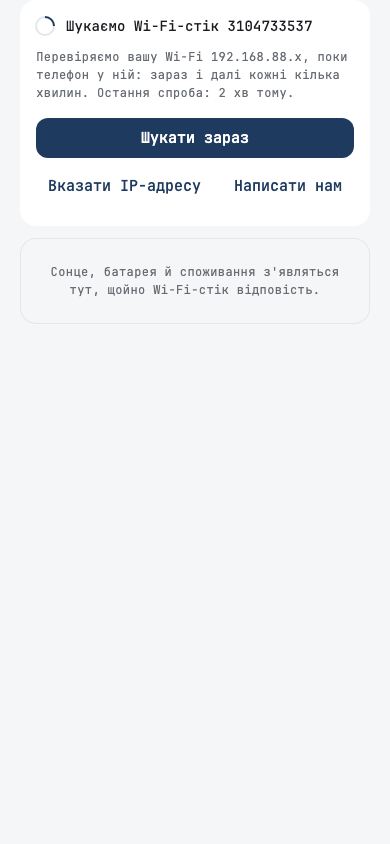
- The dashboard says what the phone is doing: Шукаємо Wi-Fi-стік … with the network it checks and the last try. A tap opens Шукати зараз, Вказати IP-адресу and Написати нам.
- If this phone is not searching, the dashboard says Wi-Fi-стік ще не знайдено and asks you to open data collection, instead of claiming that the first data is on its way.
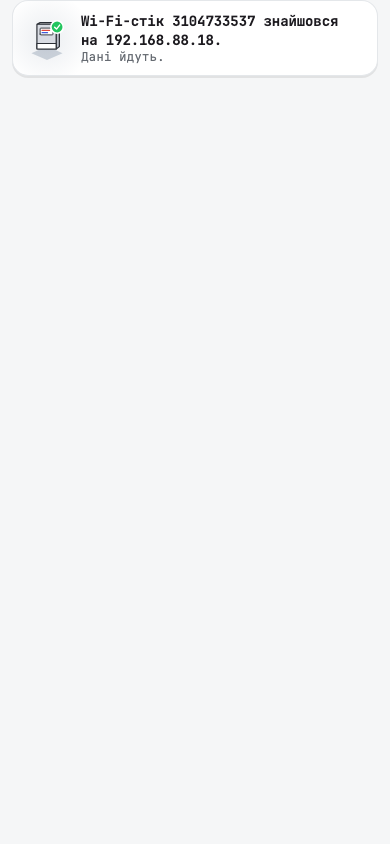
- When the stick turns up, the dashboard says Wi-Fi-стік … знайшовся на …. Дані йдуть.
This is for phone stations only. A board or Home Assistant needs the stick's address, so they do not offer it.
A setup that was interrupted
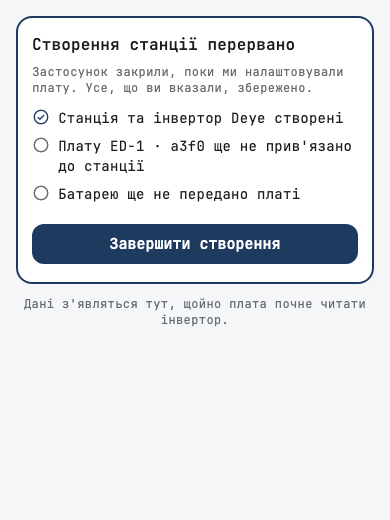
If the app closed after the station was created but before setup finished, for example before the board was linked to the station or given its inverter, the station now shows Створення станції перервано. The card lists what was made and each step still to do, and Завершити створення finishes it without asking anything twice. Only people who can manage the station see the card.
Questions on the review
- «Як дізнатися» now sits under the questions people found hardest: battery chemistry, the generator port, whether inverters work together (Разом чи окремо), and whether they share a battery. Each says what to look at on your equipment, with a link to send us a photo if you are not sure.
- No guessed answers. Whether inverters work in parallel and whether they share a battery are no longer filled in for you, so the review waits until you answer. Разом, у паралелі. Головний цей on the second inverter now makes the first one follow it, as it says.
- Battery capacity takes ampere-hours (А·год) or kilowatt-hours (кВт·год), with a switch between them.
- The Home Assistant pairing code is asked last, right before the station is created. A code lasts five minutes, and the review could take longer. A code the search read earlier is refreshed as the step opens.
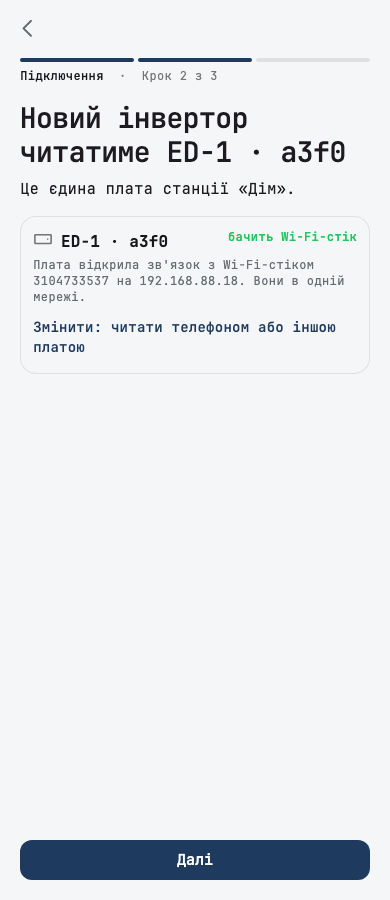
- Adding an inverter to a station with one board now says which board will read it: Новий інвертор читатиме ED-1 · …. The app asks the board, without changing anything, whether it sees the new inverter's Wi-Fi stick. Змінити: читати телефоном або іншою платою picks another reader.
- A plan that allows no more inverters gets its own screen, Ваш тариф дозволяє 1 інвертор, instead of a general sheet. Змінити тариф creates the station once the plan has changed, Залишити один інвертор keeps what fits, and Написати нам opens help. Nothing you entered is lost.
Other setup changes
- The number pad closes. On iPhone, the number pad of the serial search has no return key, and it covered Шукати. A tap outside the field now closes it.
- A not-found result offers Написати нам in every search by serial number, and on the Home Assistant step its button says Назад, because no list of results lies behind it.
- The sticker guide returns where you were. Opened from the board sheet, the serial number on the sticker brings you back to that sheet, with the board named.
- A guest who picks a brand we do not support yet is led to the sticker guide, because a request needs an account.
- Вказати IP-адресу on the dashboard names your inverter's brand, and asks for the address when the phone is not on Wi-Fi.
After setup
If the first data does not come, the station should say what to check for the way it connects.
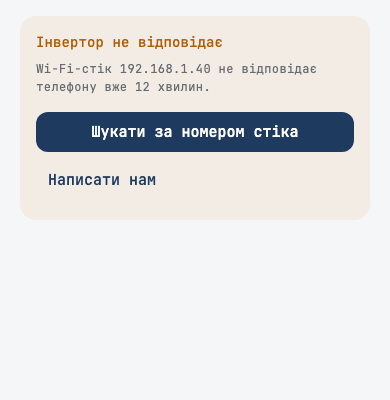
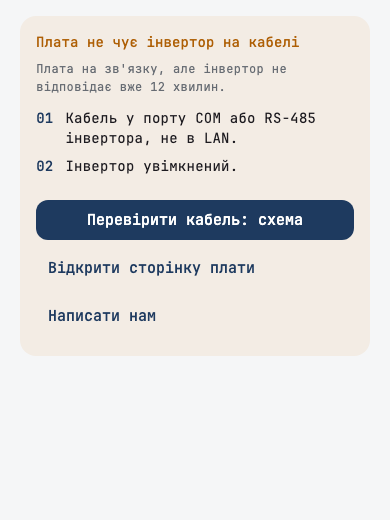
- If no data comes within five minutes, the banner gives advice for how your station connects. An inverter on a cable gets a checklist and Перевірити кабель: схема. A Wi-Fi stick that does not answer gets Шукати за номером стіка. Home Assistant gets its page. Each has Написати нам. The app says Плата не на зв'язку only when the board's own reports prove it.
- A short break in the connection no longer tells an established station that its inverter has been silent since it was created.
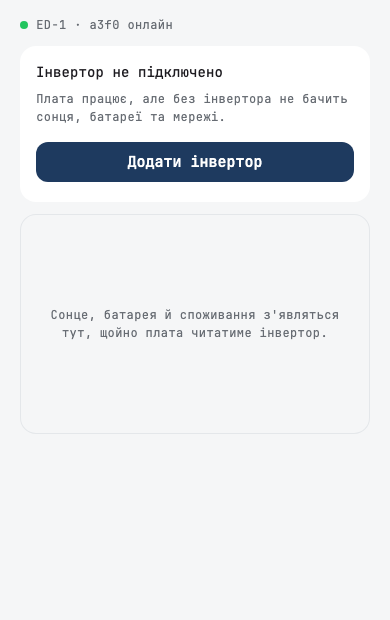
- A board with no inverter shows the board, Інвертор не підключено and Додати інвертор. A cable board offers its page instead, because adding an inverter on its cable means resetting the board.
- «Почати заново» left the dashboard. Deleting a station stays in its settings.
Outages
Before an outage, you need two answers: will the battery last, and what can you do now. The app now gives both, and its times are counted the way a clock counts them.
A warning that explains itself
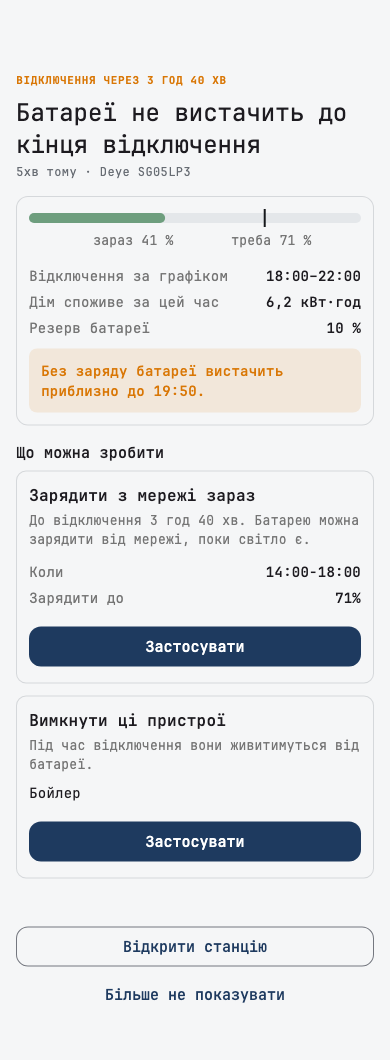
A tap on the warning that the battery will not last until the end of an outage, from the notification or from its row in Сповіщення, used to open the bare dashboard. It now opens a screen that explains it:
- how long is left until the outage, on your station's clock;
- a battery bar with the charge now and the charge needed;
- the scheduled outage window, what the house will use in it, and the battery reserve;
- roughly when the battery runs out without a charge.
Under Що можна зробити, Зарядити з мережі зараз charges the battery from the grid until the outage starts, up to the level needed, and a second card switches off devices that would run from the battery. Застосувати does it. The charge card shows only to people who manage the station, on a phone that can confirm the change.
This works for cloud stations, and for Home Assistant with the cloud copy. An island without the cloud gets no such warning yet. Warnings sent before this release show no reserve and no run-out time.
Times you can trust
- The battery time on «Без світла» is counted from what the house uses, not from what the battery gives at this moment. On a sunny day the sun covered most of the house, so the screen could read «~696 год», and the home banner named a date weeks away. The rate line now says «при навантаженні 131 Вт · до 10 %» when the house load is the measure. A time beyond 48 hours is no longer shown, because the load two days on is not the load now. The same applies to the costs under Якщо увімкнути and to the time left in the outage notification.
- The countdown on the grid label counts real minutes. At 16:57, with an outage at 18:00, it said two hours. It now says «Відключення через 1 год», and under an hour it names the minutes, such as «Відключення через 51 хв». It follows your station's clock, and an outage that starts at half past is no longer read as starting on the hour.
- The schedule gives way to the grid you have. If the schedule says the power is off but a fresh reading measures the grid, the Відключення screen says «За графіком, але світло є», and the home emergency card says «У вас є світло · графіка немає» instead of a full alarm.
Tariffs and prices
The money in the app should follow the same rules as your bill.
- Your tariff remembers when it changed. Change the meter type, electric heating, storage or УЗЕ on a saved tariff, and Тариф на електроенергію asks «З якої дати новий лічильник?» or «З якої дати діє зміна?». Today is the default, and you can pick any day of this month. The days before it stay on the old tariff, and earlier months are no longer billed again on the new one. The meter row names a change made this month, for example «Тризонний, з 18 листопада» over «До 18 листопада: двозонний». For now, the daily grid rates and the cost of charging the battery still use today's tariff.
- The sell price follows each hour's zone. For an active consumer with storage, energy sold to the grid is now counted at the РДН price, but never above the price you pay in the same hour: the semi-peak, peak or night price. Before, one number capped every hour, so a night hour could be counted above the night price. Стеля ціни продажу shows the cap for each zone, read-only, with «Ціна купівлі в ту саму годину». Past months are counted again with the new cap.
- Suggestions quote your heating discount. With electric heating, in the heating season, the price on Зарядити вночі за нічним тарифом and Зарядити з мережі зараз is the heating rate you pay. A card cannot see how much of the month's 2,000 kWh heating allowance is used, so after that point it still quotes the discounted rate.
- The reason on a charge card is true for your meter. On a flat meter, Зарядити з мережі зараз no longer says that the night tariff is on. It says that your price is the same all day, or simply «Батарею можна поповнити з мережі вже зараз.», and it names the night tariff only when a night zone is really on.
Rules
A rule should react to what is happening around you, and run the way you last set it.
Two new conditions
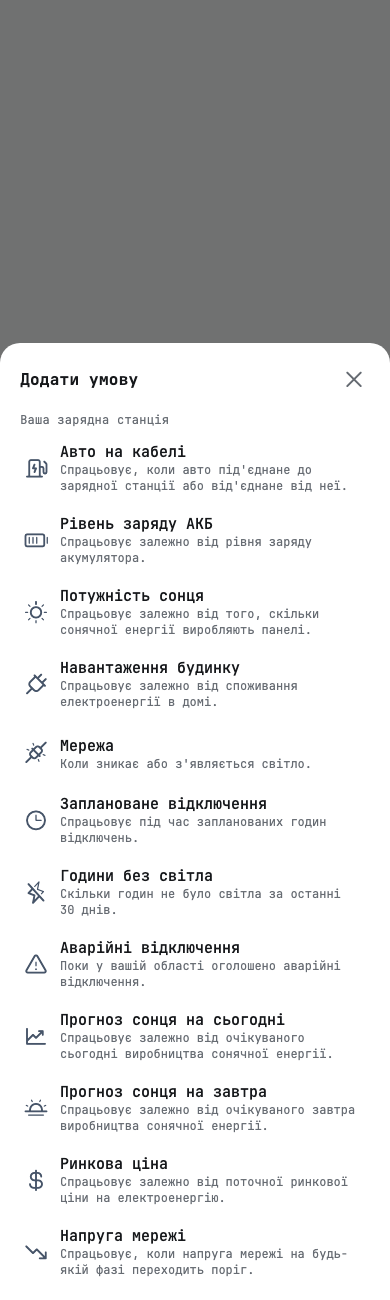
- Аварійні відключення holds while emergency outages are announced in your oblast. The announcement covers the whole oblast, not your house, so the help suggests adding the Мережа condition to check your own grid too. If the announcement is unknown, for example with no outage region set, the rule does not start.
- Розбаланс комірок reacts to the difference between battery cells, 20 mV by default. Someone asked for exactly this: «at a 20 mV imbalance, charge to 100 % once at night». The difference means little at half charge, so the condition reads the one measured the last time the battery was charged to 95 % or more, within the last 7 days. It is offered in the battery group only when your battery reports its cells.
Both run in the cloud. On a Home Assistant island they are listed under Потрібна хмарна копія.
Rules confirmed by your phone
- A time change is confirmed when you save it. App versions 1.0.254 to 1.0.256 saved a change of a rule's hours without your phone's confirmation, so the board kept the old window. Now saving confirms the new hours. A rule changed that way says «Правило змінили після підпису, і новий підпис підтвердить зміни», and Підписати знову fixes it.
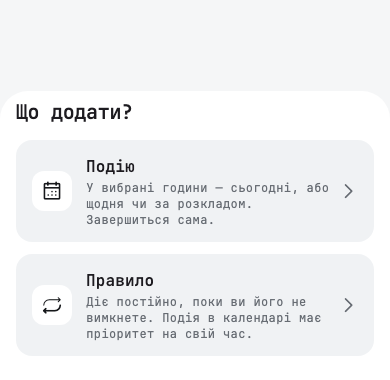
- Rule templates are gone. Що додати? no longer offers a template. Rules you made from one, such as «Нічний тариф», stay and run as ordinary rules. Their confirmation never covered all their actions, so they may ask for Підписати знову once, with «Підпис правила не охоплює всіх його дій, і новий підпис підтвердить їх». Критичні пристрої still groups its own rules.
Day planner
The day planner no longer asks for a 30-day permission. You approve each plan anyway, so the permission added a step and a renewal and gave nothing back.
- Зберегти in the planner's setup saves at once, with no consent screen, and says «Планувальник збережено. Перший план прийде завтра ввечері на ваше затвердження.»
- When you approve a plan, this phone confirms each event on its own, like a rule you make by hand. The review says so above the approve button: «Цей телефон підпише кожну подію окремо, як правило, створене вручну.»
- The renewal is gone. The reminder before the permission ran out, and Поновити дозвіл планувальника from 1.0.258, are removed, because there is nothing to renew. A rule whose only confirmation was the old planner permission asks for Підписати знову.
- No charge the battery does not need. A plan proposed a morning charge to 16 % while the inverter's own night schedule had already charged the battery far above that. The planner now skips a charge to a level the battery already holds when the window opens.
- The plan card fits a phone. A long title no longer wraps one letter per line next to the saving and the charge level, and Очікує підтвердження moves under the date instead of running off the card.
Dashboard
- Each running event has its own banner. When two events ran at once, home showed one with a «+1», and the second could not be opened. Now you swipe between them.
- Solar strings are easier to tell apart. On Сонячна історія, string 2 is teal and dashed and string 3 is pink, so two strings running low on a cloudy day no longer merge into one amber line.
- Battery cells refresh on a pull. Комірки батареї, opened from the dashboard, now asks the board for fresh battery data when you pull it down, as the pack's own page does.
- The house while a car charges. Behind a Deye, the house could read 0 W, or count the car twice, for minutes after a charge started, because the inverter's total load lagged behind. The house is now the backup load minus the car.
- Consumption with a little morning sun. A Deye that passes the grid to the house no longer shows a tiny Споживання next to a large grid import when the panels make a trickle of power.
- The CT clamp stays on the diagram once your station has proven it has one, instead of coming and going while a car charges from the grid.
Inverters
- Edecoa 24 V models (EM-302A and EM-402A) no longer offer «Сонце → мережа → батарея» (SUB) in Живлення будинку. Their inverter accepted it and then went back to «Сонце → батарея → мережа» (SBU), so the app kept reporting a mismatch. The EM-624A keeps it.
- Saving a schedule slot now names a changed grid charge, for example «Заряд від мережі: увімкнено → вимкнено». An owner who changed only the battery level found grid charging off afterwards, because a tap had hit the switch above it.
- An inverter that leads no other is no longer marked «Головний» in Інвертори. The role shows only inside a real parallel system, as on the dashboard. And Працює окремо in Паралельна система now clears a leftover leader role instead of doing nothing.
- Gen Port Use on a Deye says that the app reads only the port mode in this menu, and that the other settings are on the inverter's screen. An owner asked whether the page was broken.
Islands and phone stations
- A phone station keeps the cloud out more. With the cloud copy off, it now contacts our servers far less while Збір даних is open, and no longer sends details of your home network.
- A saved Anenji remembers its module. An Anenji saved to connect later could show readings but refuse settings and priorities. The phone now remembers its module from the first reading.
On iPhone
- You choose whether the lock screen shows the running event. The card such as «Заряджаємо · 20%» on the lock screen and in the Dynamic Island has its own switch: Картка події на заблокованому екрані in Сповіщення. It is on by default, and turning it off removes every card at once. Before, you could only swipe each card away or turn off Live Activities for the whole phone. The switch is not shown on an account with island stations only, which get no such card.
- No more crash when sharing. Надіслати on Приєднатися до станції, and sharing from Технічні дані in the search, could close the app on an iPad and on newer iOS versions.
- A failed sign-up shows its message. When creating an account failed after you had left the screen, the app could crash instead of saying what went wrong.
In the next board firmware
These are finished and reach boards with the next S3 release, after this app version.
- Boards refuse anything confirmed only by the day planner's old 30-day permission. A phone station already does in this app version.
Smaller fixes
- Tapping the same notification several times no longer stacks copies of the same screen, so one Back returns you where you were.
- A wrong confirmation code now says so at once, instead of the app quietly retrying it hundreds of times.
- Бали за баги in the menu comes back the next time you open the menu, after it failed to load once at launch.
- Як знайти кнопку на платі, on a board that still trusts its previous owner, opens the board's own page, which says to hold the button for 5 seconds.