Version 1.0.258
November 21, 2026 · iOS
On this page
This version is available in the App Store. It covers everything since 1.0.256. The screenshots are from the Ukrainian app.
A few terms
- Island: a station whose data stays at home, in your own Home Assistant or on your phone, instead of the Svitgrid cloud.
- Home Assistant: a program for running a smart home, which works on your own device at home.
- Integration: our program inside Home Assistant that talks to Svitgrid. You install it through HACS, the Home Assistant add-on store.
- ED-1 board: our small device next to the inverter that collects its data around the clock. An ED-1.1 reads the inverter by cable.
- Wi-Fi stick: the small communication module on the inverter that connects it to your Wi-Fi. It is also called a logger.
- Phone station: a station whose data the phone itself collects, while it is at home.
- Cloud copy: a copy of an island's data that it also sends to the Svitgrid cloud.
- Confirmation by your phone: a digital signature your phone adds to a change. A board checks it, so only phones you trust can change the station.
- Zigbee: a wireless connection for smart devices, such as sockets.
- TOU: the inverter's schedule by hour of the day (Time of Use), which says when to charge the battery and when to use it.
- SOC: the battery's charge, in percent.
- Master and Slave: the two roles in a pair of inverters that work together. The master leads, the slave follows.
- Firmware: the program that runs inside the board.
Deye settings you can change
You no longer need to walk to the inverter's screen to change your battery levels. Seven Deye settings that the app could only show can now be changed from the app:
- Batt Set3: Shutdown, Low Batt and Restart, when the battery works in percent.
- Batt Set2: the Start level for charging from the grid, and a new Використовувати рівень Start switch.
- Work Mode1: Max Sell Power, the most the inverter sends to the grid.
- Gen Port Use: what is connected to the inverter's GEN port.
Every change asks first, for example «Змінити Low Batt з 20 % на 25 %?», and the field shows the allowed range, such as «Від 0 до 100 %». A value the inverter would refuse, such as a Shutdown level at or above Low Batt, is explained in plain words and never sent. While the inverter applies it, the row reads Застосовується на інверторі…, and then it shows what the inverter itself reports, not what was sent. If the inverter kept its old value, the app says so.
Shutdown, Low Batt and Restart decide when your battery stops and starts again, so compare a new value with your battery's specifications.
Where you can change them:
- A phone that collects a Deye's data: at once.
- A Home Assistant island with the Svitgrid integration 0.34.3 or newer, while this phone is on your home network.
- An ED-1 board: with the next board firmware. Until then the row says which firmware it needs.
A row that cannot be changed says why in one note: you have no right to manage the station, the inverter is a slave and its master holds the setting, you are away from home, the board needs newer firmware, or another phone collects the data. While the Start switch is off, Start reads «50 % · не діє». Editable rows show a pencil.
A schedule slot that never runs
A Deye runs slots 1 to 5 only from their own start to the next slot's start, and only slot 6 can cross midnight. So a slot 1 from 23:00 to 07:00 never runs at all, and a night charge in it never happens. Some of you had exactly this in your schedule, with nothing on screen to say so.
The schedule and the slot editor now warn about such a slot. Where the app writes the whole schedule at once, Зробити його слотом 6 shifts the slots so that window becomes slot 6, with every window keeping its times and settings.
Other Deye changes
- Models are easier to find. The model list names the nameplate you searched for, such as «Deye SUN-8K-SG06LP3-EU-CM2», and the Deye entries name every series they serve, such as «Deye SG04LP1 / SG06LP1». Before, an SG06LP1 owner saw only «SG04LP1» and picked a model that looked closer.
- Recognised during an outage. The search names a single-phase or three-phase Deye even while the grid is down. Before, it asked you for the brand.
- On an ED-1.1 cable, a Deye is named «Deye · 1» instead of «Інвертор · 1», and the model list offers Deye, Sunsynk and Sol-Ark first.
- After a quick charge ends, the schedule shows the restored slots instead of the charge's 100 %.
- On an island, the Deye settings pages say that Home Assistant has not received the settings yet, instead of showing only «—». They usually arrive within half an hour.
Your phone confirms what changes your station
Only your phone should be able to change what your station is. A board that obeyed the cloud blindly could be told to stop sending data, read another inverter or drop your battery. This release closes that.
- Every change to what your station is now carries your phone's confirmation: pausing and resuming a board, adding, changing or removing an inverter, removing a Zigbee device, what a socket does when the power comes back, and adding or dropping a battery pack. Today's boards check it and report the result. With a later board firmware, a board will refuse such a change without it. Restarting a board is not one of these changes.
- EV charging too. When a board passes your tap on to an Eveus charger, your phone now confirms the exact request the charger receives, not only the button you pressed.
- Rules are confirmed only when you tap. Before, the app quietly renewed out-of-date rules in the background, using whatever the cloud said the rule was. It now renews a rule only when you approve it on screen.
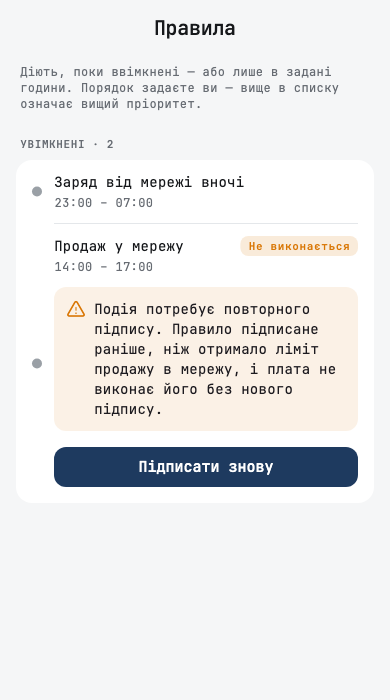
- A rule a board will not run says so. On Правила it reads Не виконається, with a sentence on why and Підписати знову. If a board refused a rule, a notification says «“<rule>” не виконалося» and opens it. If you have several such rules, each one shows its own card.
- Before it runs out. Two weeks before a rule's confirmation expires, the rule says «Підпис правила діє до 5 грудня…» with Підписати знову, and a notification reminds you. Three days before the day planner's permission ends, its event says so, and Поновити дозвіл планувальника opens its settings, where saving renews it for 30 days. Nothing is renewed without your tap.
When the cloud needs your confirmation
- Removing a phone from a board. When a phone or a member leaves your station from an older app, when someone deletes their account, or when a browser key expires, the board keeps trusting that phone until you confirm. The home screen shows Підтвердіть: прибрати телефон із плати. Підтвердити finishes it, and Не зараз keeps the request in Ваші пристрої under Чекають на ваше підтвердження. Deleting an account now removes that person's phones from every station they shared.
- Other changes the cloud starts on its own, such as dropping an inverter that left the station or unpairing a Zigbee device you never added, will wait under Підтвердіть зміну на платі with the next board firmware. Nothing is lost while they wait.
When a board does not obey
- A board that still trusts its previous owner says so on its page and at the end of setup: Плата досі довіряє попередньому власнику. Readings arrive, but your commands do not run. The card gives the two steps: hold the board's button for 5 seconds until it plays a short tune, then set it up again. Як знайти кнопку на платі shows where the button is.
- A board holds five phones. Approving a sixth now says На платі немає місця для ще одного телефона instead of claiming the key is on its way. Переглянути ключі плати lists the board's keys by name, and Звільнити місце removes one that is no longer needed.
- Every refusal reads as a sentence, never as a code such as «last_key», in the command history, the rule history, the inverter settings, the Eveus charger and the board's page.
- An invite code joins only the invited address. If someone else's account uses a forwarded code, the app says the invitation went to another address, and the invitation stays open for the person it was meant for.
When the search finds no inverter
An empty search used to be a dead end, and most people simply gave up. Now it tells you what it did find, and gives you a person to talk to.
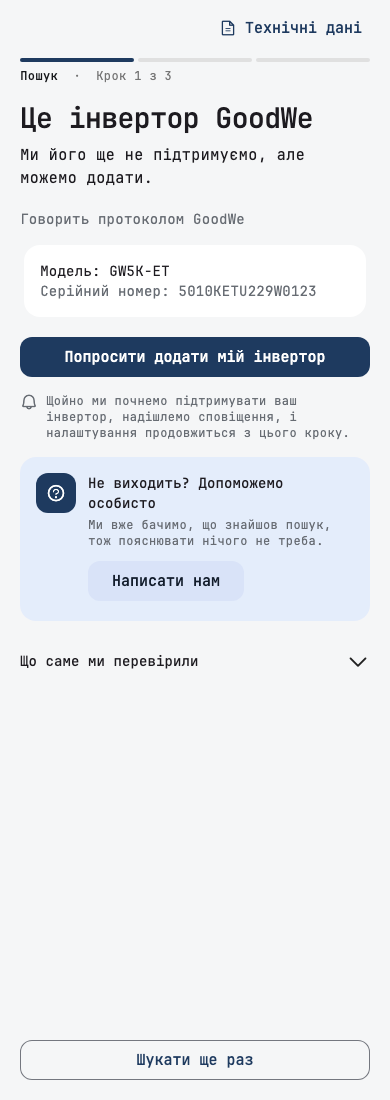
- It names what answered. If an inverter we do not support yet answered, the search says «Це інвертор GoodWe», or which protocol the device speaks and which brands use it, with Який з них ваш?. Попросити додати мій інвертор sends us the request, and the app tells you when we add it.
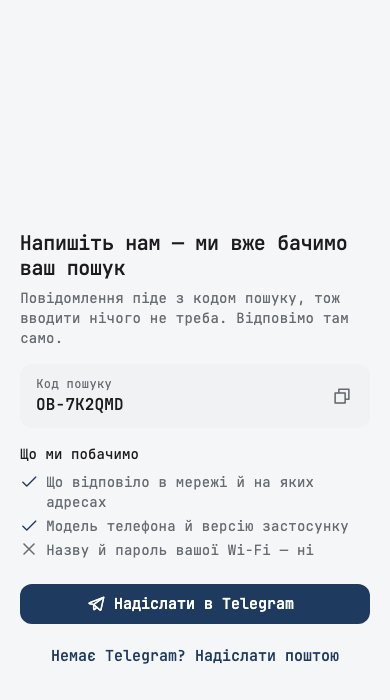
- Help, with nothing to explain. Написати нам opens a chat with @svitgrid_bot carrying a search code, so we see what your search found. It never sends your Wi-Fi name or password. If you have no Telegram, it sends an email instead.
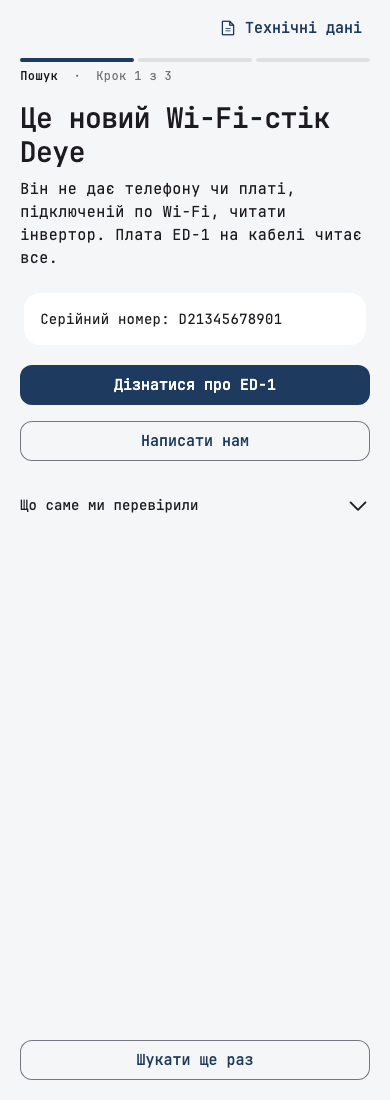
- The new Deye Wi-Fi stick is recognised by Bluetooth: Це новий Wi-Fi-стік Deye. It does not let a phone or a Wi-Fi board read the inverter, so the screen suggests an ED-1 on the cable.
- On mobile data, the screen says Під'єднайтеся до домашньої Wi-Fi, warns not to join the Wi-Fi stick's own network, and starts the search by itself once the phone joins your home Wi-Fi.
- A permission or Bluetooth off: Пошуку потрібен ще один дозвіл lists what is missing, and the search starts by itself once it is all on. Шукати без Bluetooth goes on without it. On iPhone, the Bluetooth row explains how to turn Bluetooth on in Control Centre, because the app's own settings page has no Bluetooth switch.
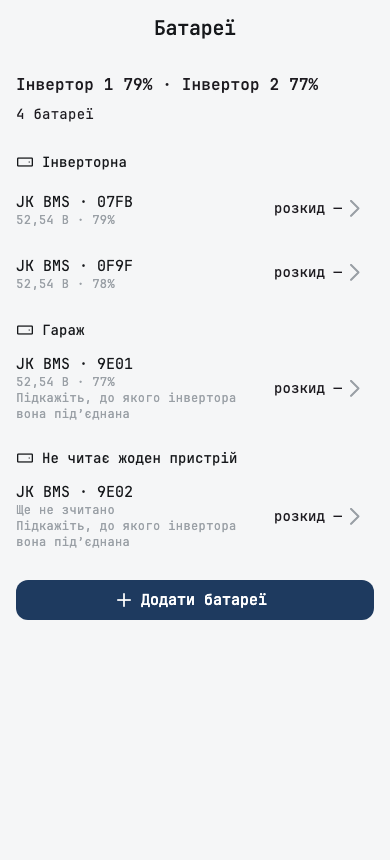
- A battery found on its own waits for its inverter instead of making a station. The Інвертор не знайдено card says the battery will join its inverter as soon as we find it.
- An ED-1.1 whose cable stays silent shows a checklist for the cable, and while a cable board checks the cable the search says it can take up to three minutes.
- Some Solarman sticks answer only a request that carries their own serial number. The search now finds them too.
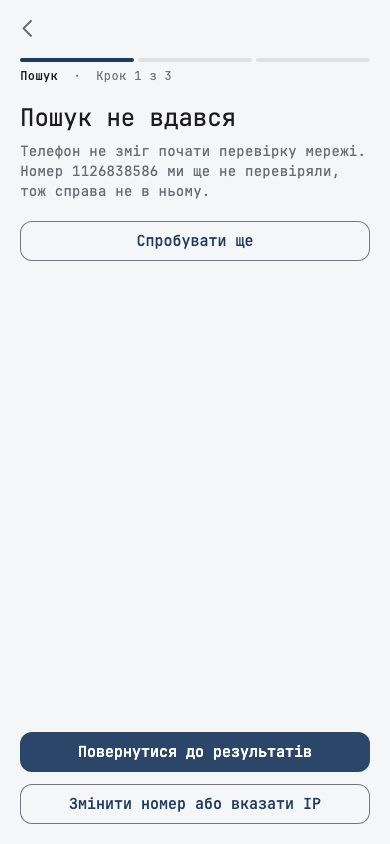
- A search by serial number with an address tries again for about 10 seconds before it gives up, and then says «Не вдалося з'єднатися з …», not that the number was wrong. A search that could not run at all says Пошук не вдався, and blames neither the number nor the network.
Other setup changes
- «Мого інвертора тут немає» now means what it says. On a cable board it unticks the inverter it rejects and asks how your inverter is connected; a wired inverter is not asked for a Wi-Fi stick's address and serial it does not have. With an inverter already ticked on Wi-Fi, the link reads Додати ще один інвертор вручну.
- The model list finds a model typed as the nameplate prints it, such as «SUN-12K-SG05LP3-EU-SM2».
- Edecoa EM-402A, a 4 kW 24 V model, is supported.
- Going back and changing what you ticked no longer leaves a station that cannot be created: setup sends only the inverters the review shows.
- One name for each thing. The app called the inverter's Wi-Fi module a logger, a stick, a collector and more, and our board a hub, Edge and more. It is now Wi-Fi-стік and плата ED-1 everywhere in Ukrainian and English.
- Plainer words. A phone station says it collects only while the app is open on the data collection screen. Guessed values on the review read Ми припустили · перевірте, and the logger serial says where it is printed. An empty Wi-Fi password reads «Не вказано». The update screen no longer shows a build number.
- Leaving setup early lists what is still missing, such as «перші показники». У мене вже є плата: шукати ще раз goes back and searches again, once. The step counter no longer makes the review look like a fourth step.
After setup
A new station should say honestly that it is waiting, not show zeros as if your battery were empty.
- The dashboard waits for the first data. Until a new station sends its first reading, the grid and the house show «—» and the battery «…», instead of 0 W and 0 %. A banner says Перші дані в дорозі, with «Плата … надішле їх за кілька хвилин» on a board, or «Відкрийте збір даних на цьому телефоні» on a phone station. After five quiet minutes the usual Інвертор ще не підключився takes over.
- Setup names what is missing when its wait runs out: the board is not on the server yet, not on Wi-Fi yet, or no data has arrived yet. Before, it said Станцію налаштовано over a failure.
- A new tour asks for one thing per page: your first live numbers, notifications if you have not allowed them, where to report a problem, inviting your family, and, for a phone station, what an ED-1 adds. Before the first reading, its first page says Чекаємо перші дані and names who sends them: the board, this phone, or Home Assistant. On an island it speaks of the island as it is.
- Повідомити про проблему opens the bot with your station's code already filled in.
Home Assistant setup
Most people who reached the pairing code left without entering it, because nothing said where to get it. The steps now say.
- Відкрийте Home Assistant is a new step after you choose Home Assistant. It lists what you need and the three steps to get the code. Svitgrid ще не встановлено opens the guide.
- The code step hints «6 символів», and Де знайти код? shows the steps and what the code window looks like.
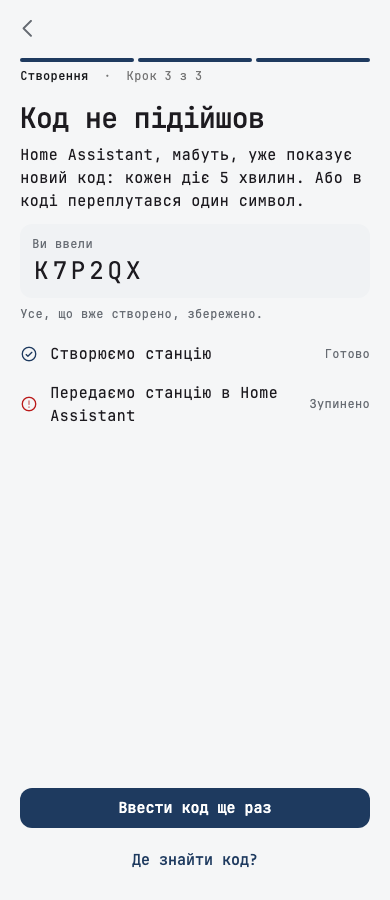
- Код не підійшов says what you typed, with Ввести код ще раз, instead of a general error.
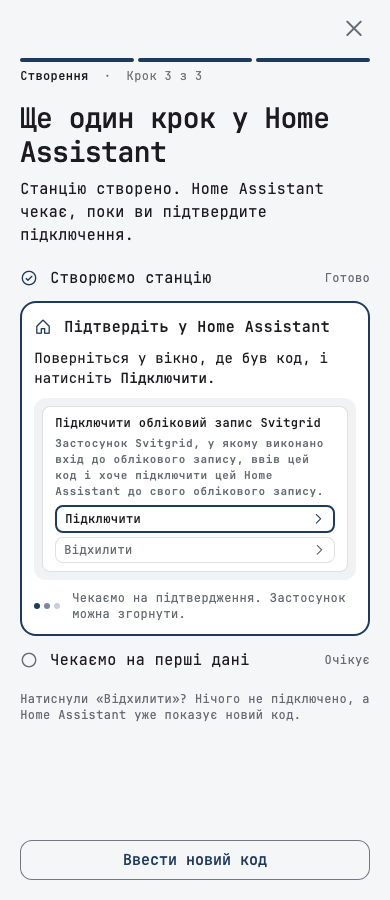
- Ще один крок у Home Assistant: after the station is created, the app says to go back to Home Assistant and approve. If the approval does not arrive, Перевірити ще раз and Ввести новий код finish the setup, even with a new code.
- If the search did not find Home Assistant, an island setup asks for its address and checks it before going on. Before, it created a station the phone could not read.
- The address can be typed without a port, which means 8123, and an address on port 80 keeps its port.
- The app now calls our piece in Home Assistant an integration, as Home Assistant does.
Islands and phone stations
A second phone, a move back to the cloud, and a change of setting now behave the way you expect.
Home Assistant islands
- Your rules follow the cloud copy. Turning the cloud copy on moves your rules to the cloud, which then runs them, and turning it off moves them back to Home Assistant. Turning it on needs Home Assistant on your home network; if it does not answer, nothing changes and the app says so. A rule left over from an earlier setup stays in Home Assistant and is named.
- A rule that was running when it moved to the cloud restores your own setting when it ends, not the one it applied. Before, selling to the grid could stay on after such a rule.
- A rule made on an island comes back when any phone returns the station to the cloud.
- Підключити цей телефон joins over your home network at the address you type, with the cloud copy on or off. A phone that joins reads the station from Home Assistant, instead of old figures from the cloud.
- With the cloud copy on, the notification list shows the cloud's alerts, instead of «Усе спокійно».
- A setting you change stays on screen once Home Assistant confirms it, instead of springing back for minutes.
- When another phone returns the station to the cloud, this phone notices on pull to refresh, on Головна or when you come back to the app.
- A station set up straight on Home Assistant hands its solar strings and battery maintenance to Home Assistant, so a dead string raises an alert and the maintenance charge runs.
- Критичні пристрої on an island without a board gives one reason, Потрібна плата Svitgrid, and opens the ED-1 order, which explains what a board adds there: Zigbee sockets that Home Assistant switches off in an outage.
- Видалити інтеграцію on the Home Assistant screen reads in Ukrainian.
Edge islands
- A board knows only the phones it trusts. A phone that joined Home Assistant after the move is told that the board does not know its key yet, and how to allow it from a phone the board trusts, instead of «executor_error». A rule saved on such a phone reads as blocked, instead of «Стежу за умовами».
- The board's page restarts, pauses and resumes the board through Home Assistant even on a phone that last saw the station in the cloud, and shows the uptime Home Assistant reports.
- The Home Assistant screen offers Підключити цей телефон on a second phone, and says that the cloud copy is available only in the cloud, instead of a switch that stays off.
- Back to the cloud from a Home Assistant paired only locally, the boards' readings from the island time can follow, with an integration that supports it.
Phone stations
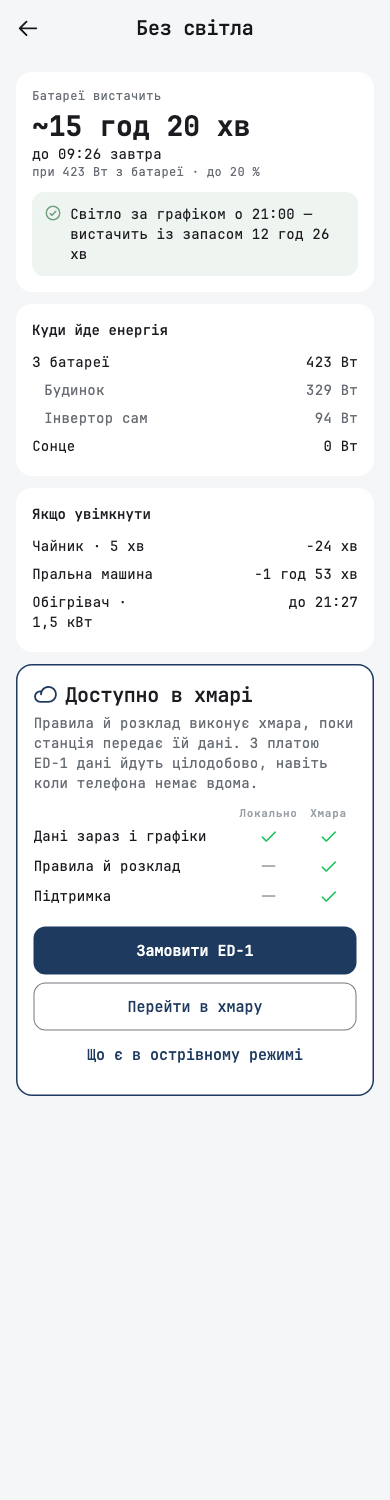
- Rules on a phone station no longer promise a future version. The calendar and Критичні пристрої say that the cloud runs rules, and that an ED-1 sends data around the clock, with Замовити ED-1 and Перейти в хмару. Критичні пристрої shows the battery estimate from the phone's own readings, instead of «Щось пішло не так».
- A family phone opens Збір даних on «Дані збирає інший телефон», with the name of the phone that collects, and no longer registers itself as a second collector.
- The station phone with Збір даних closed asks you to open it, with Відкрити, instead of sending you to the station phone, which is this one.
- After a takeover, the old phone stops collecting within seconds, also while Збір даних is open.
The board's Bluetooth row is gone
The Підключитися через Bluetooth row that 1.0.256 added is removed. On a busy paired board, Bluetooth does not fit in the board's memory, so the five-press gesture it relied on will not come. A board that stays silent comes back through a reset: hold its button for 5 seconds, then set it up again in the app. The reset clears its Wi-Fi, its pairing, its Zigbee network and its battery packs, and the Home Assistant screen and the move back to the cloud now say so.
Day planner and rules
- Daily limits are yours. The day planner's settings have a new Денні обмеження card: Заряджати батарею до, up to 100 %, and Заряд батареї за день, or Без обмеження. The limits you set stay when the planner is renewed.
- No sell windows that sell nothing. If your last three sell windows sent next to nothing to the grid, the planner stops planning them and says what to check: the export limit, grid peak shaving, solar sell, or a limiter on the meter. It tries again once a window exports, or after two weeks.
- «Працювати від батареї» on a PI30 inverter, such as an Edecoa, now lowers the voltage at which the inverter returns to the battery for the window, and restores yours afterwards. Before, the house could stay on the grid while the banner said «Від батареї». This applies to overrides started from this app version.
- An active quick override can be cancelled from the inverter card with Скасувати.
Dashboard and reports
- No grid voltages during an outage. The Мережа card no longer shows about 230 V on each phase while it says the grid is off.
- A slave's Grid sheet shows the day's import and export of the whole station, «Уся станція, рахує Master», instead of 0.0 / 0.0, where only the master counts them.
- Smart Load in Енергія сьогодні and Reports adds up both inverters of a parallel pair, as the Smart Load card does.
- The day's generated energy no longer starts the morning with yesterday's figure after a night of heavy grid use.
- A large Deye three-phase station importing more than 32.7 kW no longer reads as offline.
- An EV charge that has just started is drawn as the car, not as a Мережа line into the house.
- A battery whose inverter has not reported yet shows «…», not 0 W, 0,0 V and «Очікування».
- The import cost card shows each zone at the rate it was priced at, heating discount included.
- The calendar fills the hour that just ended from the 5-minute data until its hourly total arrives, instead of «Немає даних за цю годину».
- Куди йде зараз refreshes the sockets with the rest of the dashboard.
- A notification you opened is read when you come back to the list.
- Too many requests at once now reads «Забагато запитів. Зачекайте перед повторною спробою.», not a raw error.
- On a station with no battery, a tap on Без світла opens the outage screen instead of an empty sheet.
In the next board firmware
These are finished and reach boards with the next S3 release, after this app version.
- Boards refuse the station changes listed above without your phone's confirmation, and the cloud's own changes wait for you under Підтвердіть зміну на платі.
- An ED-1 can change the seven Deye settings.
- A board restarts on request from the app at most once an hour. A second request inside the hour reads «Плата вже перезапускалася на запит менше години тому…».
- A Deye parallel pair set up by cable during an outage is labelled Master and Slave.
Smaller fixes
- During a long outage, the «Відключення світла» notification no longer drops over the open app every few seconds after you leave and return to the dashboard.
- After a restart from the board's page, the app no longer freezes on a page opened from a link or a notification.
- Інвертори names the board's real port, RS-232 or RS-485.
- A battery pack the hub has not tried yet no longer counts as «не відповідає».
- A JK pack's empty temperature slot no longer shows as a third temperature far below zero.
- The calendar's forecast accuracy badge is no longer cut off at the largest text size, and the cooperative settlement card shows its full values.
- The first sheet after setup opens once and closes with one tap.