
Version 1.0.259
November 22, 2026 · Android
On this page
This version is available on Google Play. It covers everything since 1.0.257. The screenshots are from the Ukrainian app.
A few terms
- Wi-Fi stick: the small communication module on the inverter that connects it to your Wi-Fi. It is also called a logger. Its serial number, 10 digits, is on its sticker.
- ED-1 board: our small device next to the inverter that collects its data around the clock. An ED-1.1 reads the inverter by cable.
- Phone station: a station whose data the phone itself collects, while the app is open on the data collection screen.
- Home Assistant: a program for running a smart home, which works on your own device at home.
- Island: a station whose data stays at home, in your own Home Assistant or on your phone, instead of the Svitgrid cloud.
- Confirmation by your phone: a digital signature your phone adds to a rule or a change. A board checks it, so only phones you trust can change the station.
- Parallel system: two or more inverters joined by a cable so that they work as one. One leads (the master), the others follow.
- CT clamp: a current sensor clipped around the grid cable, which measures what the house takes from the grid.
Setup with no dead ends
A setup should end in a working station, even when the search does not find your inverter at once. Before this release, an empty search, a board with no inverter, or a Wi-Fi stick that was not on the network yet stopped many of you with nowhere to go. Each of these now leads somewhere.
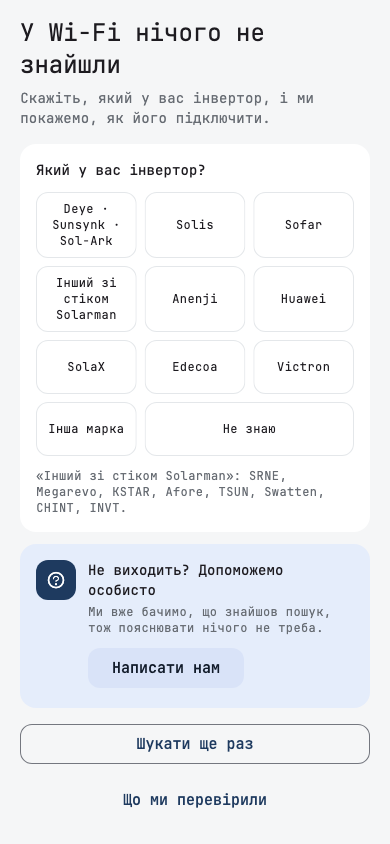
«Який у вас інвертор?»
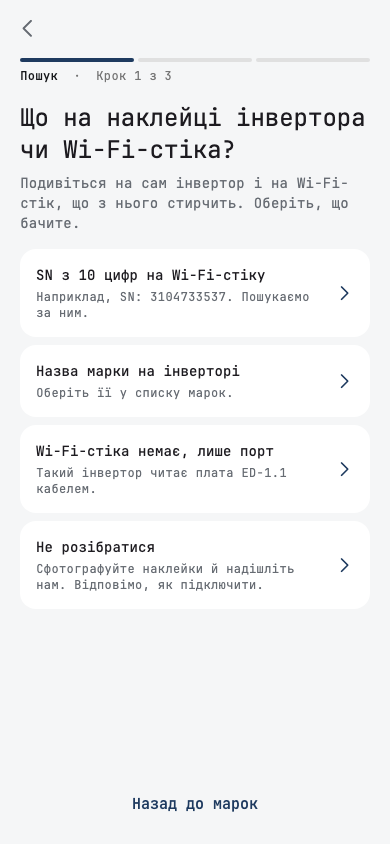
When the search finds no inverter, it now asks which inverter you have, instead of showing a checklist. You pick your brand from a list of tiles, including Інша марка and Не знаю, and each answer leads to the next real step:
- A Solarman stick with a hidden serial: the search by the stick's serial number.
- Anenji: its SmartESS module joins by itself, and the screen tells you what to check.
- SolaX and Huawei: a check of the stick's address, with how to turn Modbus TCP on.
- An inverter with no stick, only a port: how an ED-1.1 reads it by cable.
- Не знаю: a guide to what to look for on the inverter's and the stick's stickers, with a way to send us a photo.
- A brand we do not support yet: a request to add it, which we answer.
If the search did recognise something, the question starts from it: the brand it identified, the protocol the stick speaks and the brands that use it, or a new Deye stick heard over Bluetooth. Що ми перевірили shows everything the search tried. While an Anenji module may still call the phone, the screen counts down first with Чекаємо на модуль Anenji, and У мене не Anenji skips the wait.
The same question appears in two more places:
- A board found with no inverter. The sheet asks which inverter the board should read. Продовжити без інвертора now creates a station with the board alone. Before, it led to a review that asked for an inverter by hand, and creating the station then failed.
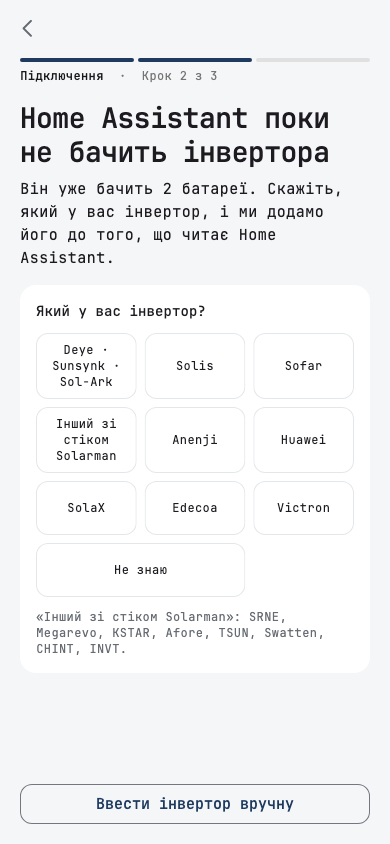
- Home Assistant that sees no inverter. Home Assistant поки не бачить інвертора says what Home Assistant already sees, such as batteries, and asks for the brand. Ввести інвертор вручну is there too.
A Wi-Fi stick that is not on the network yet
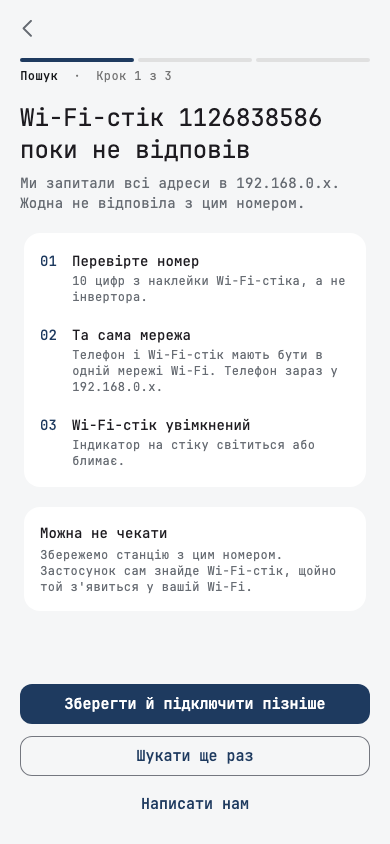
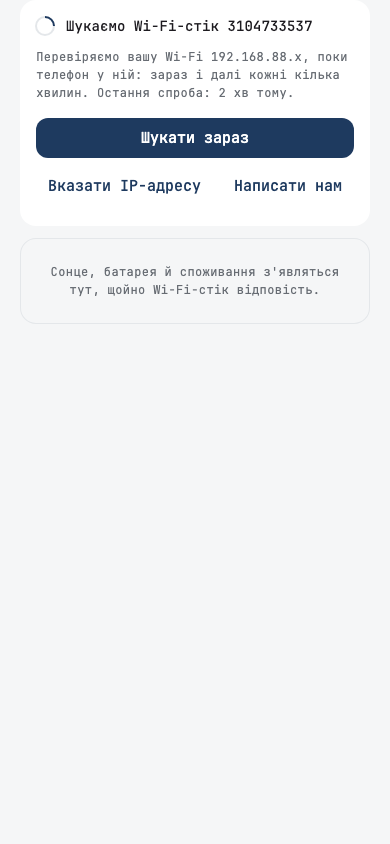
You no longer have to wait at the inverter until the stick answers. On a phone station, when the search by serial number finds nothing, the result shows Можна не чекати and Зберегти й підключити пізніше. The station is saved with the stick's serial number, and the app finds the stick by itself once it appears on your Wi-Fi. An Anenji whose module has not called yet can be saved the same way.
- The next step says that this phone will search, because an ED-1 cannot find a stick by its serial number yet. On the review, the address reads Знайдемо самі, and you can still type it.
- The phone searches your home Wi-Fi while Збір даних is open: at once, after 2, 5 and 10 minutes, then every 30 minutes. It takes only the stick with your serial number, never a neighbour's.
- The dashboard says what the phone is doing: Шукаємо Wi-Fi-стік … with the network it checks and the last try. A tap opens Шукати зараз, Вказати IP-адресу and Написати нам.
- If this phone is not searching, the dashboard says Wi-Fi-стік ще не знайдено and asks you to open data collection, instead of claiming that the first data is on its way.
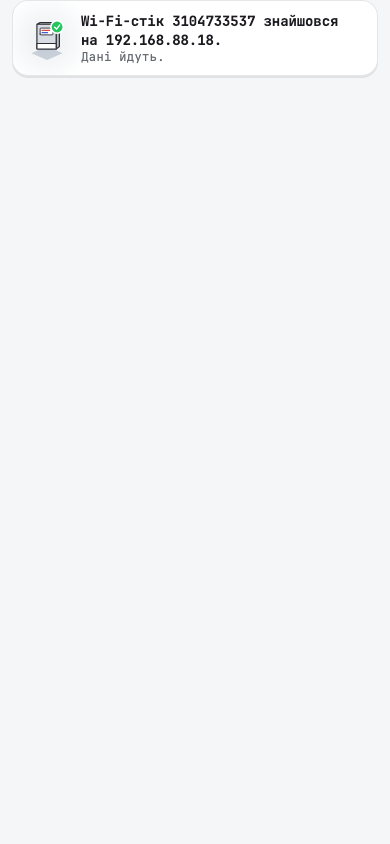
- When the stick turns up, the dashboard says Wi-Fi-стік … знайшовся на …. Дані йдуть.
This is for phone stations only. A board or Home Assistant needs the stick's address, so they do not offer it.
A setup that was interrupted
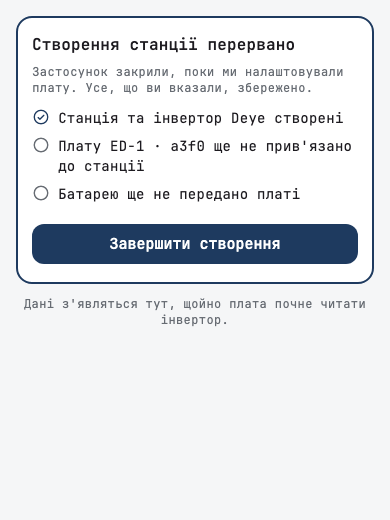
If the app closed after the station was created but before setup finished, for example before the board was linked to the station or given its inverter, the station now shows Створення станції перервано. The card lists what was made and each step still to do, and Завершити створення finishes it without asking anything twice. Only people who can manage the station see the card.
Questions on the review
- «Як дізнатися» now sits under the questions people found hardest: battery chemistry, the generator port, whether inverters work together (Разом чи окремо), and whether they share a battery. Each says what to look at on your equipment, with a link to send us a photo if you are not sure.
- No guessed answers. Whether inverters work in parallel and whether they share a battery are no longer filled in for you, so the review waits until you answer. Разом, у паралелі. Головний цей on the second inverter now makes the first one follow it, as it says.
- Battery capacity takes ampere-hours (А·год) or kilowatt-hours (кВт·год), with a switch between them.
- The Home Assistant pairing code is asked last, right before the station is created. A code lasts five minutes, and the review could take longer. A code the search read earlier is refreshed as the step opens.
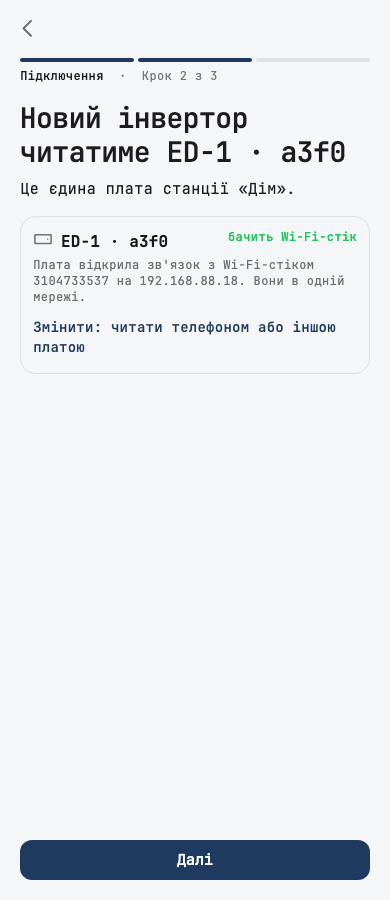
- Adding an inverter to a station with one board now says which board will read it: Новий інвертор читатиме ED-1 · …. The app asks the board, without changing anything, whether it sees the new inverter's Wi-Fi stick. Змінити: читати телефоном або іншою платою picks another reader.
- A plan that allows no more inverters gets its own screen, Ваш тариф дозволяє 1 інвертор, instead of a general sheet. Змінити тариф creates the station once the plan has changed, Залишити один інвертор keeps what fits, and Написати нам opens help. Nothing you entered is lost.
Other setup changes
- One name for each thing. The app called the inverter's Wi-Fi module a logger, a stick, a collector and more, and our board a hub, Edge and more. It is now Wi-Fi-стік and плата ED-1 everywhere in Ukrainian and English.
- «Мого інвертора тут немає» now means what it says. On a cable board it unticks the inverter it rejects and asks how your inverter is connected. With an inverter already ticked on Wi-Fi, the link reads Додати ще один інвертор вручну.
- A battery found on its own waits for its inverter instead of making a station. The Інвертор не знайдено card says the battery will join its inverter as soon as we find it.
- On mobile data, the search warns not to join the Wi-Fi stick's own network, where it cannot find the inverter. A single inverter it finds is called an inverter, not yours, until you confirm it.
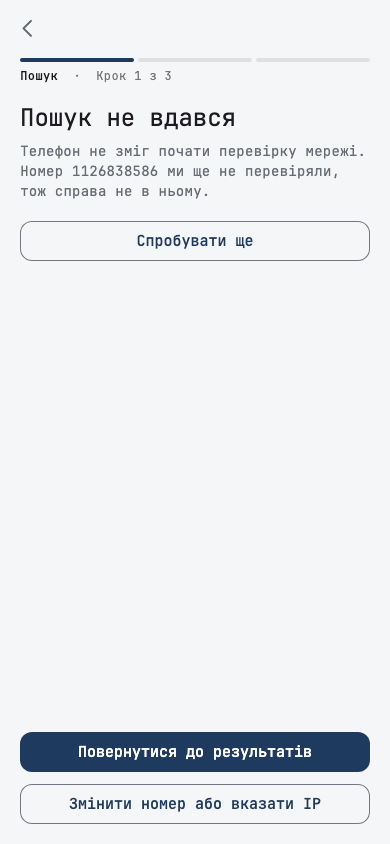
- A search by serial number that could not run says Пошук не вдався, and blames neither the number nor the network. A not-found result offers Написати нам.
- While a cable board checks the cable, the search says it can take up to three minutes.
- Plainer words. A phone station says it collects only while the app is open on the data collection screen. Guessed values on the review read Ми припустили · перевірте, and the stick's serial row says where the number is printed. An empty Wi-Fi password reads «Не вказано». The update screen no longer shows a build number.
- Leaving setup early lists what is still missing, such as «перші показники». У мене вже є плата: шукати ще раз goes back and searches again, once. The step counter no longer makes the review look like a fourth step.
After setup
A new station should say honestly that it is waiting, not show zeros as if your battery were empty. And if the data does not come, it should say what to check for the way your station connects.
- The dashboard waits for the first data. Until a new station sends its first reading, the grid and the house show «—» and the battery «…», instead of 0 W and 0 %. A banner says Перші дані в дорозі, with «Плата … надішле їх за кілька хвилин» on a board, or «Відкрийте збір даних на цьому телефоні» on a phone station.
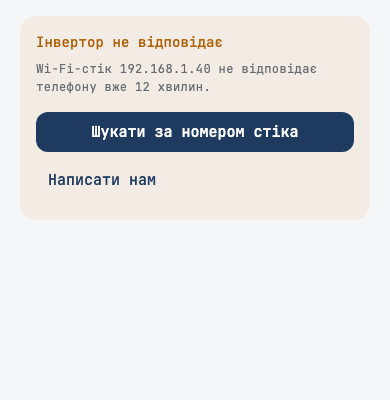
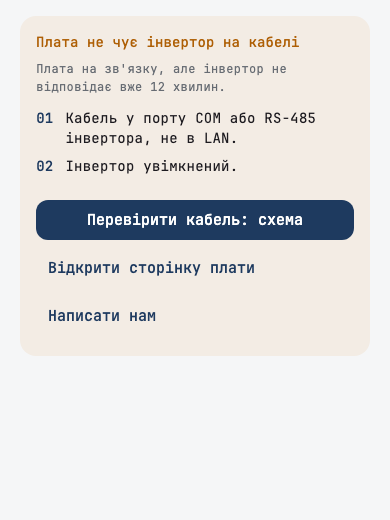
- If no data comes within five minutes, the banner gives advice for how your station connects. An inverter on a cable gets a checklist and Перевірити кабель: схема. A Wi-Fi stick that does not answer gets Шукати за номером стіка. Home Assistant gets its page. Each has Написати нам. The app says Плата не на зв'язку only when the board's own reports prove it.
- A short break in the connection no longer tells an established station that its inverter has been silent since it was created.
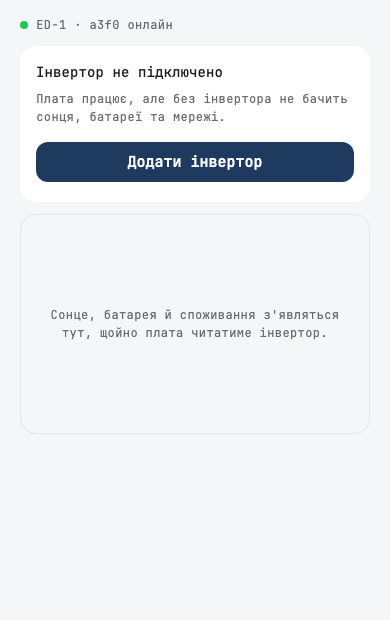
- A board with no inverter shows the board, Інвертор не підключено and Додати інвертор. A cable board offers its page instead, because adding an inverter on its cable means resetting the board.
- «Почати заново» left the dashboard. Deleting a station stays in its settings.
- Setup names what is missing when its wait runs out: the board is not on the server yet, not on Wi-Fi yet, or no data has arrived yet. Before, it said Станцію налаштовано over a failure.
- The tour's first page says Чекаємо перші дані until the first reading arrives, and names who sends it: the board, this phone, or Home Assistant.
Rules
A rule should run the way you last set it. Your phone confirms each rule for the board, and some edits slipped past that.
- A time change is confirmed when you save it. App versions 1.0.254 to 1.0.256 saved a change of a rule's hours without your phone's confirmation, so the board kept the old window. Now saving confirms the new hours. A rule changed that way says «Правило змінили після підпису, і новий підпис підтвердить зміни», and Підписати знову fixes it.
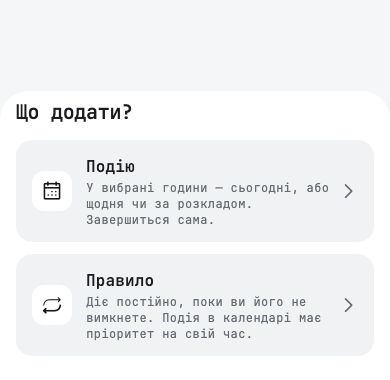
- Rule templates are gone. Що додати? no longer offers a template. Rules you made from one, such as «Нічний тариф», stay and run as ordinary rules. Their confirmation never covered all their actions, so they may ask for Підписати знову once, with «Підпис правила не охоплює всіх його дій, і новий підпис підтвердить їх». Критичні пристрої still groups its own rules.
- Before a confirmation runs out. Two weeks before a rule's confirmation expires, the rule says «Підпис правила діє до 5 грудня…» with Підписати знову, and a notification reminds you. Three days before the day planner's permission ends, its event says so, and Поновити дозвіл планувальника opens its settings, where saving renews it for 30 days. Nothing is renewed without your tap.
- EV charging too. When a board passes your tap on to an Eveus charger, your phone now confirms the exact request the charger receives, not only the button you pressed.
- A rule that was running when it moved from Home Assistant to the cloud restores your own setting when it ends, not the one it applied. Before, selling to the grid could stay on after such a rule.
Inverters
- Edecoa 24 V models (EM-302A and EM-402A) no longer offer «Сонце → мережа → батарея» (SUB) in Живлення будинку. Their inverter accepted it and then went back to «Сонце → батарея → мережа» (SBU), so the app kept reporting a mismatch. The EM-624A keeps it.
- Saving a schedule slot now names a changed grid charge, for example «Заряд від мережі: увімкнено → вимкнено». An owner who changed only the battery level found grid charging off afterwards, because a tap had hit the switch above it.
- An inverter that leads no other is no longer marked «Головний» in Інвертори. The role shows only inside a real parallel system, as on the dashboard. And Працює окремо in Паралельна система now clears a leftover leader role instead of doing nothing.
Dashboard
- Each running event has its own banner. When two events ran at once, home showed one with a «+1», and the second could not be opened. Now you swipe between them.
- Solar strings are easier to tell apart. On Сонячна історія, string 2 is teal and dashed and string 3 is pink, so two strings running low on a cloudy day no longer merge into one amber line.
- Battery cells refresh on a pull. Комірки батареї, opened from the dashboard, now asks the board for fresh battery data when you pull it down, as the pack's own page does.
- Consumption with a little morning sun. A Deye that passes the grid to the house no longer shows a tiny Споживання next to a large grid import when the panels make a trickle of power.
- The CT clamp stays on the diagram once your station has proven it has one, instead of coming and going while a car charges from the grid.
Islands and phone stations
- A phone station keeps the cloud out more. With the cloud copy off, it now contacts our servers far less while Збір даних is open, and no longer sends details of your home network.
- A saved Anenji remembers its module. An Anenji saved to connect later could show readings but refuse settings and priorities. The phone now remembers its module from the first reading.
Smaller fixes
- Tapping the same notification several times no longer stacks copies of the same screen, so one Back returns you where you were.
- A wrong confirmation code now says so at once, instead of the app quietly retrying it hundreds of times.