
Version 1.0.261
November 23, 2026 · Android
On this page
This version is available on Google Play. It covers everything since 1.0.259. The screenshots are from the Ukrainian app.
A few terms
- Reserve: the battery level your inverter keeps back and does not use up.
- BMS: the electronic unit in a battery that watches its charge, cells, and temperature.
- Cell imbalance: a battery is made of many cells. When some hold more charge than others, the difference between them grows, and the battery can no longer use its full capacity.
- Two-zone or three-zone meter: a meter that bills day and night (and, for three zones, peak) hours at different prices.
- Active consumer: a household that sells its surplus energy at the market price (РДН, the day-ahead market) under its own offer.
- УЗЕ: registered energy storage, a battery recorded with your supplier.
- Day planner: a Svitgrid feature that proposes a plan for tomorrow's battery each evening, for you to approve.
- Confirmation by your phone: a digital signature your phone adds to a rule or a change. A board checks it, so only phones you trust can change the station.
Outages
A battery warning that tells you what to do
When the battery will not last through the next outage, you need to know by how much, and what you can do about it while the power is still on. Before this release, a tap on that warning only opened the dashboard, and nothing there explained it.
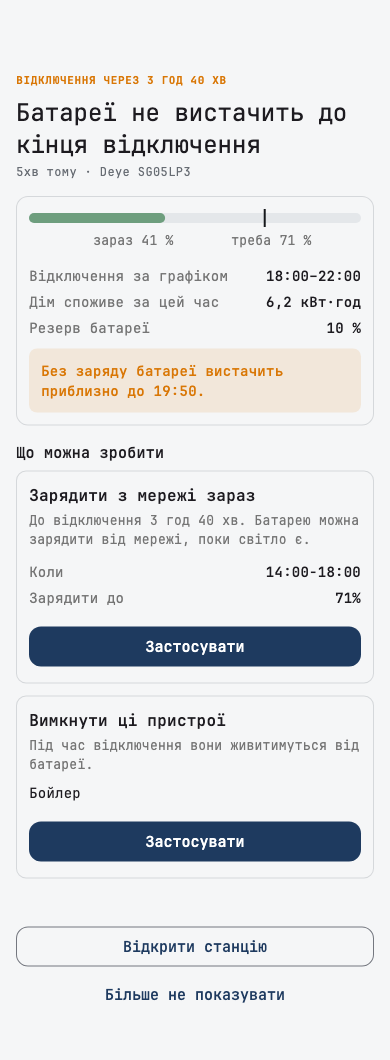
Now the warning, from the notification or from its row in Сповіщення, opens its own screen:
- At the top, a countdown to the outage in hours and minutes, on your station's clock, and the inverter it is about.
- A battery bar with the charge now and the charge you need, the outage window, how much the house will use in it, your reserve, and the time the battery runs out without a charge.
- Зарядити з мережі зараз, with the window from now to the outage and the level to charge to. Застосувати sets it up.
- Below it, a card to switch off chosen devices during the outage, so they do not draw from the battery.
The charge card appears only while the outage is still ahead and the battery is below the level it needs, and only on a phone that can confirm changes for this station. Warnings sent before this update show fewer figures. This works for stations that send their data to the cloud. An island has no such warning yet.
A battery runtime you can trust
On a sunny day, Без світла could say the battery would last almost 700 hours, and the home banner named a date weeks away. Both divided the battery by its draw at that moment, while the sun was covering most of the house.
The runtime now counts what the battery will carry once the sun fades: the house load. The line under it says so, for example «при навантаженні 131 Вт · до 10 %». The costs under Якщо увімкнути, the load-shedding suggestion, the home banner and the outage notification use the same figure. A runtime past 48 hours is no longer shown, because the load two days from now is not the load now. The screen then shows the charge level alone.
When the schedule says off but the power is on
At 16:15 the Відключення screen could say «Світла немає до 17:30» while the inverter measured the grid at 233 V. Now a fresh reading that sees the grid wins: the card says За графіком, але світло є with a green dot, as the dashboard already did. On a station with one inverter, the emergency card on the home screen also reads the live reading, so it shows У вас є світло · графіка немає instead of a full alarm.
An outage countdown in real minutes
The grid label on the dashboard counted clock hours, so at 16:57, with an outage at 18:00, it said two hours. It also read an outage that starts at half past as starting on the hour. It now counts the real minutes on your station's clock: under an hour it reads, for example, «Відключення через 51 хв», and from an hour on it rounds to the nearest hour.
Tariffs and bills
Your figures in Svitgrid should match the bill you get. These changes bring them closer.
A tariff change counts from the day it happened
A tariff had no history: change the meter, and every earlier day, including past months, was priced as if the new meter had always been there. Now, when you change the meter type, electric heating, storage (УЗЕ) or its settings on a saved tariff in Тариф на електроенергію, the app asks З якої дати новий лічильник? or З якої дати діє зміна?. Today is the default, and you can pick any day of this month. The days before it are billed as before, and past months are no longer re-billed. The meter row then names the change, for example «Тризонний, з 18 листопада» with «До 18 листопада: двозонний» under it.
The sell price for an active consumer, by zone
An active consumer with storage sells at the hour's market price, but never above the price they pay in that same hour. The app capped every hour at one number, so a night hour could be counted at a price far above the night tariff. Each hour is now capped at its own zone's price, for two-zone and three-zone meters, in the monthly settlement and in the day planner. The tariff screen shows the cap for each zone, under Ціна купівлі в ту саму годину. Months already calculated are calculated again.
Charge suggestions quote your real price
- With electric heating (Тариф для електроопалення), the charge cards after the grid returns now quote the heating rate in the heating season, the same price your settlement uses. They quoted the standard rate.
- The reason matches your meter. On a flat meter, «Зарядити з мережі зараз» said a night tariff was already on. The card now gives a reason that is true for your meter: the night tariff when it is on, «Ваш тариф однаковий цілу добу» on a flat meter, and «Батарею можна поповнити з мережі вже зараз.» otherwise.
Rules
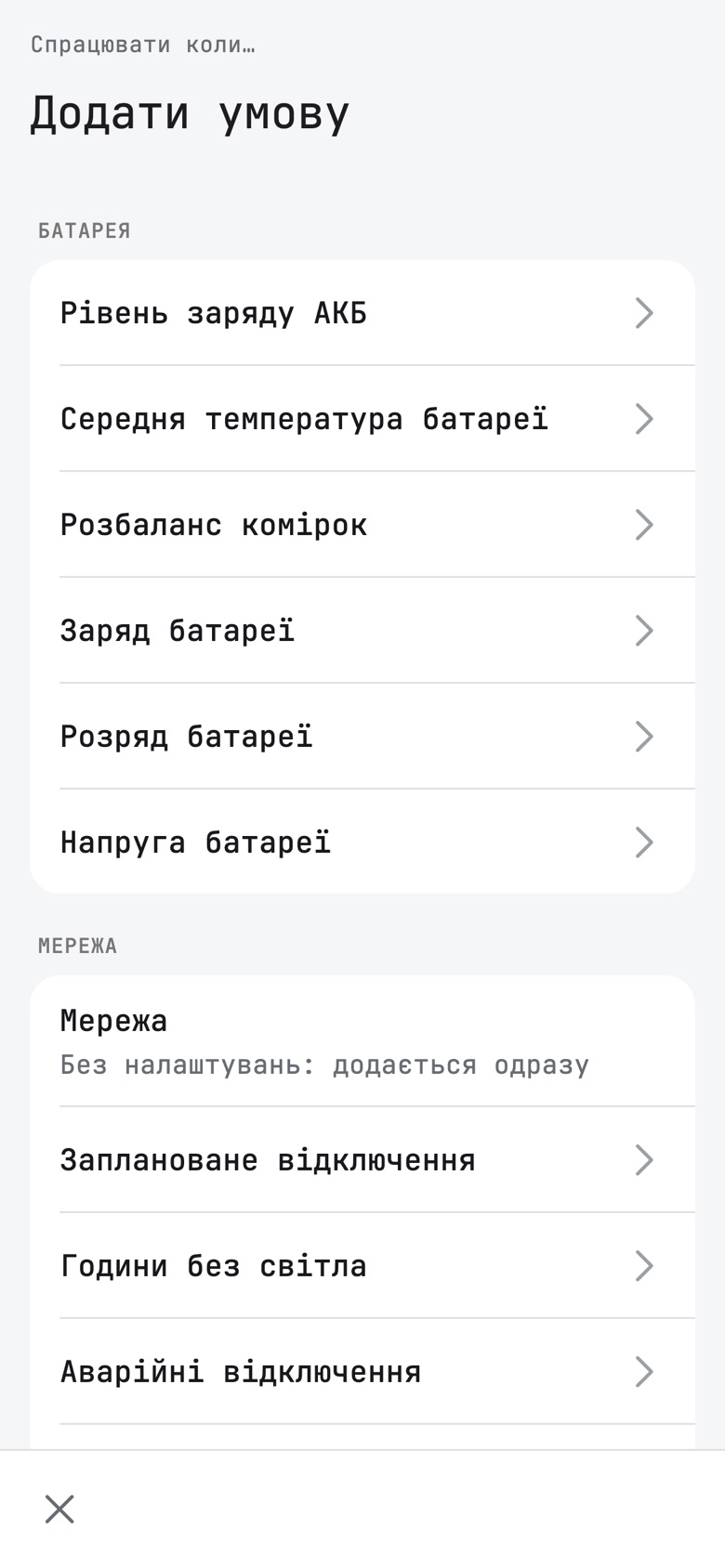
Rules can now look after your battery's health and react to the news from your region.
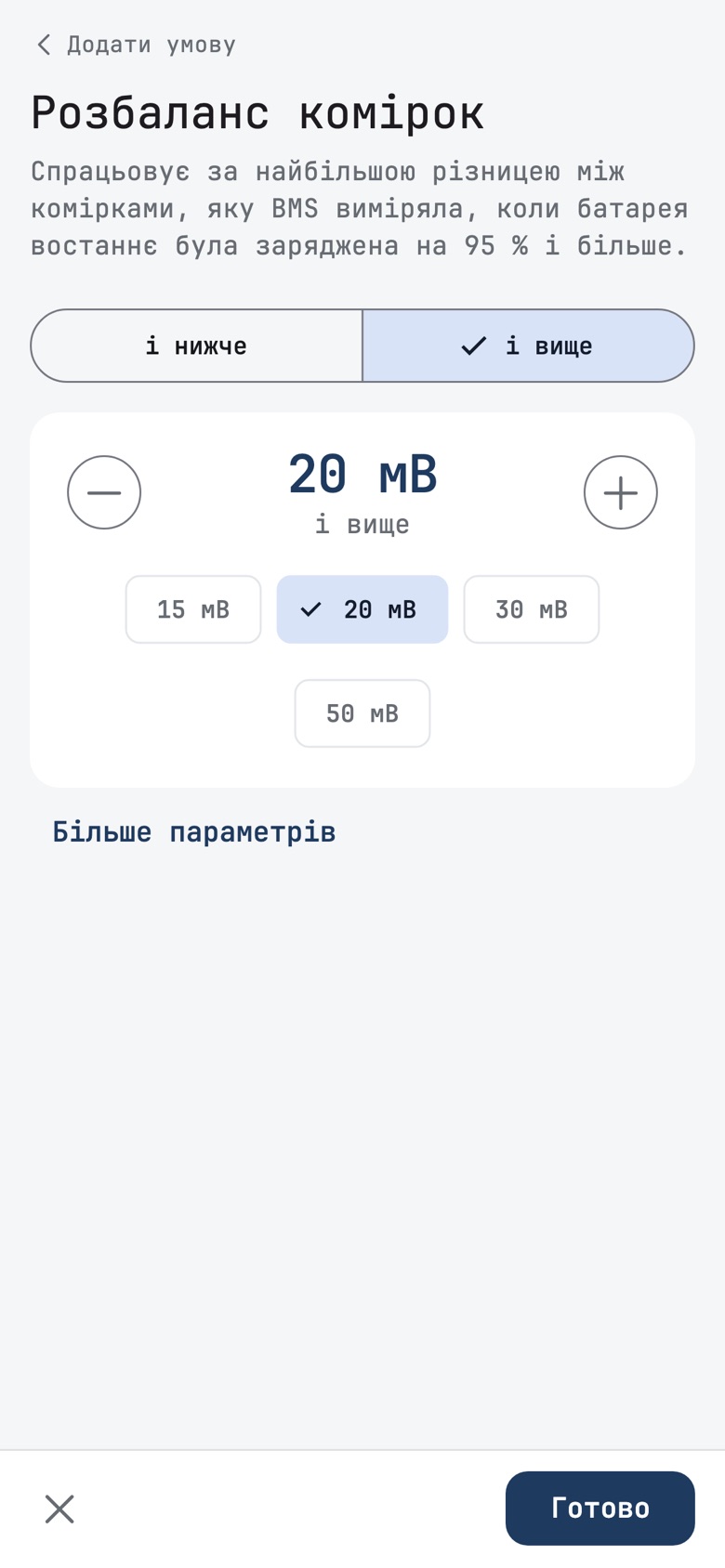
Cell imbalance
A new battery condition, Розбаланс комірок, for rules and for events in the Професійний mode. It reads the largest difference between cells that the BMS measured the last time the battery was charged to 95 % or more, because in the middle of the charge that difference says little. Use it, for example, to charge to 100 % once at night when the imbalance reaches 20 mV, so the battery can even out its cells. The rule lets go once the difference falls to 10 mV.
The condition appears only when your battery reports its cell voltages, and it works with the cloud. Without a full charge in the last 7 days, it is not met.
Emergency outages
A new grid condition, Аварійні відключення: «Поки у вашій області оголошено аварійні відключення». A rule can, for example, charge the battery as soon as emergency outages are announced in your oblast, before your own power goes. The announcement is for the whole oblast, so add the Мережа condition if you also want to check your own grid. If the announcement cannot be read, the condition is not met either way. It works on cloud stations, phone stations, and Home Assistant with the cloud copy. On a Home Assistant island it appears under Потрібна хмарна копія.
EV chargers
A rule or event that controls an EV charger now has your phone's confirmation cover the charger itself and each command it sends to it, as it already did for the inverter.
Day planner
The day planner no longer needs a 30-day permission. You approve each plan, and that is enough.
- Зберегти in the planner's setup saves it at once, with no permission screen, and says «Планувальник збережено. Перший план прийде завтра ввечері на ваше затвердження.»
- When you approve a plan, your phone confirms each event on its own, like a rule you made by hand. A line above the approve button says so. There is no expired-permission banner and no renew button any more, including the Поновити дозвіл планувальника reminder from the last version.
- An old rule whose only confirmation was the planner's permission asks for Підписати знову once.
- No pointless night charge. A plan could propose charging to 16 % in a window when your inverter's own schedule had already charged the battery to about 75 %. The planner no longer proposes a charge to a level the battery already holds.
- A plan card that fits a phone. On a narrow phone the card's title could wrap one letter per line, and the status pill ran off the edge. The figures now sit on their own line under the title, and the pill moves under the date when they do not fit side by side.
Dashboard and EV charging
- A charge that is starting is the car, not the house. While a car charge ramps up, the charger reports its power once a minute, behind the inverter. The dashboard counted the difference as house load from the grid, and drew a «Мережа» line into the house. It now counts it as the car while the charge is still rising.
- The house is not zero while a car charges. On some Deye inverters the total load lags behind for minutes after a charge starts. The house then read 0 W, or counted the car twice. The app now takes the car out of the larger, consistent figure, on the dashboard and on the home-screen widget.
Deye settings
- Gen Port Use shows one setting, the port mode, and an owner asked whether the page was broken. It now says that Svitgrid reads only the port mode in this menu, and that the other settings are on the inverter's screen.
- At the largest text size («Дуже великий»), the Deye settings pages no longer cut words off with «…». The tabs scroll, hints wrap, and a value that does not fit beside its name moves under it. At the default size nothing changes.
Smaller fixes
- The Бали за баги row in the menu comes back when you open the menu again after a failed load, instead of staying hidden until the app restarts.
- On the card Плата досі довіряє попередньому власнику, Як знайти кнопку на платі now opens the board's page in the docs. That page now says how to reset a set-up board: hold the button for 5 seconds.