Svitgrid now controls the appliances in your home
An inverter can take energy from the battery, the sun or the grid, but it cannot switch off a water heater. Svitgrid now can: through Zigbee plugs and breakers it shows what each appliance uses, and controls them with rules you set.
 Ivan UrsulSvitgrid developer
Why we took on appliances
At Svitgrid we build an app for solar systems that works with inverters from many brands: Deye, Sunsynk, Sol-Ark, Victron, SolaX, Anenji and others. It can fully replace your inverter's own app, and we try to make it simpler and clearer for an ordinary person. You can see how many people have already chosen Svitgrid on the map of systems, where each system's real location is hidden.
From the start, one question bothered us. Controlling the inverter is good, but an inverter can do only a few things: take energy from the battery, the sun, the grid or a generator. You cannot tell it to keep the water heater running now and make the dishwasher wait. So when we designed our device, we built a Zigbee coordinator into it: a separate microcontroller meant, one day, to control the appliances in the home. The first pieces came early; today we are announcing the full integration.
Who "we" are
In truth, "we" is me. My name is Ivan Ursul, and I build Svitgrid on my own. More than a hundred people use the app. Every new device order makes me glad, because it means people believe in the project. And it makes me a little sad too, because some of those devices I have not yet brought to series production.
I use Svitgrid every day
I follow a simple rule: to build a good app, you have to use it yourself. One of the first things I made was a full-screen mode for a tablet. The tablet hangs where everyone can see it, so the whole family knows what the house is using and how much is left in the battery. My wife really does look at it, and it has helped us more than once.
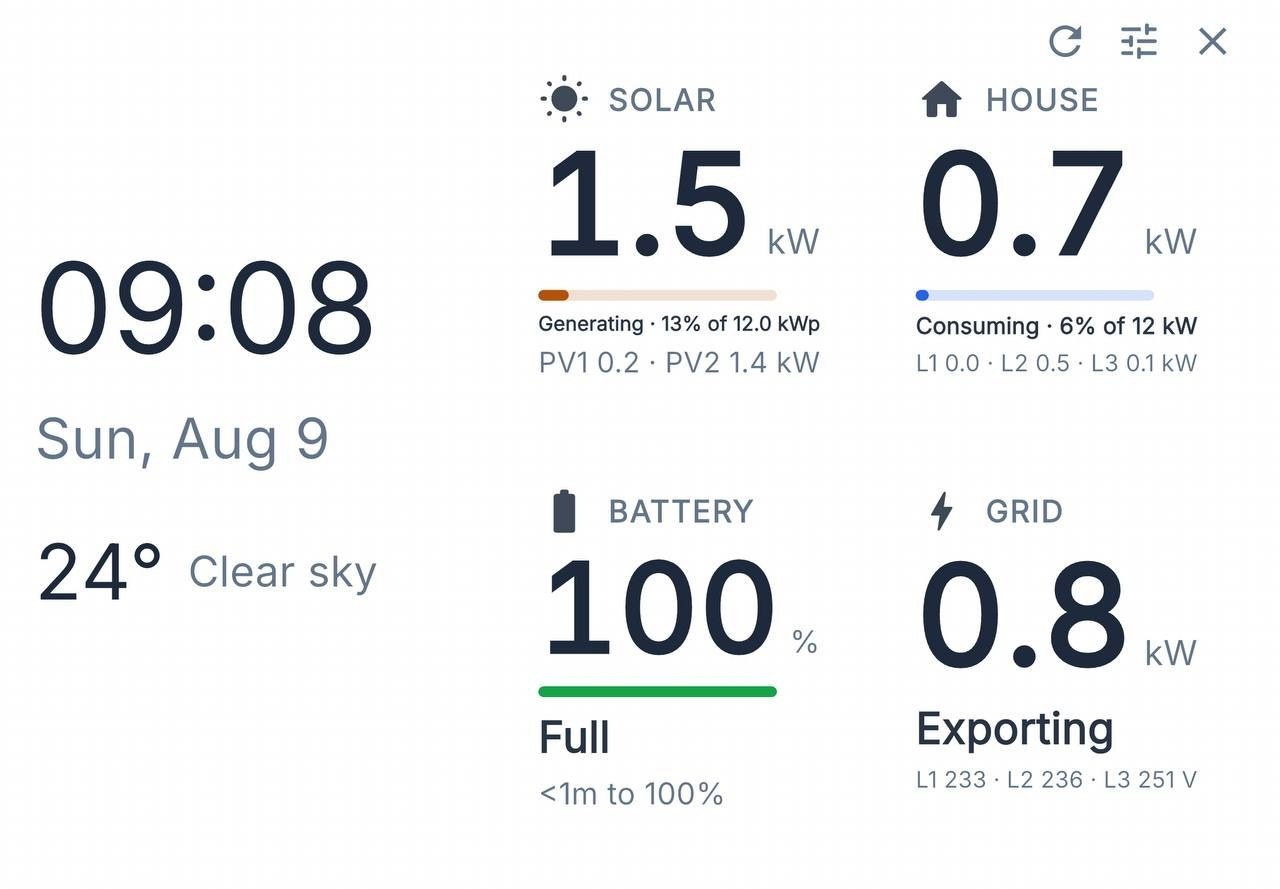
But we live next to a country that strikes our power system and wants to leave us in the dark. During outages there is not always the time or the means to watch consumption. And my house has appliances that run all the time: a compressor for the lake's cleaning system, and a pump that raises the pressure of the water coming from the city mains. I wanted to set once how they should behave under different conditions, and stop thinking about it. That is how Rules came to Svitgrid.
What Rules are
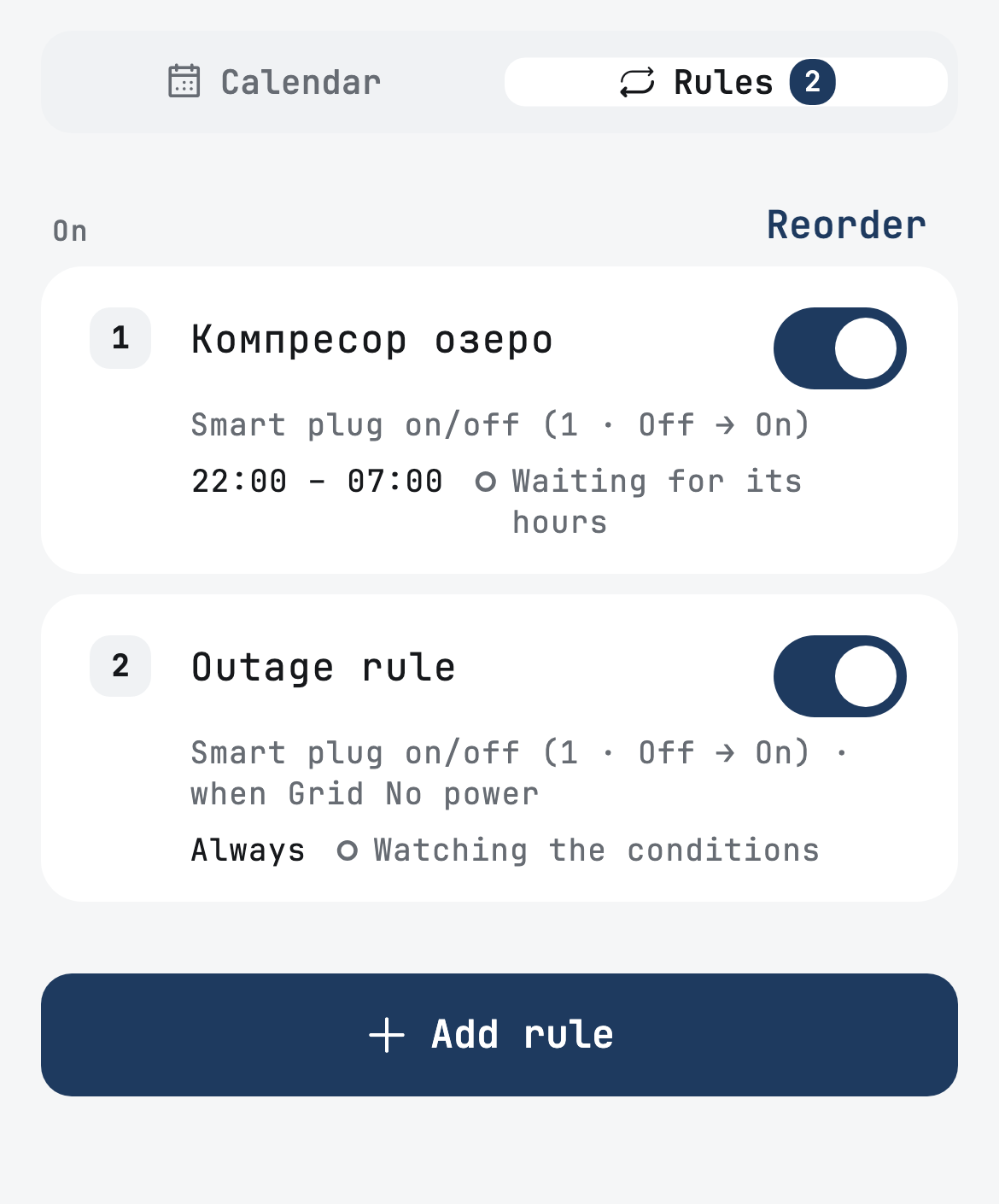
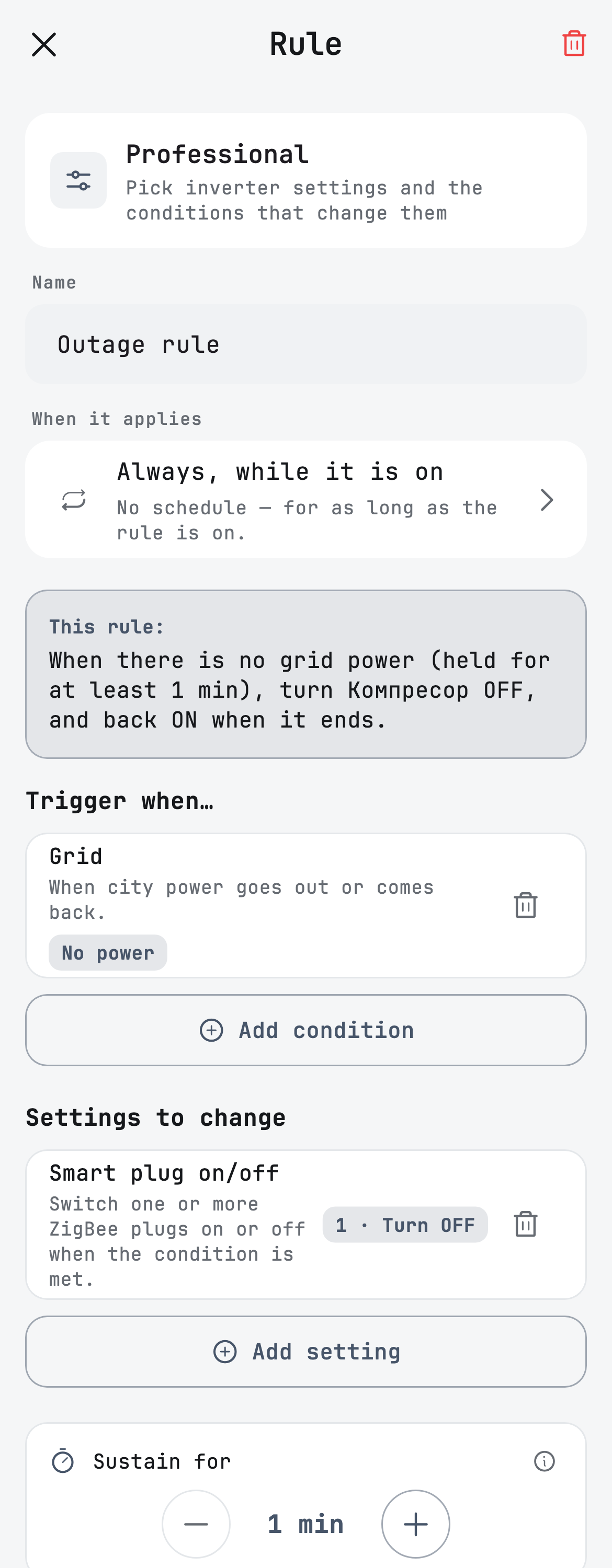
A rule works as "if… then…". If the grid goes down, the sun is producing enough, or the grid voltage drops below normal, Svitgrid does what you told it to: switches smart plugs off or on, or changes inverter settings. When the condition no longer holds, everything goes back as it was.
For example, my lake compressor switches off from 22:00 to 07:00, so it does not drain the battery at night. And when the grid goes down, another rule switches it off within a minute or two, whatever the time.
I had to connect the whole house
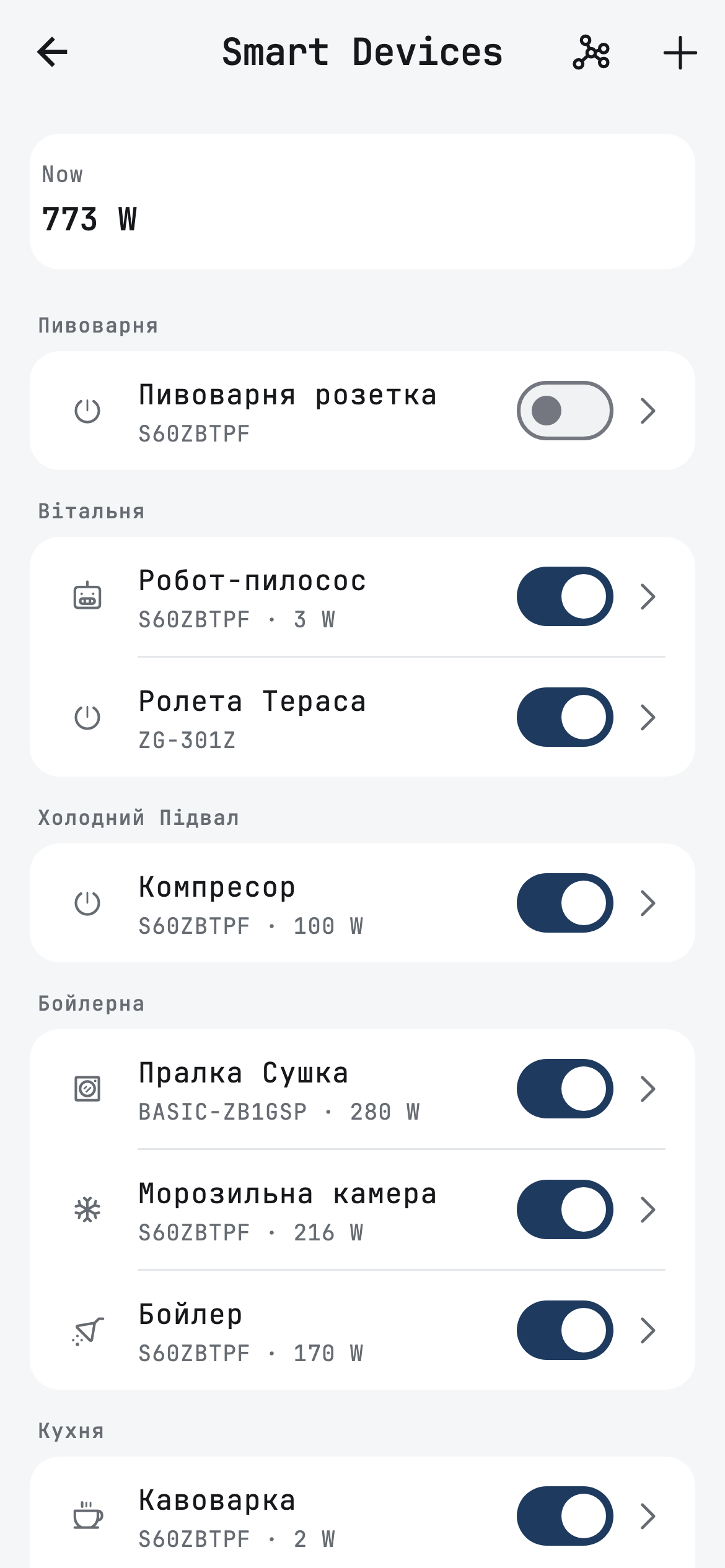
To give the rules something to control, I connected most of the appliances in the house through smart plugs and Zigbee breakers: the water heater, the freezer, the dishwasher, the washing machine and the dryer, the coffee machine, the kettle, a pump, the robot vacuum, the lake compressor and the terrace blind.
Zigbee builds a mesh: most mains-powered plugs and breakers pass messages on, so the signal reaches distant rooms. But my house is large, and its walls and floors are 40 cm thick. One mesh could not cover it, so I installed three ED-1 hubs and got three separate meshes. The app could not do that at the time, so I had to extend it: now one home can have several hubs.
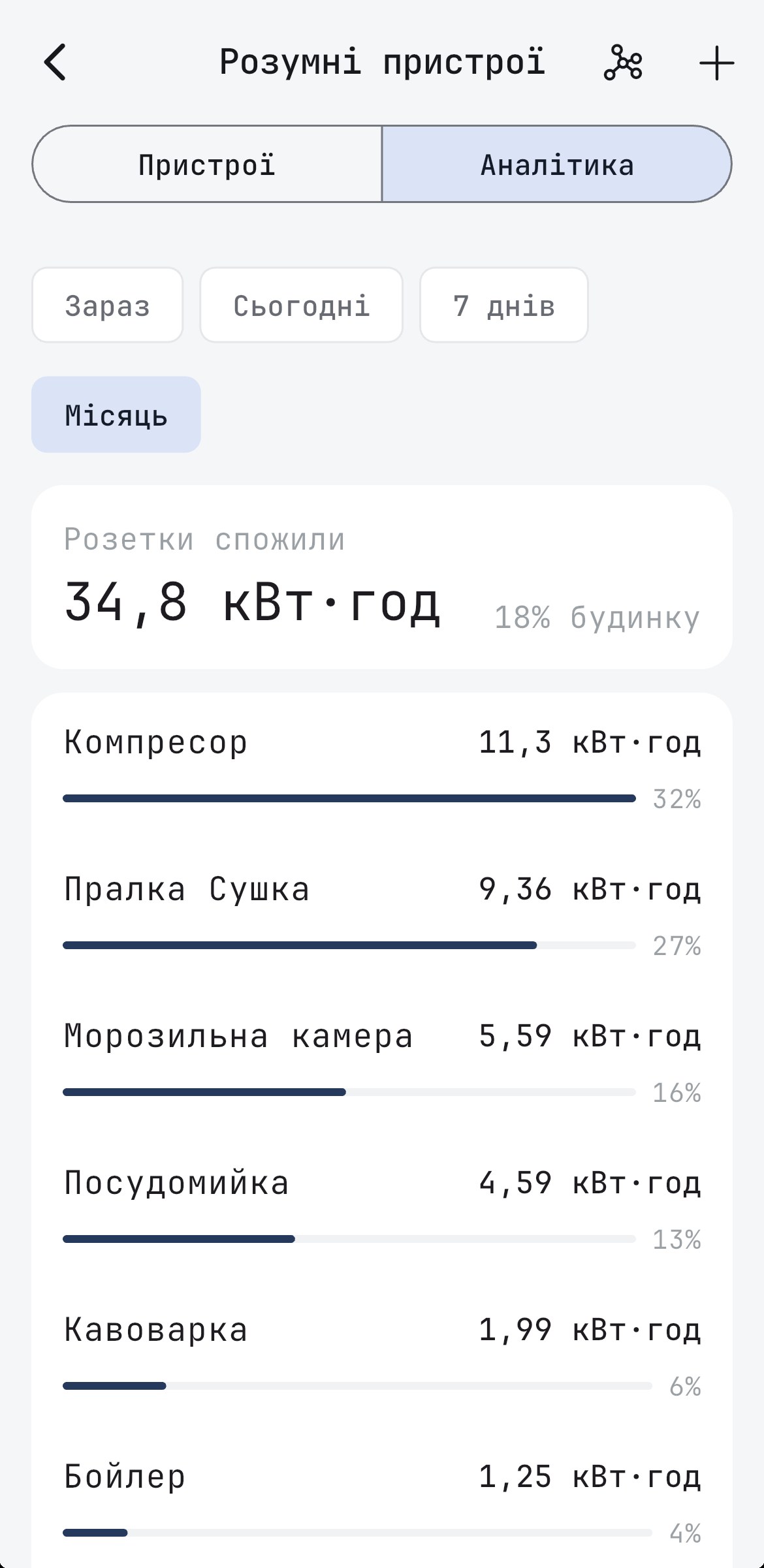
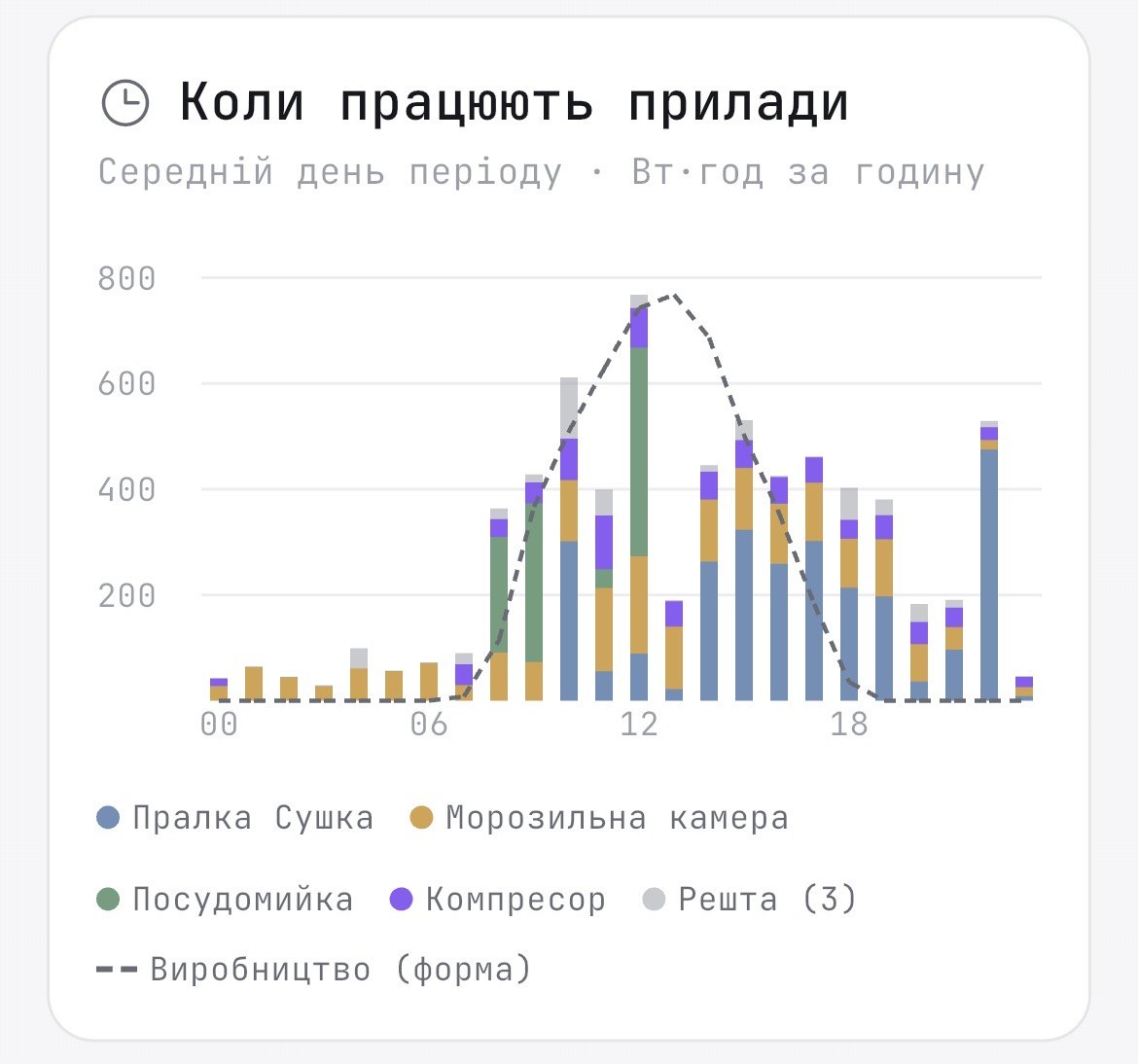
And as a bonus, the app keeps the history. You can look at how any appliance used energy over a day, a week or a month, and when exactly it runs. The chart below shows that my dishwasher runs in the morning and around noon, the washer-dryer during the day and in the evening, and the freezer around the clock. Over the month the lake compressor used the most, 11.3 kWh, because it runs around the clock. That is exactly why I switch it off at night.
What it showed
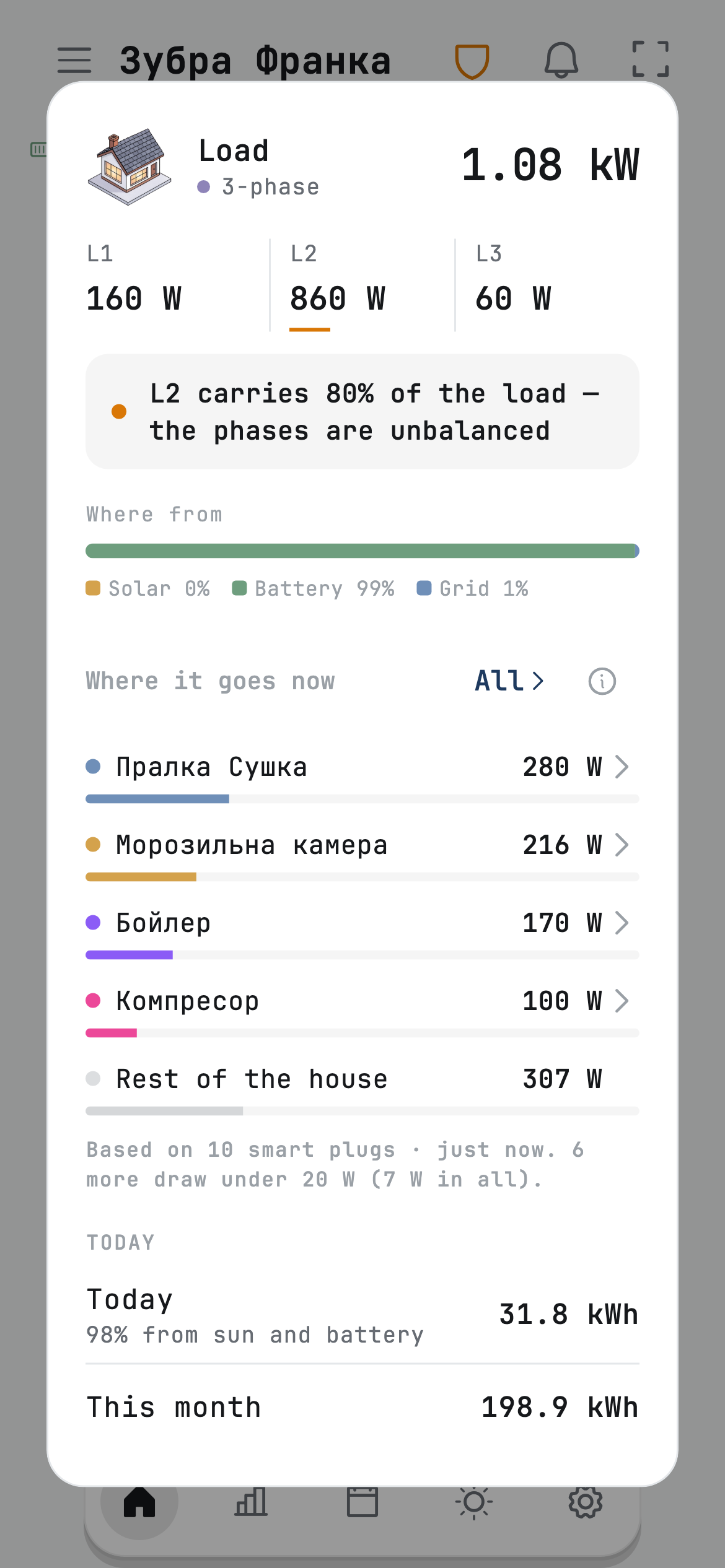
With every appliance connected, you can see where the energy goes. On the main screen Svitgrid shows what each plug is drawing right now. Whatever the plugs do not measure appears as a separate line, "Rest of the house".
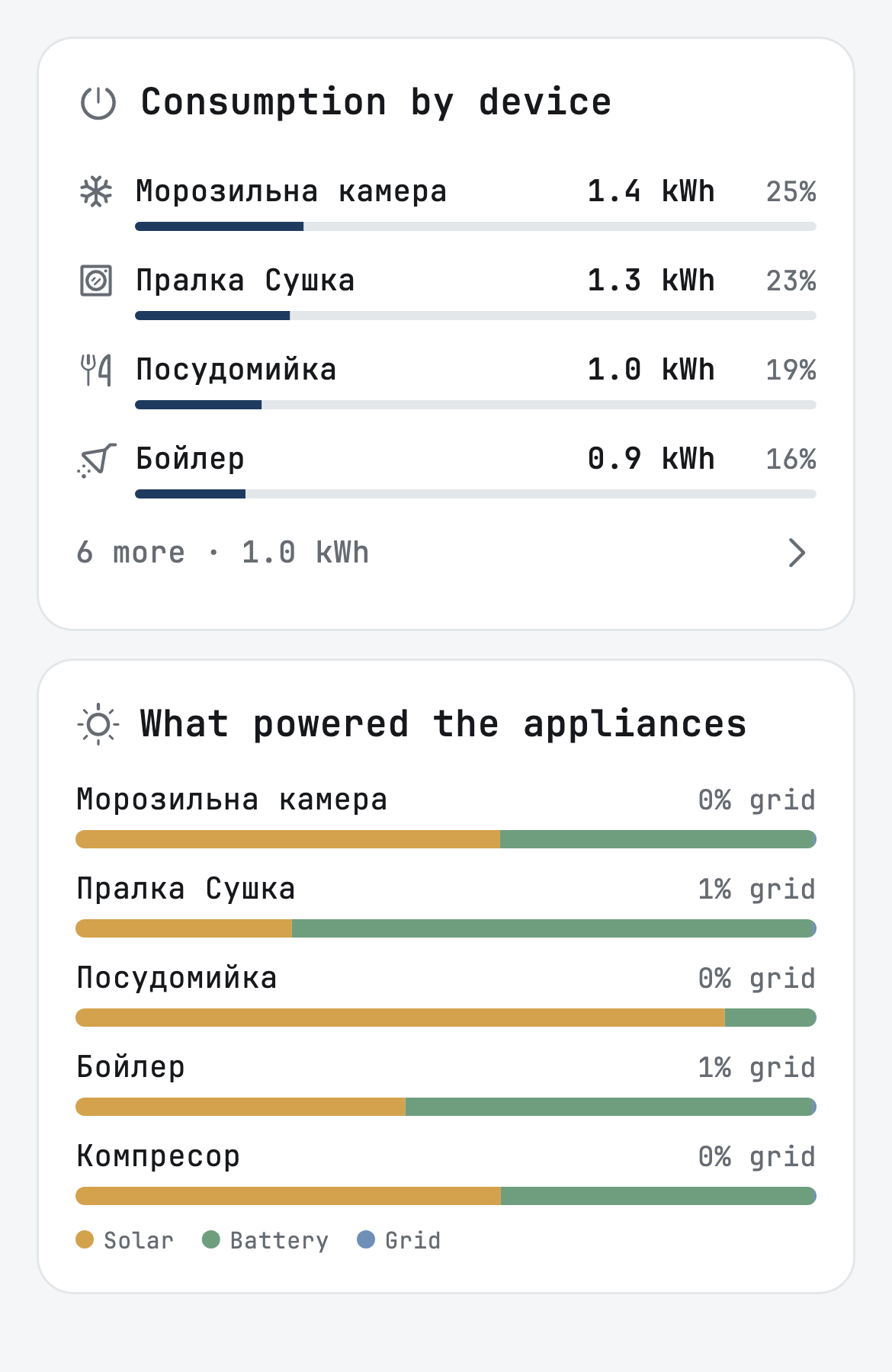
Reports show how much each appliance used and how much of that came from the battery. Here are the three biggest users in my house on 7 October, from 13:00 to 21:00.
| Total | From the battery | |
|---|---|---|
| Washer-dryer | 1.27 kWh | 0.89 kWh |
| Freezer | 1.38 kWh | 0.59 kWh |
| Water heater | 0.91 kWh | 0.50 kWh |
The freezer used the most, but mostly during the day, from the sun. The washer-dryer used slightly less, yet the battery supplied 70 % of its energy, because the washing was done in the evening. Now I know to do the washing during the day.
Plug or breaker
You can connect appliances two ways: with a Zigbee plug that goes into an ordinary socket, or with a Zigbee breaker on the DIN rail in your panel. I use a mix. The dishwasher and the washing machine have their own circuits in my panel, so breakers control them. The water heater and everything else are on plugs. Choose whatever suits you.
If you fit breakers, keep one thing in mind: radio does not pass through metal well. In a metal enclosure a Zigbee breaker may not reach the mesh, so use a plastic box, or a plug nearby that will pass the signal on.
And one thing to discuss with your electrician. When the grid goes down, everything running at that moment lands on the inverter, so the total power of the appliances on its line must fit within its rating. I only measure the fridge and the pumps; I do not switch them with rules.
Why Zigbee
I have no plans to make my own smart plug and sell it for a fortune. Svitgrid earns from subscriptions, and I want the hardware to stay affordable. Zigbee fits that perfectly: plugs with power metering are made by dozens of manufacturers and cost 400–1000 UAH. A branded plug from one inverter maker costs about 2000 UAH, needs a separate module for the inverter, which European shops sell for €50–86, roughly 2500–4000 UAH, and works only with inverters of its own brand.
Some cheap Tuya plugs send their data in a format of their own that Svitgrid does not read yet. If in doubt, send me the model before you buy.
Inverter brand plug
≈ 2000 UAH
- plus a module for the inverter, ≈ 2500–4000 UAH
- works only with its own brand
- one maker's plugs and switches
Zigbee plug
400–1000 UAH
- connects to the Svitgrid Gateway
- any inverter Svitgrid supports
- plugs, breakers and sensors from dozens of makers
What you need and what it costs
Plugs and breakers connect to the Svitgrid Gateway, the same device that reads your inverter. If your system shows up in a cloud app such as Solarman, ED-1 at 999 UAH suits you: it reads the inverter over Wi-Fi, so it can go anywhere in the house. If not, you need ED-1.1, from 1400 UAH, which connects to the inverter with a cable.
If one mesh does not cover the whole house, as in mine, add one or two more ED-1 and use them as hubs. The app supports it.
You buy the plugs separately, at 400–1000 UAH each. You can subscribe two ways: in the app through the App Store or Google Play, at $2, $5.99 or $11.99 a month, or on the website, at 72, 214 or 429 UAH a month. On the website the price is in hryvnias and 20 % lower. The plan sets how many smart devices you can add: Basic up to 4, Plus up to 10, Pro up to 16 per hub. For example, an ED-1 and three plugs at 800 UAH come to about 3400 UAH once, plus Basic at 72 UAH a month on the website.
Order a Gateway
Ships via Nova Poshta within Ukraine. International orders are arranged individually.
from 999 ₴
ED-1, at 999 UAH, reads the inverter over Wi-Fi. ED-1.1, from 1400 UAH, connects to the inverter with an RS-485 cable. Both carry a Zigbee radio, and either can serve as an extra hub.
Not sure which one you need? The Gateway page sets the choice out next to the prices.
You can subscribe in the app or on the website. Plans start at 72 UAH a month.
Choose on the Gateway pageEvery change in the app and the firmware, line by line.
Open the changelog →